0 ratings


商品#:
219575296
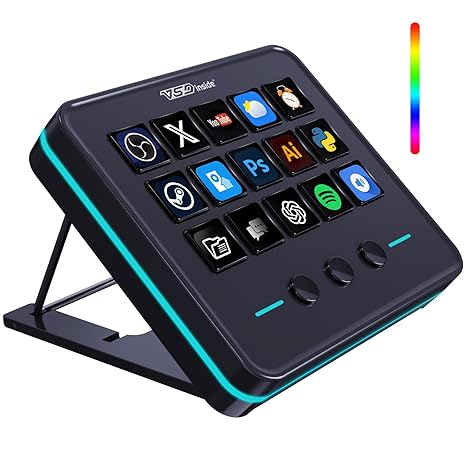
VSDINSIDE Macro Keypad, Stream Controller Deck Gaming Streaming Shortcut Keyboard, 18 Programmable Keys Customizable Visual AI Pad USB Soundboard for
商品#:
219575296
JPY 11751
価格の詳細
配送料と関税を除く ( 配送料と関税は購入手続き時に計算されます )
*すべての商品はアメリカから輸入されます
0 ratings
レビューを書く
在庫あり
 USA ストアからの輸入品
今すぐ注文すると 頃に届きます 水曜日, 8月 26
安全な取引
Ubuyはお客様のセキュリティとプライバシーの保護に努めています。当社の高度な決済セキュリティシステムは、AES(高度暗号化標準)およびSSL(セキュアソケットレイヤー)プロトコルを使用して送信中の情報を暗号化することで機密性を確保しています。お客様の決済情報は第三者の販売者と共有されることはなく、100%安全に保護されています。
最高の物流パートナー


Once you experience the VSDinside STREAMING DECK smart console, you’ll find live streaming is no longer possible without it.

Fast
Shipping

Free
Return*

安全な梱包

100%正規品

PCI DSS 準拠

ISO 27001認証取得





この商品の利点
Customizable Keys
With 18 programmable keys, users can personalize shortcuts for gaming or streaming, enhancing their efficiency and productivity in various applications like OBS and YouTube.
Versatile Compatibility
The keypad is designed to work seamlessly with Windows, Mac, and Linux systems, making it an ideal accessory for a diverse range of users, from streamers to office professionals.
Compact Design
Its sleek and portable design fits perfectly on any desk setup, ensuring easy access to commands without cluttering the workspace, ideal for both home and office environments.
製品詳細
| Compatible Devices | PC, Mac |
| Connectivity Technology | USB-C |
| Additional Features | Customizable LCD Visual Icons (JPG, PNG, GIF), One-Click Multi-Hotkey Macro Pad AI Keyboard, Portable One-Touch Operation USB Streaming Deck, Programmable Keys, Surrounding RGB Light Ring |
| Keyboard Backlighting Color Support | RGB |
| Language | English |
| Power Source | USB Powered |
| Keyboard Layout | Neo |
| Hand Orientation | Ambidextrous |
| Button Quantity | 18 |
| Water Resistance Level | Water Repellent |
| Total USB 2.0 Ports | 1 |
| Minimum Required Operating System Version | Mac OS 14 Sonoma, Windows 11 |
| Compatible Operating System Family | Windows |
| Number of Keys | 18 |
| Number of Sections | 2 |
| Processor Count | 1 |
| Color | Black |
| Style Name | Contemporary |
| Brand | VSDINSIDE |
| Keyboard Description | Multi Functional, Macro |
| Antenna Location | Gaming |
| Built-In Media | USB-A to USB-C Cable x1, User Manual |
| Model Number | VSD M18 |
| Unit Count | 1 Count |
| Manufacturer | Shenzhen An Rui Xin Technology Co.,Ltd. |
| Number of Packs | 1 |
| UPC | 717813963940 |
| Number of Items | 1 |
| Item Weight | 10.56 ounces (299.38 grams) |
| Mfr Part Number | VSD M18 Streaming Deck Macro Keypad |
| Item Dimensions L x W x H | 4.6"L x 4.1"W x 0.8"H (11.7 x 10.4 x 2 cm) |
| Enclosure Material | Acrylic, Acrylonitrile Butadiene Styrene, Polycarbonate, Rubber, Silicone, Stainless Steel |
| Country of Origin | This item will be imported from US |
| Date First Available | May 20, 2025 |
どんな人にお勧めですか?

-
Content Creators
Ideal for streamers and video creators who require quick access to various functions during live broadcasts.
-
Gamers
Perfect for gamers looking to enhance gameplay with customizable key setups for quick execution of commands.
-
Office Professionals
Useful for those in desk jobs needing macro shortcuts for improved productivity during repetitive tasks.

-
Casual Users
May not benefit casual users who do not require programmable keys or advanced features in their workflow.
製品説明書
VSDINSIDE Macro Keypad, Stream Controller Deck Gaming Streaming Shortcut Keyboard, 18 Programmable Keys Customizable Visual AI Pad USB Soundboard for OBS, YouTube, Desk Office Setup, Laptop, PC, Mac
何か質問はありますか? チャットでお問い合わせください
お客様の質問と回答
-
質問:
What is the VSDINSIDE Macro Keypad used for?
回答: The VSDINSIDE Macro Keypad is designed for streamers, gamers, and content creators to streamline their workflow. With 18 programmable keys, users can customize shortcuts for various functions, enhancing productivity during live streaming and gaming sessions. This allows you to switch scenes, trigger sound effects, or execute complex commands at the touch of a button, enabling a smoother, more engaging viewer experience. -
質問:
Can the keys on the VSDINSIDE Macro Keypad be customized?
回答: Yes, the keys on the VSDINSIDE Macro Keypad are highly customizable. Users can program each of the 18 keys to perform specific actions or functions, tailored to their needs. This customization is particularly useful for streamers and gamers who require quick access to various controls such as switching graphics, adjusting audio levels, or activating macros, enhancing their interactive experience while gaming or streaming. -
質問:
Is the VSDINSIDE Macro Keypad compatible with multiple operating systems?
回答: Absolutely, the VSDINSIDE Macro Keypad is designed to be compatible with various operating systems, including Windows and Mac OS. This versatility allows users from different backgrounds to incorporate the keypad into their existing setups. Whether you’re using it for gaming, streaming, or creative tasks, having a keypad that works across platforms makes it an excellent addition to your toolkit. -
質問:
How does the Visual AI feature work in the VSDINSIDE Macro Keypad?
回答: The Visual AI feature in the VSDINSIDE Macro Keypad provides a dynamic and interactive interface for users. It allows for visual customization where users can assign images and icons to keys, making it easier to identify functions during use. This feature is particularly beneficial during high-pressure situations like live streaming, where quick recognition of commands can significantly enhance workflow and performance. -
質問:
What are some practical uses for the VSDINSIDE Macro Keypad?
回答: The VSDINSIDE Macro Keypad boasts a range of practical uses, making it a versatile tool. Streamers can use it to change scenes or trigger effects, gamers may employ it to execute complex combos quickly, while content creators can utilize it for shortcuts in video editing software. The versatility of the keypad makes it a valuable tool across various digital environments, boosting productivity and enhancing the user experience. -
質問:
Is the VSDINSIDE Macro Keypad portable?
回答: Yes, the VSDINSIDE Macro Keypad is designed with portability in mind. Its compact size makes it easy to fit into a backpack or laptop bag, making it convenient for on-the-go use. This portability means you can take your macro keypad to gaming tournaments, streaming events, or collaborative projects, ensuring you have your customized setup available whenever you need it. -
質問:
What type of connectivity does the VSDINSIDE Macro Keypad use?
回答: The VSDINSIDE Macro Keypad connects via USB, ensuring a reliable and fast connection to your computer or laptop. The USB connectivity allows for a plug-and-play setup, meaning you can start using it almost immediately without the need for any special software installations. This straightforward approach makes it accessible to both beginners and experienced users alike. -
質問:
Can I use the VSDINSIDE Macro Keypad with my gaming console?
回答: The VSDINSIDE Macro Keypad is primarily designed for use with computers and may not be directly compatible with gaming consoles. However, if your console supports USB input and allows for keyboard accessory setups, it may work in limited scenarios. Users looking for console compatibility should verify their specific gaming console's ability to recognize external keyboards for macro functions. -
質問:
What is required to set up the VSDINSIDE Macro Keypad?
回答: Setting up the VSDINSIDE Macro Keypad is straightforward. You simply connect the keypad to a USB port on your computer or laptop. Once connected, you can use software provided or compatible applications to configure the keys as per your requirements. This setup process allows for quick customization to match your gaming or streaming needs, enabling you to optimize your workflow efficiently. -
質問:
Where can I buy the VSDINSIDE Macro Keypad in Japan?
回答: You can buy the VSDINSIDE Macro Keypad at Ubuy, a reliable online shopping platform that offers a variety of electronics and gadgets. Ubuy provides a user-friendly interface and secure payment options, making it easy for customers in Japan to purchase tech products like the Macro Keypad. Additionally, they often provide detailed product descriptions and reviews, helping you make informed decisions.
VSDINSIDE Gaming Keyboards VSD M18 Editorial Review
VSDINSIDE Macro Keypad, Stream Controller Deck Gaming Streaming Shortcut Keyboard, is an excellent tool for both gamers and productivity enthusiasts alike. With its 18 programmable keys, it allows users to customize their experience effortlessly, ensuring quick access to essential commands and functions. The intuitive software is light and responsive, making it easy to set up and manage various profiles tailored to specific applications. Many reviews highlight its versatility beyond streaming, noting how it aids in video editing, app launching, and gaming configuration. While some found the button responsiveness could be improved, the overall consensus praises its solid build quality and the aesthetic appeal of its customizable RGB lights.
お客様のレビュー&評価
1 カスタマー評価
-
5 星
100%
-
4 星
0%
-
3 星
0%
-
2 星
0%
-
1 星
0%
この商品のレビュー
お考えをお聞かせください
長所
- 18 programmable keys for customization
- Compatible with Windows and Mac systems
- User-friendly software for easy setup
- Profiles automatically switch per application
- Solid build with attractive RGB lighting
短所
- Buttons require firm pressure for best responsiveness
プラットフォームの信頼性とお客様の安心

MA
Mohammad
Verified buyer
“Excellent quality and original too,when ubuy send original things I will appreciate that ,I very satisfied thank you”
23 July 2026 · via Trustpilot
CK
Chitra
Verified buyer
“The order and delivery progress was communicated very well. Package arrived within the estimated time. Products arrived as expected in good condition.”
22-Jul-26 · via Trustpilot
K
kund
Verified buyer
“Good supply of products. Safe payment methods, and shipment worldwide! Genuine products.”
23-Jul-26 · via Trustpilot
OO
Onesi
Verified buyer
“Was my first time buying a product from Ubuy, but I found it so helpful. This is reliable. Gonna place a new order!”
22 July 2026 · via Trustpilot
SJ
SAO JOHN
Verified buyer
“Ubuy is a great online platform to buy stuff. Reliable, fast delivery time and great value for money. I've been using Ubuy online shopping platform for three years now and will continue to do so.”
23 July 2026 · via Trustpilot
安全な決済
国際配送
簡単返品
正規品保証
価格推移
重要な情報
- 注意:国際運送の商品に関して、製造会社保障は無効になる可能性、アフターサービスは受けれない可能性、取説や安全情報は発送先の言語になっていない可能性ある。商品とその付属品は配送先の国の規格、仕様、ラベル表示法などに適応していない可能性があります。また、配送先の国の電力企画に適応しいない(アダプタや変換器を必要とする)可能性があります。ご注文の商品は配送先の国に輸入することは合法なのかを確認するのは購入者の責任になります。Ubuyからご購入の際、受け取り者は正式な輸入者となり、配送先の全ての法律やルールに遵守する必要があります。
- Ubuyはグローバル検索エンジンのためリストにある全ての商品が購入できないことがあります。商品は輸出規制、貿易規制があります。
JPY 11751
今すぐ注文すると 頃に届きます 水曜日, 8月 26
This item is not restrict in my country.(Please click on above link if this item is not restrict in your country, So our team will review and allow.)
数量:
安全な取引
PCI DSS準拠・ISO 27001:2022認証取得。すべてのご注文に暗号化決済と充実したバイヤープロテクションが適用されます。
最高の物流パートナー
最速の国際配送
特徴と利点
- Transform your streaming experience with the VSDinside Streaming Deck.
- Enjoy 10x faster streaming setup and seamless live management.
- Customize 18 macro keys for your specific workflow needs.
- One-click command for sound effects and media control enhances efficiency.
- RGB light ring creates an engaging desktop atmosphere.
- Perfect for gamers, streamers, and content creators striving for peak performance.
Ubuyの安心保証
100%正規品、PCI DSS準拠の決済セキュリティ、ISO 27001認証のデータ保護、最速の国際配送、無料返品※、安全な梱包をすべてのご注文でお届けします。