0 ratings


安全な取引
Ubuyはお客様のセキュリティとプライバシーの保護に努めています。当社の高度な決済セキュリティシステムは、AES(高度暗号化標準)およびSSL(セキュアソケットレイヤー)プロトコルを使用して送信中の情報を暗号化することで機密性を確保しています。お客様の決済情報は第三者の販売者と共有されることはなく、100%安全に保護されています。
最高の物流パートナー


Engage, connect and collaborate in the most effective way. Share your notes and work remotely with anyone.

Fast
Shipping

Free
Return*

安全な梱包

100%本物

PCI DSS 準拠

ISO 27001 保証


この商品の利点
Versatile Connectivity
The Edge + USB offers seamless connectivity options, allowing users to easily sync and transfer data, enhancing productivity across multiple devices without any hassle.
Compact Design
Its sleek and compact design ensures portability, making it ideal for on-the-go professionals who need to carry essential tools without unnecessary bulk.
High-Speed Performance
Designed with advanced technology, the Edge + USB provides high-speed data transfer, significantly reducing wait times and improving overall efficiency for users with demanding tasks.
製品詳細
| Item Weight | 0.1 lbs (50 grams) |
どんな人にお勧めですか?

-
Tech-savvy Users
Ideal for users who frequently upgrade their devices and require versatile connectivity options for data transfer.
-
Frequent Travelers
Perfect for travelers needing a compact solution to manage multiple devices and data on the go.
-
Remote Workers
Useful for remote workers who need reliable connectivity for devices on a home or office network.

-
Casual Users
Not suitable for casual users who require basic plug-and-play features without advanced connectivity.
-
Budget-conscious Buyers
May not appeal to budget-conscious buyers looking for a more cost-effective solution without added features.
-
Non-tech Enthusiasts
Not ideal for those uncomfortable with technology, as it may require some understanding of connectivity protocols.
製品説明書
Edge USB
何か質問はありますか? おしゃべりしましょう
顧客の質問と回答
-
質問:
What is Edge USB and how does it work?
答え: Edge USB refers to advanced USB drives designed for high-speed data transfer and storage. These drives utilize cutting-edge technology, often boasting faster read and write speeds than standard USBs. They work by connecting to any compatible USB port, allowing users to transfer files, back up data, or extend storage capacity with ease. Ideal for professionals who require quick access to large files, Edge USB drives ensure efficient workflows and seamless data management. -
質問:
What are the storage capacities available for Edge USB?
答え: Edge USB drives are available in a variety of storage capacities to suit different needs. Common options include 16GB, 32GB, 64GB, and even larger capacities up to 1TB or more. These choices cater to casual users who need basic file storage, as well as professionals or gamers who require extensive space for larger files, applications, or multimedia. Selecting the right capacity depends on your data storage habits and file sizes you frequently handle. -
質問:
What devices are compatible with Edge USB drives?
答え: Edge USB drives are designed to be universally compatible with a wide range of devices. You can easily connect them to computers, laptops, game consoles, and certain tablets or smartphones that support USB OTG. This versatility enables users to transfer files across different platforms effortlessly. For example, you might use an Edge USB drive to transfer media files from a computer to a gaming console or back up important documents on the go. -
質問:
Can Edge USB drives store multimedia files?
答え: Yes, Edge USB drives are excellent for storing multimedia files such as music, videos, and photos. Their higher storage capacities combined with fast read/write speeds make them suitable for transferring large files efficiently. For instance, a photographer can use an Edge USB drive to store and transfer high-resolution images from a camera to a computer for editing, or a music producer can back up their sound library without delay. -
質問:
What are the advantages of using Edge USB drives over traditional USBs?
答え: Edge USB drives often provide superior speed and durability compared to traditional USB drives. Many models are designed to withstand harsher conditions, offering features like water resistance and shockproof casing. Additionally, their advanced technology allows faster data transfer speeds, significantly reducing the time needed for backups or file transfers. For professionals and tech enthusiasts, these advanced features enhance productivity and reliability. -
質問:
What types of data transfer speeds can I expect from Edge USB drives?
答え: Edge USB drives typically support high data transfer speeds, often ranging from 100 MB/s to 500 MB/s, depending on the model and USB standard (USB 3.0, 3.1, or 3.2). This high-speed performance is particularly beneficial for users who frequently move large files, such as 4K videos or extensive databases. For example, a graphic designer can quickly transfer project files to and from an Edge USB drive, allowing more time for creativity without frustration. -
質問:
Are there security features available in Edge USB drives?
答え: Many Edge USB drives come with built-in security features, such as encryption and password protection, to keep your data safe from unauthorized access. These features are essential for professionals handling sensitive information or personal users concerned about privacy. For instance, a business professional can store client data on an Edge USB drive, using password protection to ensure that only authorized individuals can access it. -
質問:
How can I format my Edge USB drive for different uses?
答え: To format an Edge USB drive for different uses, you can connect it to your computer and use the built-in formatting tool in your operating system. By selecting the desired file system (NTFS, FAT32, exFAT), you can tailor the drive for specific tasks, like storing large files or ensuring compatibility with various devices. For example, formatting the drive to exFAT allows seamless file transfers between Windows and Mac systems. -
質問:
Can I use Edge USB drives for gaming?
答え: Absolutely! Edge USB drives are great for gaming purposes, as they can be used to store game files, downloadable content, and backups. Their fast data transfer speeds and larger capacities mean games can load faster, reducing wait times. Gamers can also use Edge USB drives to back up game saves or transfer games between consoles, making them a practical accessory for enhancing the gaming experience. -
質問:
Where can I buy Edge USB in Japan?
答え: You can buy Edge USB from Ubuy, which offers a wide selection of electronic products, including high-quality Edge USB drives. Ubuy provides a convenient platform for browsing, comparing models, and selecting the right USB drive that fits your requirements, making it an excellent choice for your digital storage needs.
eBeam Presentation Products Editorial Review
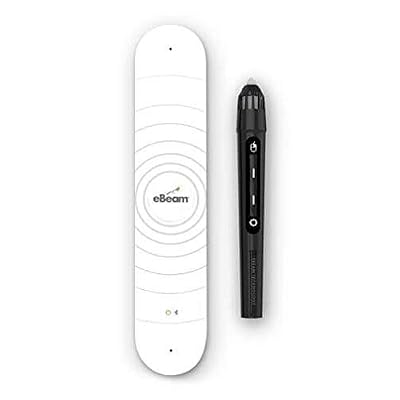
The eBeam Edge + USB allows users to turn any surface into an interactive whiteboard. It requires a projector to display the digital information and a computer to control it. The eBeam Edge + USB works with both Windows and Mac operating systems. Despite not being wireless, users can order a wireless version directly from the eBeam website. Customers have asked if this device works without a projector or with an iPad or iPhone, to which the answer is no. The device requires a projector and computer to function properly. However, the manufacturer has provided software for the Mac operating system that can be found on their website. The eBeam Edge + USB is a great product for teachers, business professionals, or anyone who needs to make a presentation. It's a cost-effective solution for turning any surface into a whiteboard.
お客様のレビュー&評価
1 カスタマー評価
-
5 星
100%
-
4 星
0%
-
3 星
0%
-
2 星
0%
-
1 星
0%
この商品のレビュー
お考えをお聞かせください
長所
- Cost-effective
- Works with both Windows and Mac operating systems
- Can be used with any surface
- Great for presentations
短所
- Not wireless
Product Price History
重要な情報
- 注意:国際運送の商品に関して、製造会社保障は無効になる可能性、アフターサービスは受けれない可能性、取説や安全情報は発送先の言語になっていない可能性ある。商品とその付属品は配送先の国の規格、仕様、ラベル表示法などに適応していない可能性があります。また、配送先の国の電力企画に適応しいない(アダプタや変換器を必要とする)可能性があります。ご注文の商品は配送先の国に輸入することは合法なのかを確認するのは購入者の責任になります。Ubuyからご購入の際、受け取り者は正式な輸入者となり、配送先の全ての法律やルールに遵守する必要があります。
- Ubuyはグローバル検索エンジンのためリストにある全ての商品が購入できないことがあります。商品は輸出規制、貿易規制があります。
Currently unavailable.
We don't know when or if this item will be back in stock.
This item is not restrict in my country.(Please click on above link if this item is not restrict in your country, So our team will review and allow.)
安全な取引
Ubuyはお客様のセキュリティとプライバシーの保護に努めています。当社の高度な決済セキュリティシステムは、AES(高度暗号化標準)およびSSL(セキュアソケットレイヤー)プロトコルを使用して送信中の情報を暗号化することで機密性を確保しています。お客様の決済情報は第三者の販売者と共有されることはなく、100%安全に保護されています。
最高の物流パートナー
最速の国際配送
特徴と利点
- Annotate, interact and build content with easy to use tools
- Distribute materials anytime, anywhere
- Utilize existing surfaces to save and distribute materials
- Highly portable and easy to use