- ホームページ /
- Tools & Home Improvement /
- Electrical /
- Testers /
- Voltage Testers /
- J-Link USB JTAG/SWD Debug Emulator, 8.08.28 T...
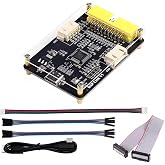
J-Link USB JTAG/SWD Debug Emulator, 8.08.28 Test Tools
JPY 279021
価格の詳細
Excluding Shipping & Custom charges ( Shipping and custom charges will be calculated on checkout )
*All items will import from アメリカ
数量:
Ubuyはお客様のセキュリティとプライバシーの保護に努めています。当社の高度な決済セキュリティシステムは、AES(高度暗号化標準)およびSSL(セキュアソケットレイヤー)プロトコルを使用して送信中の情報を暗号化することで機密性を確保しています。お客様の決済情報は第三者の販売者と共有されることはなく、100%安全に保護されています。
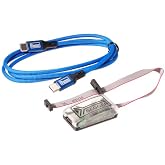
The SEGGER J-Link USB JTAG/SWD Debug Emulator is a professional-grade testing and debugging tool essential for embedded systems development.
Fast
Shipping
Free
Return*
安全な梱包
100%正規品
PCI DSS 準拠
ISO 27001認証取得

この商品の利点
製品詳細
| Power Source | Usb |
| Lower Temperature Rating | 32 Degrees Fahrenheit |
| Minimum Operating Voltage | 5 Volts |
| Upper Temperature Rating | 158 Degrees Fahrenheit |
| Measurement Type | Jtag, Swd |
| Maximum Operating Voltage | 5 Volts |
| Compatible Devices | Microcontrollers and processors with JTAG or SWD interfaces |
| Style Name | Usb Jtag/Swd |
| Color | Blue |
| Item Weight | 3.2 Ounces (90.72 grams) |
| Item Dimensions | 3 x 2.5 x 1.2 inches (7.6 x 6.4 x 3 cm) |
| Brand Name | SEGGER |
| Model | 8.08.28 |
| Manufacturer | Segger |
| Part Number | SEGGER 8.08.28 |
| Included Components | J-link Debug Probe, Usb Cable |
| Unit Count | 1.0 Count |
| Specification Met | Jtag, Swd, Usb 2.0 |
| Brand | SEGGER |
| Style | Usb Jtag/Swd |
どんな人にお勧めですか?
-
Embedded Developers
Ideal for embedded developers needing efficient debugging tools for ARM-based microcontrollers and systems.
-
Educational Institutions
Perfect for universities and colleges teaching embedded systems programming and debugging techniques using JTAG/SWD.
-
Prototyping Teams
Beneficial for teams working on prototypes where high-speed debugging and flash programming are essential.
-
Hobbyist Programmers
Less suitable for hobbyists seeking low-cost and simpler debugging solutions for basic projects.
製品説明書
J-Link USB JTAG/SWD Debug Emulator, 8.08.28 Test Tools
お客様の質問と回答
-
質問:
What is the SEGGER J-Link USB JTAG/SWD Debug Emulator used for?
回答: The SEGGER J-Link USB JTAG/SWD Debug Emulator is primarily used for debugging and programming embedded systems. It establishes a connection between a host system and target microcontroller, allowing developers to perform real-time debugging and flash programming. This reliable tool supports a wide range of architectures and integrates seamlessly with popular Integrated Development Environments (IDEs) like Keil, IAR, and Eclipse. Developers often utilize this emulator when working on projects requiring in-depth debugging, such as firmware development or hardware testing. -
質問:
What are the key features of the SEGGER J-Link 8.08.28 model?
回答: The SEGGER J-Link 8.08.28 model offers multiple features beneficial for developers, including high-speed performance, support for various platforms, and a user-friendly interface. It supports both JTAG and SWD protocols, allowing flexibility in debugging and programming applications. Furthermore, its advanced flash programming capabilities and robust debugging functions make it an ideal choice for engineers. Ideal scenarios include working on resource-constrained environments or when needing efficient debugging for complex applications, ensuring smooth development processes. -
質問:
Is the SEGGER J-Link compatible with ARM microcontrollers?
回答: Yes, the SEGGER J-Link is compatible with ARM microcontrollers, making it an essential tool for developers working within this ecosystem. With its support for the ARM Cortex-M series, you can use it to program and debug ARM-based devices efficiently. It is particularly useful for developers involved in IoT, automotive systems, and consumer electronics where ARM architectures are prevalent. This compatibility ensures that users can seamlessly integrate the J-Link into their development workflows without any hardware compatibility issues. -
質問:
How can I install the SEGGER J-Link software?
回答: To install the SEGGER J-Link software, visit the SEGGER official website and download the latest version of the J-Link software package. Following the installation instructions, connect your J-Link device to your computer, and the software will automatically detect it. The intuitive installation interface efficiently guides users through initial setup, ensuring all necessary drivers and tools are properly configured. This installation process enhances your development experience, allowing for a smooth transition to using the J-Link in your projects. -
質問:
What IDEs work best with SEGGER J-Link?
回答: SEGGER J-Link is compatible with various Integrated Development Environments (IDEs), including Keil MDK, IAR Embedded Workbench, and Eclipse-based IDEs. These environments leverage the J-Link's capabilities for efficient debugging and programming of embedded applications. Developers often choose IDEs based on their project requirements and personal preference, allowing them to tailor their workflow. This versatility ensures that whether you're working on embedded applications or IoT devices, the J-Link integrates smoothly into your chosen development environment. -
質問:
Can the SEGGER J-Link emulator be used for both programming and debugging?
回答: Absolutely! The SEGGER J-Link emulator excels in both programming and debugging functionalities. It allows developers to upload code to microcontrollers and simultaneously provides powerful debugging features such as breakpoints, watchpoints, and real-time variable monitoring. This dual functionality aids developers in tuning their code efficiently, as they can directly analyze it during execution. It’s particularly beneficial in complex scenarios where pinpointing issues in both the code and hardware is crucial for successful project outcomes. -
質問:
What is the maximum speed of the SEGGER J-Link?
回答: The SEGGER J-Link supports a maximum speed of up to 1 Mbit/s when communicating with target devices via JTAG or SWD protocols. This high-speed capability ensures quick data transfers, which is essential for efficient debugging and programming of embedded applications. Such speed improves overall workflow and reduces development time, especially when working on larger applications that require frequent debugging cycles. Moreover, the fast communication helps ensure that programmers can iterate on their designs more rapidly. -
質問:
Does the SEGGER J-Link support real-time debugging?
回答: Yes, the SEGGER J-Link supports real-time debugging, which allows developers to monitor and control the execution of their code as it runs on the target hardware. This feature enables the observation of system behavior, ensuring that any issues can be diagnosed and resolved on-the-fly. Developers particularly benefit from this when dealing with time-sensitive applications where performance and accuracy are critical, allowing for immediate adjustments in the coding process. -
質問:
Can I use the SEGGER J-Link for programming Linux-based systems?
回答: While the SEGGER J-Link is primarily designed for embedded systems, it can also be used to program and debug Linux-based systems that run on compatible architecture. This capability is particularly useful for developing applications within the embedded Linux realm, where developers need to manage both hardware and software interactions. A common use case includes embedded engineers who are tasked with integrating device drivers or debugging embedded Linux applications on SoC platforms. -
質問:
Where can I buy the SEGGER J-Link USB JTAG/SWD Debug Emulator in Japan?
回答: You can purchase the SEGGER J-Link USB JTAG/SWD Debug Emulator in Japan through Ubuy. They offer a wide range of electronics and tools, ensuring you can find the right model and specifications to meet your development needs. Shopping on Ubuy provides you with a reliable platform to acquire this essential debugging tool for your embedded systems projects.
SEGGER Voltage Testers Editorial Review
お客様のレビュー&評価
-
5 星
100%
-
4 星
0%
-
3 星
0%
-
2 星
0%
-
1 星
0%
この商品のレビュー
お考えをお聞かせください
プラットフォームの信頼性とお客様の安心
“Excellent quality and original too,when ubuy send original things I will appreciate that ,I very satisfied thank you”
“The order and delivery progress was communicated very well. Package arrived within the estimated time. Products arrived as expected in good condition.”
“Good supply of products. Safe payment methods, and shipment worldwide! Genuine products.”
“Was my first time buying a product from Ubuy, but I found it so helpful. This is reliable. Gonna place a new order!”
“Ubuy is a great online platform to buy stuff. Reliable, fast delivery time and great value for money. I've been using Ubuy online shopping platform for three years now and will continue to do so.”
価格推移
重要な情報
- 注意:国際運送の商品に関して、製造会社保障は無効になる可能性、アフターサービスは受けれない可能性、取説や安全情報は発送先の言語になっていない可能性ある。商品とその付属品は配送先の国の規格、仕様、ラベル表示法などに適応していない可能性があります。また、配送先の国の電力企画に適応しいない(アダプタや変換器を必要とする)可能性があります。ご注文の商品は配送先の国に輸入することは合法なのかを確認するのは購入者の責任になります。Ubuyからご購入の際、受け取り者は正式な輸入者となり、配送先の全ての法律やルールに遵守する必要があります。
- Ubuyはグローバル検索エンジンのためリストにある全ての商品が購入できないことがあります。商品は輸出規制、貿易規制があります。
JPY 279021
今すぐ注文すると 頃に届きます Monday, 8月 31
This item is not restrict in my country.(Please click on above link if this item is not restrict in your country, So our team will review and allow.)
数量:
PCI DSS準拠・ISO 27001:2022認証取得。すべてのご注文に暗号化決済と充実したバイヤープロテクションが適用されます。
特徴と利点
- Supports both JTAG and SWD interfaces for compatibility with various microcontrollers.
- USB connectivity allows for easy setup with modern development workstations.
- Reliable debugging capabilities help identify and resolve issues efficiently.
- Enables real-time debugging, flash programming, and trace capabilities.
- Designed for electronics engineers, developers, and testing professionals.
- Essential tool for firmware development, hardware testing, and system integration.
Ubuyの安心保証
100%正規品、PCI DSS準拠の決済セキュリティ、ISO 27001認証のデータ保護、最速の国際配送、無料返品※、安全な梱包をすべてのご注文でお届けします。