0 ratings


商品#:
1826083
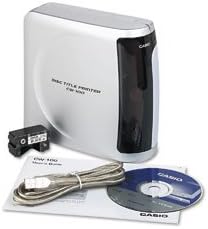
Casio CW-100 CD Label Printer
商品#:
1826083
JPY 58630
価格の詳細
Excluding Shipping & Custom charges ( Shipping and custom charges will be calculated on checkout )
*All items will import from アメリカ
0 ratings
レビューを書く
在庫あり
 USA ストアからの輸入品
今すぐ注文すると 頃に届きます 木曜日, 8月 27
安全な取引
Ubuyはお客様のセキュリティとプライバシーの保護に努めています。当社の高度な決済セキュリティシステムは、AES(高度暗号化標準)およびSSL(セキュアソケットレイヤー)プロトコルを使用して送信中の情報を暗号化することで機密性を確保しています。お客様の決済情報は第三者の販売者と共有されることはなく、100%安全に保護されています。
最高の物流パートナー


Creates crisp, clear professional-looking CDs without the hassle of applying labels.

Fast
Shipping

Free
Return*

安全な梱包

100%正規品

PCI DSS 準拠

ISO 27001認証取得


この商品の利点
Versatile Labeling
The Casio CW-100 allows users to print custom CD labels and covers, accommodating various media types, enhancing organization and personalization for music lovers and professionals alike.
High-Quality Prints
With superior print resolution, the CW-100 delivers crisp and vibrant label designs, ensuring that every detail stands out, making it perfect for presentations and professional use.
User-Friendly Interface
The intuitive interface and easy-to-use software of the CW-100 simplify the labeling process, enabling users to create and print labels quickly, saving time without compromising on quality.
製品詳細
- Prints on up to 40 discs in 5 colors per ribbon cartridge - red, green, blue, silver, or black
- 300 DPI Resolution for sharp and professional results
- Uses any TrueType font for custom disc titles
- Direct thermal printing technology ensures instant drying and no damage to discs
- Auto-turn function for printing on upper and lower areas of discs in one operation
- Can import BMP or JPG graphics and preview label appearance on screen
| Printer Type | Thermal |
| Other Special Features of the Product | CD Printing |
| Printer Output Type | Monochrome |
| Item Weight | 3.7 pounds (1.68 kg) |
| Print media | Labels |
| Compatible Devices | PC |
| Maximum Copies Per Run | 40 |
| Ink Color | red, green, blue, silver, black |
| Additional Printer Functions | Print Only |
| Control Method | App |
| Processor Count | 1 |
| Number of Drivers | 1 |
| Resolution | 300 x 300 |
| Maximum Media Size | 120mm |
| Maximum Sheet Capacity | 40 |
| Maximum print Resolution Color | 300 dots_per_inch (762 cm) |
| Maximum Print Resolution Black and White | 300 dpi |
| Duplex | Simplex |
| Maximum Copy Resolution Color | 300 dpi |
| Maximum Copy Resolution Black and White | 300 dpi |
| Brand | Casio |
| Model Name | CW 100 |
| Model Number | CW-100-IH |
| Built-In Media | AC Adapter, USB Cable, Ink Ribbon Cassette, Practice CD-R, CD-ROM with CD-R Title Printer Application, CD Layout Ruler |
| Series Number | 100 |
| Model Series | CW |
| Specific Uses For Product | CD Label Printing |
| UPC | 999999049025 079767161835 079767168780 |
| Unit Count | 1 Count |
| Global Trade Identification Number | 00079767161835 |
| Manufacturer | #N/A! |
| Color | silver |
| Color Depth | 1 bits_per_pixel |
| Printer Connectivity Type | USB |
| Hardware Interface | USB |
| Total USB 2.0 Ports | 1 |
| Total Usb Ports | 1 |
| Connectivity Technology | USB |
| Printing Technology | Thermal |
| Special Feature | CD Printing |
| Printer Output | Monochrome |
| Included Components | AC Adapter, USB Cable, Ink Ribbon Cassette, Practice CD-R, CD-ROM with CD-R Title Printer Application, CD Layout Ruler See more |
同梱内容
AC Adapter, USB Cable, Ink Ribbon Cassette, Practice CD-R, CD-ROM with CD-R Title Printer Application, CD Layout Ruler
どんな人にお勧めですか?

-
Home Users
Ideal for individuals wanting to organize personal media collections with custom labels and designs.
-
Small Businesses
Great for small businesses needing to create professional labels for CDs, DVDs, and promotional materials.
-
Hobbyists
Perfect for craft enthusiasts who enjoy creating unique, personalized labels for various projects.

-
High-Volume Users
Not suitable for those who require frequent, high-volume printing due to relatively slower print speeds.
製品説明書
About This Item
Introducing the Casio CW-100 CD Label Printer, the perfect solution for all your labeling needs. This compact and versatile printer is designed to create professional-quality CD labels with ease. With the Casio CW-100 Label Printer, you can say goodbye to the hassle of handwriting labels or dealing with messy ink cartridges.
This printer uses thermal printing technology, which means that it prints directly onto the labels using heat. This ensures that your labels look crisp, clear, and smudge-free every time. Whether you need to print labels for organizing your CD collection, creating professional presentations, or even customizing gifts, the Casio CW-100 Printer has got you covered. It offers a wide range of label templates and customization options, allowing you to create labels that suit your unique style and needs.
This Casio Label Printer is also incredibly convenient to use. It features a wireless connectivity option, so you can easily send your label designs from your computer or mobile devices. Additionally, its portable design makes it perfect for on-the-go use or for setting up a small labeling station in your workspace. But don't let its compact size fool you - the Casio CW-100 Label Printer is a powerhouse when it comes to performance.
It boasts high-speed printing capabilities, allowing you to print multiple labels in a matter of minutes. Plus, it is built to last, thanks to its durable construction and reliable functionality. In summary, the Casio CW-100 CD Label Printer is the ultimate labeling solution. With its professional-quality prints, versatile features, and user-friendly design, it is the perfect addition to any office, home, or personal workspace.
Say goodbye to messy handwriting and hello to convenience and efficiency with the Casio CW-100 Label Printer.
何か質問はありますか? チャットでお問い合わせください
お客様からの質問と回答
-
質問:
What type of labels can I print with the Casio CW-100 CD Label Printer?
回答: The Casio CW-100 CD Label Printer is designed to print a variety of labels, primarily optimized for CD and DVD media. It supports standard-sized labels specifically made for discs, ensuring that your labels fit perfectly without any trimming. Additionally, you can create labels for other products like gifts, organizational tags, and even customized stickers, giving you versatility in your labeling projects. -
質問:
How does the ink system work in the Casio CW-100?
回答: The Casio CW-100 utilizes a thermal transfer printing system that ensures high-quality prints. This system employs heat to transfer ink from a ribbon onto the label material, resulting in vibrant colors and sharp images. Users find this method excellent for creating detailed designs and text that stand out, making it perfect for custom CD covers or professional presentations. -
質問:
Can I create custom designs using the Casio CW-100?
回答: Yes, you can create custom designs using the Casio CW-100 CD Label Printer. The device comes with built-in templates and features that allow users to personalize labels with text, graphics, and images. Whether you’re labeling your music collection or creating unique event invitations, the user-friendly interface makes it easy to unleash your creativity and produce professional-looking labels. -
質問:
Is the Casio CW-100 compatible with my computer?
回答: The Casio CW-100 CD Label Printer is compatible with both Windows and Mac operating systems. It connects via USB, allowing for seamless integration with your computer. This compatibility makes it convenient for users to design and print labels directly from popular design software or the included software package, enhancing your productivity when printing labels. -
質問:
What font options are available with the CW-100?
回答: The Casio CW-100 offers a variety of font styles and sizes, enabling users to customize their labels to their liking. A wide selection of built-in fonts allows for creative flexibility, whether you're labeling a personal project or a corporate presentation. Additionally, the ability to adjust font sizes and apply styles such as bold, italic, or underlined enhances the appeal of your labels. -
質問:
Can the CW-100 print in color?
回答: Yes, the Casio CW-100 CD Label Printer can print in color, providing an opportunity to produce vibrant and visually appealing labels. It utilizes a high-quality ink system that allows for colorful graphics and clear text, making your discs more attractive and professional-looking. This feature is particularly beneficial for promotional materials, personal projects, or custom gifts. -
質問:
How do I load and replace labels in the CW-100?
回答: Loading and replacing labels in the Casio CW-100 is a straightforward process. Simply open the cartridge compartment, remove the old label roll, and insert the new one, ensuring it is aligned properly. Follow the on-screen prompts for loading, and you’ll be ready to create labels swiftly. This user-friendly design minimizes downtime and maximizes efficiency, ideal for busy environments or home use. -
質問:
What are some creative uses for the Casio CW-100?
回答: The Casio CW-100 can be utilized for a range of creative applications beyond just CD labeling. For instance, you can create custom stickers for events, organize your home with labeled storage boxes, or craft personalized gifts. This versatility allows users to think outside the box and maximize the printer's potential for various projects, facilitating organization and creativity. -
質問:
How does the CW-100 compare to other label printers?
回答: The Casio CW-100 stands out in the label printer market due to its specialized design for CDs and DVDs combined with high-quality color printing capabilities. Its thermal transfer technology ensures durability against fading and smudging, which is often a concern with standard inkjet printers. When compared to other label printers, the CW-100’s focus on media labels makes it a top choice for users looking for specialized applications. -
質問:
Where can I buy Casio CW-100 CD Label Printer in Japan?
回答: You can purchase the Casio CW-100 CD Label Printer from Ubuy in Japan. Ubuy offers a wide selection of Casio products, ensuring you’ll find what you need in a reliable online store known for its comprehensive range and customer service.
Casio Label Makers CW-100-IH Editorial Review

The Casio CW-100 CD Label Printer is a reliable and easy-to-use printer for creating labels on CDs. It is compatible with Windows XP and Windows 7 Pro 64 bit operating system. However, it does not print CD logos and is not compatible with Mac computers. The printer is capable of printing different fonts, sizes, and arrangements for a simple business-like print on a silver disc.
お客様のレビュー&評価
32 カスタマー評価
-
5 星
41%
-
4 星
25%
-
3 星
12%
-
2 星
11%
-
1 星
11%
この商品のレビュー
お考えをお聞かせください
長所
- Reliable and easy-to-use
- Compatible with Windows XP and Windows 7 Pro 64 bit
短所
- Does not print CD logos
プラットフォームの信頼性とお客様の安心

MA
Mohammad
Verified buyer
“Excellent quality and original too,when ubuy send original things I will appreciate that ,I very satisfied thank you”
23 July 2026 · via Trustpilot
CK
Chitra
Verified buyer
“The order and delivery progress was communicated very well. Package arrived within the estimated time. Products arrived as expected in good condition.”
22-Jul-26 · via Trustpilot
K
kund
Verified buyer
“Good supply of products. Safe payment methods, and shipment worldwide! Genuine products.”
23-Jul-26 · via Trustpilot
OO
Onesi
Verified buyer
“Was my first time buying a product from Ubuy, but I found it so helpful. This is reliable. Gonna place a new order!”
22 July 2026 · via Trustpilot
SJ
SAO JOHN
Verified buyer
“Ubuy is a great online platform to buy stuff. Reliable, fast delivery time and great value for money. I've been using Ubuy online shopping platform for three years now and will continue to do so.”
23 July 2026 · via Trustpilot
安全な決済
国際配送
簡単返品
正規品保証
価格推移
重要な情報
- 注意:国際運送の商品に関して、製造会社保障は無効になる可能性、アフターサービスは受けれない可能性、取説や安全情報は発送先の言語になっていない可能性ある。商品とその付属品は配送先の国の規格、仕様、ラベル表示法などに適応していない可能性があります。また、配送先の国の電力企画に適応しいない(アダプタや変換器を必要とする)可能性があります。ご注文の商品は配送先の国に輸入することは合法なのかを確認するのは購入者の責任になります。Ubuyからご購入の際、受け取り者は正式な輸入者となり、配送先の全ての法律やルールに遵守する必要があります。
- Ubuyはグローバル検索エンジンのためリストにある全ての商品が購入できないことがあります。商品は輸出規制、貿易規制があります。
JPY 58630
今すぐ注文すると 頃に届きます 木曜日, 8月 27
This item is not restrict in my country.(Please click on above link if this item is not restrict in your country, So our team will review and allow.)
数量:
安全な取引
PCI DSS準拠・ISO 27001:2022認証取得。すべてのご注文に暗号化決済と充実したバイヤープロテクションが適用されます。
最高の物流パートナー
最速の国際配送
特徴と利点
- Auto-loading and auto-turn saves time and improves performance
- Utilizes any TrueType fonts available via Mac.
- 300 dpi print resolution.
- Includes USB cable, software, black ink ribbon, CD-R and AC adapter.
- Can print on up to 40 discs in 1 of 5 colors per ribbon cartridge.
- Uses any type of TrueType font.
Ubuyの安心保証
100%正規品、PCI DSS準拠の決済セキュリティ、ISO 27001認証のデータ保護、最速の国際配送、無料返品※、安全な梱包をすべてのご注文でお届けします。