- ホームページ /
- 電子機器 /
- Computer Accessories /
- Computer Components /
- Computer Internal Components /
- Graphics Cards /
- Mikikit Pcie Mining Graphics Card Adapter USB...
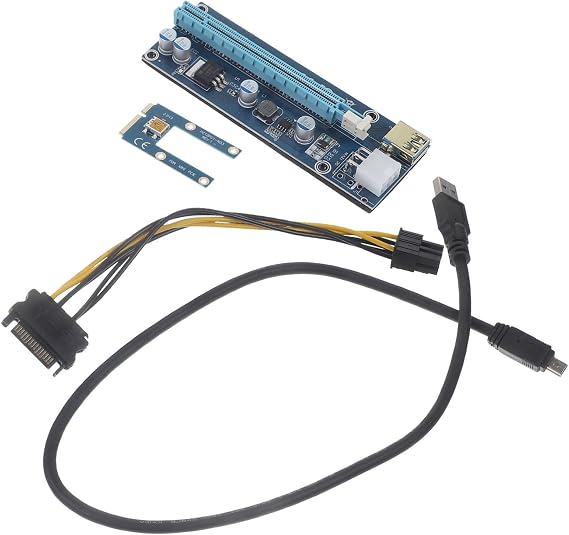
Mikikit Pcie Mining Graphics Card Adapter USB Cable for External Gpu Connection Compatible Laptop Pci Pci Efficient Performance Upgrade
JPY 3955
価格の詳細
Excluding Shipping & Custom charges ( Shipping and custom charges will be calculated on checkout )
*All items will import from アメリカ
Ubuyはお客様のセキュリティとプライバシーの保護に努めています。当社の高度な決済セキュリティシステムは、AES(高度暗号化標準)およびSSL(セキュアソケットレイヤー)プロトコルを使用して送信中の情報を暗号化することで機密性を確保しています。お客様の決済情報は第三者の販売者と共有されることはなく、100%安全に保護されています。
Upgrade your 's graphics processing power and take your multimedia experience to the next level with this graphics card adapter.
Fast
Shipping
Free
Return*
安全な梱包
100%正規品
PCI DSS 準拠
ISO 27001認証取得

この商品の利点
製品詳細
| Compatible Devices | iPhone 4S |
| Brand | Mikikit |
| Model Name | Docking Stations |
| Manufacturer | Mikikit |
| Mfr Part Number | 03L54ABZMTE39KQ157W01 |
| Model Number | 03L54ABZMTE39KQ157W01 |
| Item Type Name | electronicdevicedockingstation |
| Item Weight | 0.19 Pounds (90 grams) |
どんな人にお勧めですか?
-
Laptop Gamers
Users looking to enhance their laptop gaming performance with an external GPU for improved graphics and frame rates.
-
Crypto Miners
Cryptocurrency miners who want to connect external GPUs to laptops for enhanced mining efficiency and performance.
-
Tech Enthusiasts
Individuals interested in building custom setups or upgrading existing systems with better GPU capabilities using laptops.
-
Casual Users
Everyday users who do not need enhanced graphics performance may find this product unnecessary and redundant.
製品説明書
Mikikit Pcie Mining Graphics Card Adapter USB Cable for External Gpu Connection Compatible Laptop Pci Pci Efficient Performance Upgrade
お客様からの質問と回答
-
質問:
What is the Mikikit PCIe Mining Graphics Card Adapter USB Cable?
回答: The Mikikit PCIe Mining Graphics Card Adapter USB Cable is a specialized product designed to connect an external graphics processing unit (GPU) to a laptop via the PCI Express interface. This cable allows users to upgrade their laptop's performance by utilizing a powerful external GPU, enabling enhanced graphics processing for gaming, design, and mining tasks. The USB interface offers flexibility, allowing users to set up their external GPU system efficiently. This setup is especially beneficial for gamers and professionals requiring high-quality graphics or extensive computational power. -
質問:
How does the Mikikit adapter enhance laptop performance?
回答: The Mikikit adapter enhances laptop performance by allowing the integration of high-performance external GPUs that can significantly improve graphics rendering and computational capabilities. By offloading rendering tasks from the laptop’s integrated graphics to the external GPU, users experience faster frame rates in games, improved graphics in applications, and better performance in intensive tasks like 3D modeling or cryptocurrency mining. This means smoother gameplay, quicker rendering times, and the possibility of using more demanding software without being limited by the laptop's internal specs. -
質問:
Is the Mikikit PCIe cable compatible with all laptops?
回答: Not all laptops are compatible with the Mikikit PCIe cable; compatibility primarily depends on the laptop's design and support for PCI Express ports. Generally, laptops with a Thunderbolt 3 or USB-C port will have a higher chance of compatible connection. It's crucial to check your laptop's specifications and confirm it supports external GPU functions to utilize this adapter effectively. If unsure, consulting the laptop’s manual or the manufacturer’s website can provide clarity regarding compatibility with PCIe connections. -
質問:
Can I use the Mikikit PCIe adapter for gaming purposes?
回答: Yes, the Mikikit PCIe adapter is ideal for gaming purposes. By connecting an external GPU, gamers can experience higher graphics quality, improved frame rates, and reduced lag in gameplay. This setup is particularly useful for those with laptops that struggle to run modern games due to insufficient internal graphics capabilities. Using this adapter allows for a more powerful gaming experience as it unlocks the potential of advanced GPUs, making it feasible to enjoy the latest titles in high settings without sacrificing performance. -
質問:
What types of GPUs are compatible with the Mikikit PCIe adapter?
回答: The Mikikit PCIe adapter is compatible with a wide range of GPUs from leading manufacturers like NVIDIA and AMD. It is crucial to select a GPU that fits the adapter’s specifications and offers a supported power requirement. Common choices include the NVIDIA GeForce RTX series and AMD Radeon RX series, known for reliable performance in gaming and professional applications. Users should also consider the physical size of the GPU and ensure it fits properly within their external case while being mindful of its cooling needs for optimal functionality. -
質問:
How do I set up the Mikikit PCIe adapter with my laptop?
回答: Setting up the Mikikit PCIe adapter involves a few clear steps: First, securely connect the external GPU to the adapter using the appropriate PCIe slot. Next, attach the adapter to your laptop via the designated USB or Thunderbolt port. Finally, install any necessary drivers for the external GPU to ensure it's recognized by your operating system. After setup, users may need to adjust the graphics settings in their preferred applications to optimize performance effectively. This setup provides a significant boost in graphics capabilities, tailored specifically for the laptop’s needs. -
質問:
What advantages does USB connectivity offer for the Mikikit adapter?
回答: The USB connectivity of the Mikikit adapter offers several advantages, including portability and ease of use. Unlike traditional internal GPU setups, this allows for a quick plug-and-play experience with minimal hassle. Users can easily connect and disconnect the external GPU without needing extensive technical knowledge or modifications to their laptops. Additionally, USB connections often support high data transfer rates, ensuring that the external GPU performs efficiently for gaming or demanding applications, making it a practical choice for users seeking performance upgrades. -
質問:
Can I use the Mikikit adapter for cryptocurrency mining?
回答: Yes, the Mikikit adapter is suitable for cryptocurrency mining, particularly when paired with a capable external GPU. Miners benefit from the increased processing power available from high-performance GPUs, which can significantly enhance mining efficiency. When set up correctly, this adapter allows laptops to leverage external graphics capabilities, making it feasible to participate in mining activities without solely relying on integrated graphics. It’s essential to ensure that your system is adequately cooled and powered to handle the demands of mining operations effectively. -
質問:
Where can I buy the Mikikit PCIe Mining Graphics Card Adapter USB Cable?
回答: You can purchase the Mikikit PCIe Mining Graphics Card Adapter USB Cable at Ubuy. Ubuy offers a convenient platform for acquiring this essential accessory, providing a wide selection of products and efficient service tailored to your needs. Being a trusted online retailer, Ubuy presents various options and competitive offerings, making it easy for you to find the Mikikit adapter and enhance your laptop's performance.
Mikikit Graphics Cards 03L54ABZMTE39KQ157W01 Editorial Review
お客様のレビュー&評価
-
5 星
100%
-
4 星
0%
-
3 星
0%
-
2 星
0%
-
1 星
0%
この商品のレビュー
お考えをお聞かせください
プラットフォームの信頼性とお客様の安心

“Excellent quality and original too,when ubuy send original things I will appreciate that ,I very satisfied thank you”
“The order and delivery progress was communicated very well. Package arrived within the estimated time. Products arrived as expected in good condition.”
“Good supply of products. Safe payment methods, and shipment worldwide! Genuine products.”
“Was my first time buying a product from Ubuy, but I found it so helpful. This is reliable. Gonna place a new order!”
“Ubuy is a great online platform to buy stuff. Reliable, fast delivery time and great value for money. I've been using Ubuy online shopping platform for three years now and will continue to do so.”
価格推移
重要な情報
- 注意:国際運送の商品に関して、製造会社保障は無効になる可能性、アフターサービスは受けれない可能性、取説や安全情報は発送先の言語になっていない可能性ある。商品とその付属品は配送先の国の規格、仕様、ラベル表示法などに適応していない可能性があります。また、配送先の国の電力企画に適応しいない(アダプタや変換器を必要とする)可能性があります。ご注文の商品は配送先の国に輸入することは合法なのかを確認するのは購入者の責任になります。Ubuyからご購入の際、受け取り者は正式な輸入者となり、配送先の全ての法律やルールに遵守する必要があります。
- Ubuyはグローバル検索エンジンのためリストにある全ての商品が購入できないことがあります。商品は輸出規制、貿易規制があります。
JPY 3955
今すぐ注文すると 頃に届きます Monday, 8月 31
This item is not restrict in my country.(Please click on above link if this item is not restrict in your country, So our team will review and allow.)
数量:
PCI DSS準拠・ISO 27001:2022認証取得。すべてのご注文に暗号化決済と充実したバイヤープロテクションが適用されます。
特徴と利点
- Enhances graphics processing power for improved performance.
- Simple solution for connecting external displays and devices.
- Offers multiple connectivity options for versatility.
- Ideal for gamers and multimedia enthusiasts.
- Easy-to-use design for seamless integration.
- Upgrade your visual experience with immersive effects.
Ubuyの安心保証
100%正規品、PCI DSS準拠の決済セキュリティ、ISO 27001認証のデータ保護、最速の国際配送、無料返品※、安全な梱包をすべてのご注文でお届けします。



