- ホームページ /
- ビデオゲーム /
- PC /
- アクセサリー /
- Controllers /
- Joysticks /
- Flight Simulation Controller Joystick for PC,...
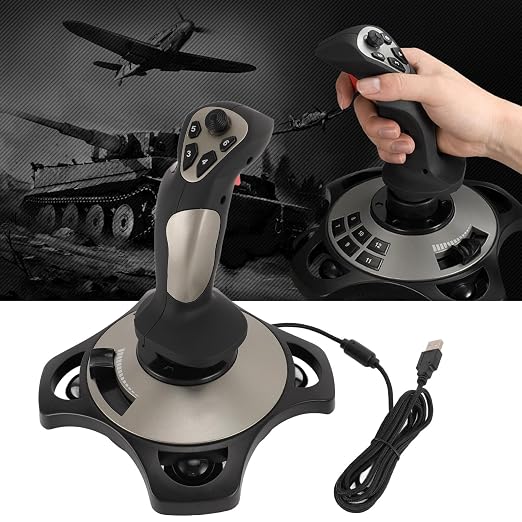
Flight Simulation Controller Joystick for PC, PC Flight Joystick Controls with Vibration Function Throttle Control for PC Computer Laptop for 7 8 10
JPY 19069
Price Details
Excluding Shipping & Custom charges ( Shipping and custom charges will be calculated on checkout )
*All items will import from アメリカ
Ubuyはお客様のセキュリティとプライバシーの保護に努めています。当社の高度な決済セキュリティシステムは、AES(高度暗号化標準)およびSSL(セキュアソケットレイヤー)プロトコルを使用して送信中の情報を暗号化することで機密性を確保しています。お客様の決済情報は第三者の販売者と共有されることはなく、100%安全に保護されています。
Experience the thrill of flight simulation with our easy-to-use joystick, featuring advanced controls, vibration feedback, and wide compatibility.
Fast
Shipping
Free
Return*
安全な梱包
100%本物
PCI DSS 準拠
ISO 27001 保証
この商品の利点
製品詳細
| Item Weight | 3 lbs (1.36 kg) |
どんな人にお勧めですか?
-
Avid Flight Simulators
Great for enthusiasts who enjoy detailed flight simulation games, offering realistic controls and feedback.
-
Training Pilots
Useful for student pilots needing to practice controls and develop skills in a virtual environment.
-
Casual Gamers
Perfect for gamers who want to try flight simulations casually without professional-grade equipment.
-
Professional Pilots
Lacks the precision and features required for serious training and professional flight simulations.
-
Console Gamers
Not suitable for users who primarily play flight simulators on console systems like Xbox or PlayStation.
-
Mobile Users
Not designed for use with mobile devices and may not provide optimal performance on laptops.
製品説明書
Flight Simulation Controller Joystick for PC, PC Flight Joystick Controls with Vibration Function Throttle Control for PC Computer Laptop for 7 8 10 11
顧客の質問と回答
-
質問:
What are the key features of the Flight Simulation Controller Joystick?
答え: The Flight Simulation Controller Joystick includes features like high-precision controls, vibration feedback, and throttle control. These features allow for a more immersive flight simulation experience, making it easier to navigate the skies and feel the aircraft's response. The joystick is compatible with various flight simulation software, enhancing realism and user engagement. This product is especially beneficial for dedicated flight simulation enthusiasts looking to replicate genuine flying conditions. -
質問:
Is the joystick compatible with Windows 10?
答え: This joystick is specifically designed for Windows 7 and 8. While some users have reported limited functionality on Windows 10, compatibility can vary based on system specifications and drivers. It’s advisable to check for any necessary driver updates or software patches that may enhance compatibility. If you’re planning to use this joystick on Windows 10, ensure your system can support it for optimal performance. -
質問:
Does the joystick support virtual reality flight simulations?
答え: While the joystick itself does not directly support virtual reality, it can be used alongside VR systems to enhance the experience. When paired with a VR headset and compatible flight simulation software, this controller can provide an immersive and engaging flying experience. The tactile feedback from the joystick further adds to the realism during flight, making it a great addition for users looking to blend VR with traditional simulation setups. -
質問:
Can this joystick be used for other gaming genres?
答え: Yes, the Flight Simulation Controller Joystick can also be utilized in various gaming genres beyond flight sims. Many users find it suitable for racing games or any titles that benefit from precise control mechanics. While it excels in aviation simulations, its precision and throttle control can enhance gameplay in other racing and action games, allowing for a different gaming experience. -
質問:
How do I configure the joystick for use with flight simulation software?
答え: Configuring the joystick for flight simulation software typically involves installing any necessary drivers and adjusting settings within the game. After connecting the joystick to your PC, access the game’s controls menu to map the joystick functions to the specific in-game actions, ensuring optimal compatibility. Most flight simulation games offer user-friendly interfaces for customization, allowing you to tweak settings for personal preferences. -
質問:
What makes the vibration function beneficial for flight simulations?
答え: The vibration function of the joystick provides feedback that enhances realism during flight simulations. It simulates the feeling of turbulence and aircraft responses to maneuvers, giving users a more immersive experience. This tactile feedback is key for understanding the physical sensations of flying, helping users react more naturally during their simulated flights. -
質問:
Is the joystick designed for left or right-handed users?
答え: The Flight Simulation Controller Joystick is designed to be ambidextrous, allowing both left and right-handed users to feel comfortable while using it. Its ergonomic design caters to various hand sizes and preferences, ensuring a smooth gaming experience for everyone. Regardless of your dominant hand, you can easily grasp and control the joystick effectively. -
質問:
What are the dimensions and weight of the joystick?
答え: The dimensions of the joystick typically vary depending on the model, but it is generally designed to be compact and lightweight for easy maneuverability. This lightweight design aids in long session comfort, preventing fatigue during extensive gaming. Its size allows for easy storage or portability, making it suitable for both home setups and traveling gamers. -
質問:
Where can I buy the Flight Simulation Controller Joystick for PC?
答え: You can purchase the Flight Simulation Controller Joystick for PC from Ubuy in Japan. Ubuy offers a wide selection of gaming gear, including flight controllers, ensuring you can find the right product to enhance your gaming experience. Their platform is user-friendly, making it easy to navigate and locate the joystick you need for your flight simulations.
ASHATA Joysticks Editorial Review
お客様のレビュー&評価
-
5 星
100%
-
4 星
0%
-
3 星
0%
-
2 星
0%
-
1 星
0%
この商品のレビュー
お考えをお聞かせください
Platform Trust & Buyer Confidence
“The product received very good packaging & safe…Thank You”
“Accurate delivery timing given”
“Not madly expensive like I thought, and much quicker than promised.”
“Never dealt with Ubuy before, but everything worked out great. Seamless cross border purchasing and shipping. Thanks!”
“The process was smooth, with clear communication and timelines. This was my 1st purchase and I am really impressed. I will definitely be coming back.”
Product Price History
重要な情報
- 注意:国際運送の商品に関して、製造会社保障は無効になる可能性、アフターサービスは受けれない可能性、取説や安全情報は発送先の言語になっていない可能性ある。商品とその付属品は配送先の国の規格、仕様、ラベル表示法などに適応していない可能性があります。また、配送先の国の電力企画に適応しいない(アダプタや変換器を必要とする)可能性があります。ご注文の商品は配送先の国に輸入することは合法なのかを確認するのは購入者の責任になります。Ubuyからご購入の際、受け取り者は正式な輸入者となり、配送先の全ての法律やルールに遵守する必要があります。
- Ubuyはグローバル検索エンジンのためリストにある全ての商品が購入できないことがあります。商品は輸出規制、貿易規制があります。
JPY 19069
今すぐ注文すると 頃に届きます 土曜日, 7月 11
This item is not restrict in my country.(Please click on above link if this item is not restrict in your country, So our team will review and allow.)
QTY:
Ubuyはお客様のセキュリティとプライバシーの保護に努めています。当社の高度な決済セキュリティシステムは、AES(高度暗号化標準)およびSSL(セキュアソケットレイヤー)プロトコルを使用して送信中の情報を暗号化することで機密性を確保しています。お客様の決済情報は第三者の販売者と共有されることはなく、100%安全に保護されています。
特徴と利点
- User-friendly plug-and-play design with no driver installation required.
- Four axes for precise control and 12 programmable buttons for customizable gameplay.
- Integrated vibration motors enhance gaming immersion with varying intensity.
- Quick multi-directional control for easy maneuvering in flight simulations.
- Compatible with PC systems including Windows 7, 8, 10, and 11.
- Perfect for gamers looking to elevate their flight simulation experience.