- ホームページ /
- オフィス製品 /
- オフィス家電 /
- プリンター・アクセサリー /
- プリンター /
- レーザープリンター /
- Canon imageCLASS MF287dw - Monochrome, Duplex...
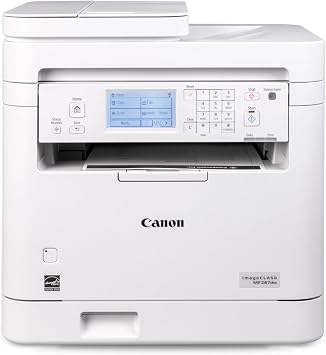
Canon imageCLASS MF287dw - Monochrome, Duplex, Wireless Laser Printer, All-in-One Print, Copy, Scan, Fax, Auto Document Feeder, 35 PPM, White
回答者の83%がこの商品を友人に勧めたいと回答
JPY 47548
価格の詳細
配送料と関税を除く ( 配送料と関税は購入手続き時に計算されます )
*すべての商品はアメリカから輸入されます
Ubuyはお客様のセキュリティとプライバシーの保護に努めています。当社の高度な決済セキュリティシステムは、AES(高度暗号化標準)およびSSL(セキュアソケットレイヤー)プロトコルを使用して送信中の情報を暗号化することで機密性を確保しています。お客様の決済情報は第三者の販売者と共有されることはなく、100%安全に保護されています。
Print up to 35 pages-per-minute with a first print out of less than 4.9 seconds.
Fast
Shipping
Free
Return*
安全な梱包
100%正規品
PCI DSS 準拠
ISO 27001認証取得

この商品の利点
製品詳細
| Printer Type | Laser |
| Other Special Features of the Product | Display Screen |
| Printer Output Type | Monochrome |
| Item Weight | 27.6 pounds (12.52 kg) |
| Item Dimensions D x W x H | 22.5"D x 22.8"W x 22.1"H (57.2 x 57.9 x 56.1 cm) |
| Print media | High-resolution paper, Paper (plain), Unknown |
| Scanner Type | Automatic Document Feeder |
| Maximum Copy Speed Black and White | 35 pages_per_minute |
| EU Spare Part Availability Duration | 1 tyears |
| Ink Color | Black |
| Additional Printer Functions | All In One |
| Compatible Cartridge | Canon Genuine Toner 072 Standard, 072 High Capacity |
| Number of Trays | 1 |
| Display Type | LCD |
| Resolution | 600 x 600 |
| Maximum Media Size | 8.5 x 14 inch (21.6 cm) |
| Maximum Sheet Capacity | 250 |
| Paper Size | 3 x 5 Inches to 8.5 x 14 Inches (7.6 x 148.6 x 35.6 cm) |
| Maximum Print Resolution Black and White | Up to 600 x 600 dpi |
| Wattage | 970 watts |
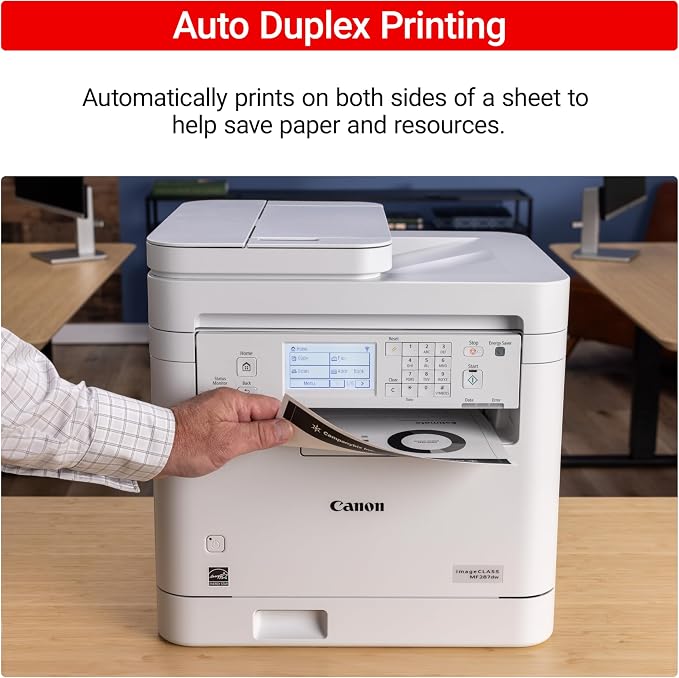
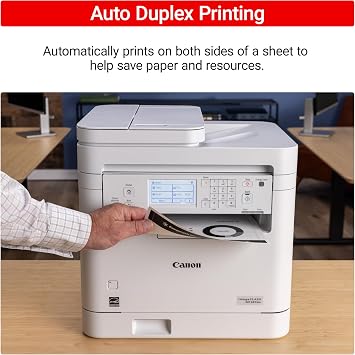
| Duplex | Automatic |
| Brand | Canon |
| Model Name | imageCLASS MF287dw |
| Model Number | 6354C011 |
| Built-In Media | Toner Cartridges |
| Series Number | 6354011 |
| Model Series | imageCLASS |
| Specific Uses For Product | Office |
| UPC | 013803372267 |
| Item Type Name | Laser Printer |
| Manufacturer | Canon |
| Color Pages per Minute | 35 |
| B&W Pages per Minute | 35 pages_per_minute |
| Color | White |
| Color Depth | 1 bits_per_pixel |
| Printer Connectivity Type | Wi-Fi |
| Hardware Interface | USB 2.0 |
| Total Usb Ports | 1 |
| Maximum Copy Resolution Black and White | Up to 600 x 600 dpi |
| Connectivity Technology | Wi-Fi |
| Printing Technology | Laser |
| Special Feature | Display Screen |
| Printer Output | Monochrome |
| Maximum Print Speed (Color) | 35 |
| Max Printspeed Monochrome | 35 pages_per_minute |
どんな人にお勧めですか?
-
Small Offices
Ideal for small offices needing efficient printing, copying, and scanning with high-quality monochrome output.
-
Home Offices
Perfect for home office users who require a reliable all-in-one printer for everyday document handling.
-
Frequent Print Users
Great for users printing large volumes due to fast print speeds and automatic duplex printing capabilities.
-
Photo Printing
Not suitable for users needing high-quality color photo prints, as it's a monochrome laser printer.
製品説明書
Canon imageCLASS MF287dw - Monochrome, Duplex, Wireless Laser Printer, All-in-One Print, Copy, Scan, Fax, Auto Document Feeder, 35 PPM, White
お客様の質問と回答
-
質問:
What are the main features of the Canon imageCLASS MF287dw printer?
回答: The Canon imageCLASS MF287dw is a versatile all-in-one printer that offers printing, copying, scanning, and faxing functionalities. It features duplex printing, which allows for printing on both sides of a page, enhancing paper efficiency. With wireless connectivity, users can easily print from smartphones and tablets, while the auto document feeder supports high-volume tasks. Its impressive print speed of up to 35 pages per minute makes it ideal for busy environments like offices. -
質問:
Can the Canon imageCLASS MF287dw print in color?
回答: No, the Canon imageCLASS MF287dw is a monochrome laser printer, meaning it only prints in black and white. This design is efficient for document printing, especially in environments that primarily use text-heavy materials. Users who need clear and professional black-and-white prints, like for reports or invoices, will find this particular printer suitable. -
質問:
How do I set up the Canon imageCLASS MF287dw for wireless printing?
回答: Setting up the Canon imageCLASS MF287dw for wireless printing involves connecting the printer to your Wi-Fi network. Begin by powering on the printer and accessing the settings menu to find the wireless LAN setup option. Follow the on-screen prompts to select your Wi-Fi network and enter the password. Once connected, install the Canon PRINT app on your smartphone or download the printer driver on your computer to print directly from your devices. -
質問:
Is the Canon imageCLASS MF287dw compatible with Mac and PC?
回答: Yes, the Canon imageCLASS MF287dw is compatible with both Mac and PC systems. For Mac users, ensure to download the latest drivers from Canon's website compatible with your macOS version. Windows users also can easily install the printer drivers available on the Canon website. This cross-platform compatibility ensures versatility for various office environments using different operating systems. -
質問:
What types of paper can the Canon imageCLASS MF287dw handle?
回答: The Canon imageCLASS MF287dw can handle a variety of paper types and sizes, including plain paper, envelopes, and recycled paper. Its paper capacity is suitable for standard office sizes, including letter and legal formats. Such flexibility allows users to perform different tasks efficiently, from basic document printing to handling specialized media for professional presentations or correspondence. -
質問:
What is automatic duplex printing, and how does it work on this printer?
回答: Automatic duplex printing is a feature that allows the printer to automatically print on both sides of the paper. In the Canon imageCLASS MF287dw, this is done through a mechanism that pulls the paper back into the printer after the first side is printed, flipping it to print on the other side. This functionality is particularly useful for reducing paper usage and creating professional-looking double-sided documents effortlessly. -
質問:
Can I scan documents directly from my mobile device to the Canon imageCLASS MF287dw?
回答: Yes, the Canon imageCLASS MF287dw allows users to scan documents directly to a mobile device. Users can utilize the Canon PRINT app to easily initiate scans. The app offers intuitive controls and enables you to save scanned documents in various formats, such as PDF or JPEG, which you can then share or store on your mobile device seamlessly. -
質問:
Does the printer support cloud printing?
回答: Yes, the Canon imageCLASS MF287dw supports cloud printing services, allowing users to print documents stored in cloud services like Google Drive or Dropbox directly from the printer. This feature enhances accessibility for users who rely on cloud storage for their files, making it suitable for both home and office use. Just ensure your printer is connected to the internet and appropriately configured to access these services. -
質問:
What is the print speed of the Canon imageCLASS MF287dw?
回答: The Canon imageCLASS MF287dw boasts a print speed of up to 35 pages per minute (PPM). This rapid printing capability is advantageous in high-demand environments, where efficiency is vital. Whether for printing large reports, presentations, or everyday work documents, the quick output helps maintain productivity in busy office settings. -
質問:
Where can I buy the Canon imageCLASS MF287dw printer?
回答: You can buy the Canon imageCLASS MF287dw printer from Ubuy in Japan. Ubuy offers a reliable shopping experience with various options for purchasing Canon printers along with helpful customer service to assist you with your order. You can explore their offerings online for detailed product information and availability.
Canon Laser Printers 6354C011 Editorial Review
Canon imageCLASS MF287dw - Monochrome, Duplex, Wireless Laser Printer, All-in-One Print, Copy, Scan, Fax, Auto Document Feeder, 35 PPM, White delivers versatile functionality with features like automatic duplex printing and a high-speed capability of 35 pages per minute. Users appreciate the straightforward setup and wireless connectivity, which facilitates printing from anywhere in the home. However, some have noted inconsistencies in print quality, particularly when printing shipping labels; smudging and toner speckling have been mentioned as potential issues. The printer's comprehensive functions are handy for various office tasks, but those seeking higher print durability may need to consider alternatives.
お客様のレビュー&評価
-
5 星
100%
-
4 星
0%
-
3 星
0%
-
2 星
0%
-
1 星
0%
この商品のレビュー
お考えをお聞かせください
長所
- Wireless connectivity allows easy printing from anywhere
- Easy setup process for quick deployment
- All-in-one functionality covers printing, scanning, copying
- Compact dimensions fit well in most office spaces
- Automated duplex feature saves on paper usage
短所
- Could benefit from clearer documentation and instructions
プラットフォームの信頼性とお客様の安心
“Easy to use and always helpful and sorts any issues I've had past and present”
“I always receive support when I engage customer service. Overall my experience with UBUY has been top notch. Keep up the good work.”
“The delivery was fast and the product came undamaged and authentic.”
“Ubuy is extremely efficient and to order online is an easy process. The verity of products to buy is really unlimited! My order was urgent and I got it on time. The products are great! Thank you Ubuy!”
“Fast, convenient and cheap. Great store!”
価格推移
重要な情報
- 注意:国際運送の商品に関して、製造会社保障は無効になる可能性、アフターサービスは受けれない可能性、取説や安全情報は発送先の言語になっていない可能性ある。商品とその付属品は配送先の国の規格、仕様、ラベル表示法などに適応していない可能性があります。また、配送先の国の電力企画に適応しいない(アダプタや変換器を必要とする)可能性があります。ご注文の商品は配送先の国に輸入することは合法なのかを確認するのは購入者の責任になります。Ubuyからご購入の際、受け取り者は正式な輸入者となり、配送先の全ての法律やルールに遵守する必要があります。
- Ubuyはグローバル検索エンジンのためリストにある全ての商品が購入できないことがあります。商品は輸出規制、貿易規制があります。
JPY 47548
今すぐ注文すると 頃に届きます 金曜日, 9月 18
This item is not restrict in my country.(Please click on above link if this item is not restrict in your country, So our team will review and allow.)
数量:
PCI DSS準拠・ISO 27001:2022認証取得。すべてのご注文に暗号化決済と充実したバイヤープロテクションが適用されます。
特徴と利点
- All in One wireless duplex laser printer.
- Print speeds of up to 35 pages-per-minute.
- First print out time in less than 4.9 seconds.
- Supports mobile printing through various apps.
- High capacity toner option reduces interruptions.
- Duplex printing saves paper and costs.
Ubuyの安心保証
100%正規品、PCI DSS準拠の決済セキュリティ、ISO 27001認証のデータ保護、最速の国際配送、無料返品※、安全な梱包をすべてのご注文でお届けします。