- ホームページ /
- 電子機器 /
- Computer Accessories /
- Computer Components /
- Single Board Computers /
- KEYESTUDIO Microbit Basic Starter Kit Microbi...
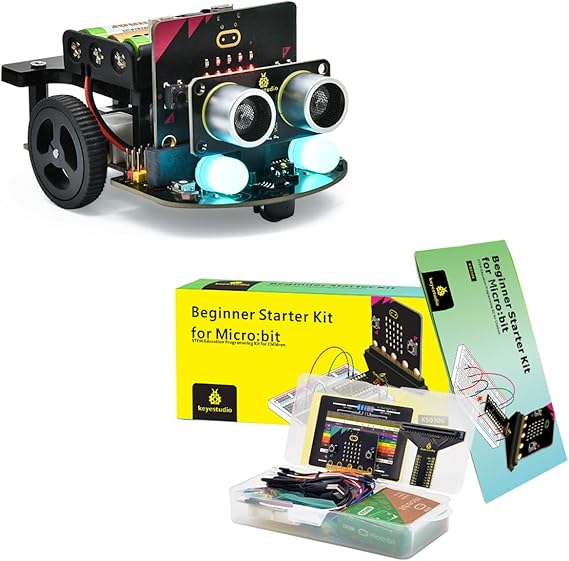
KEYESTUDIO Microbit Basic Starter Kit Microbit V2 Robot Kit
JPY 13344
Price Details
Excluding Shipping & Custom charges ( Shipping and custom charges will be calculated on checkout )
*All items will import from アメリカ
QTY:
Ubuyはお客様のセキュリティとプライバシーの保護に努めています。当社の高度な決済セキュリティシステムは、AES(高度暗号化標準)およびSSL(セキュアソケットレイヤー)プロトコルを使用して送信中の情報を暗号化することで機密性を確保しています。お客様の決済情報は第三者の販売者と共有されることはなく、100%安全に保護されています。
This basic starter kit includes everything you need to get started with 18 interesting projects!
Fast
Shipping
Free
Return*
安全な梱包
100%本物
PCI DSS 準拠
ISO 27001 保証
この商品の利点
製品詳細
| Item Weight | 1.2 lbs (540 grams) |
どんな人にお勧めですか?
-
Beginner Programmers
Ideal for those new to coding, offering a hands-on approach to learning programming concepts with Microbit.
-
STEM Educators
Great for teachers looking to provide interactive learning experiences in electronics and programming for students.
-
Hobbyist Makers
Perfect for DIY enthusiasts interested in building simple robotics and electronic projects using microcontrollers.
-
Advanced Developers
Experienced programmers may find the kit too basic for advanced robotics or programming challenges.
-
Professional Robotics
This kit is not suitable for professionals seeking high-end robotics solutions or complex functionalities.
-
Budget-Conscious Users
Individuals looking for affordable options may find this kit pricier compared to other basic robotic kits available.
製品説明書
KEYESTUDIO Microbit Basic Starter Kit Microbit V2 Robot Kit
顧客の質問と回答
-
質問:
What is included in the KEYESTUDIO Microbit Basic Starter Kit?
答え: The KEYESTUDIO Microbit Basic Starter Kit includes essential components such as the Microbit V2 board, various sensors, LED lights, and cables for connecting components. This kit is designed to provide everything you need to start experimenting with coding and hardware integration. Additionally, it offers an array of tutorial resources and project guides to help beginners engage with microcontroller programming effectively. For educational settings, this versatility makes the kit ideal for projects ranging from simple LED displays to more complex robotics applications. -
質問:
How do I set up the Microbit V2 from the KEYESTUDIO kit?
答え: Setting up the Microbit V2 from the KEYESTUDIO kit involves connecting the Microbit board to your computer via USB, and then downloading the necessary coding software like MakeCode. From there, you can choose from a variety of sample projects or create your custom programs. The included instructions and project resources guide you through the setup process step by step. This setup is particularly beneficial for educators, as it allows for hands-on learning experiences in coding and electronics. -
質問:
Can I use the Microbit V2 in other programming languages?
答え: Yes, the Microbit V2 supports several programming languages, including JavaScript, Python, and Blocks through platforms like MakeCode. This versatility allows users to choose the language they're most comfortable with or to gradually learn new programming skills. For instance, students who start with block coding can eventually progress to Python or JavaScript as they become more confident in their coding abilities. This flexibility makes the kit suitable for a wide range of educational purposes. -
質問:
What types of projects can I create with the KEYESTUDIO Microbit Kit?
答え: The KEYESTUDIO Microbit Kit enables a variety of projects such as creating smart toys, interactive games, and even simple robotics. Users can program the Microbit to respond to sensors or incorporate it into wearables that react to environmental changes. It's particularly popular in educational settings for teaching STEM concepts, where students can bring their creations to life through hands-on activities. The array of components encourages creativity and innovation in project development. -
質問:
Is the KEYESTUDIO Microbit Kit suitable for beginners?
答え: Absolutely! The KEYESTUDIO Microbit Kit is specifically designed with beginners in mind. It includes comprehensive instructional materials that break down the principles of coding and electronics into digestible lessons. Beginners can easily follow along with the included projects or tutorials, making it an excellent entry point into the world of programming and robotics. Whether for classroom use or at-home learning, this kit makes it accessible for anyone starting their tech journey. -
質問:
What age group is the KEYESTUDIO Microbit Kit intended for?
答え: The KEYESTUDIO Microbit Kit is generally targeted toward children aged 8 and up, making it suitable for both students and young learners. The kit's simplicity allows younger users to grasp complex concepts with proper guidance, while older students can use it for more advanced projects. This flexibility allows educators to use it in diverse age groups and skill levels, facilitating collaborative learning experiences in classrooms or workshops. -
質問:
Can I connect the Microbit to other devices?
答え: Yes, the Microbit V2 can connect to various devices and external modules through its built-in Bluetooth or GPIO pins. This capability allows users to expand their projects significantly, integrating additional sensors or even linking other devices for complex communication. For example, you can connect the Microbit to smartphones or tablets for applications that require mobile interaction, enhancing the overall project functionality. -
質問:
What educational benefits does the KEYESTUDIO Microbit Kit offer?
答え: The KEYESTUDIO Microbit Kit offers numerous educational benefits, including enhanced logical reasoning, problem-solving skills, and creativity. By engaging students in hands-on coding and electronics projects, the kit promotes active learning where students can apply theoretical concepts practically. These skills are highly beneficial in today’s technology-driven world, equipping learners with the fundamental knowledge they need for future studies or careers in STEM fields. -
質問:
How does the Microbit V2 differ from previous versions?
答え: The Microbit V2 includes several enhancements over its predecessors, including improved audio capabilities with a built-in speaker, additional memory, and a more sensitive accelerometer. These advancements allow for more complex and interactive projects, offering users a more enriched experience. For instance, the audio output can be used in developing musical applications or sound-based games, expanding the creative possibilities for users of all levels. -
質問:
Where can I buy the KEYESTUDIO Microbit Basic Starter Kit in Japan?
答え: You can buy the KEYESTUDIO Microbit Basic Starter Kit from Ubuy in Japan. Ubuy provides a reliable platform and ensures you get the original product with all the included components. It's convenient for users looking to start their coding journey with this comprehensive kit, as Ubuy offers excellent customer service and a seamless shopping experience for such innovative electronics.
KEYESTUDIO Single Board Computers Editorial Review
お客様のレビュー&評価
-
5 星
100%
-
4 星
0%
-
3 星
0%
-
2 星
0%
-
1 星
0%
この商品のレビュー
お考えをお聞かせください
長所
- Great for beginners
- Includes comprehensive guides
- Fun and engaging projects
- Boosts coding skills
- Compatible with Microbit V2
短所
- Some components may require careful handling.
Product Price History
重要な情報
- 注意:国際運送の商品に関して、製造会社保障は無効になる可能性、アフターサービスは受けれない可能性、取説や安全情報は発送先の言語になっていない可能性ある。商品とその付属品は配送先の国の規格、仕様、ラベル表示法などに適応していない可能性があります。また、配送先の国の電力企画に適応しいない(アダプタや変換器を必要とする)可能性があります。ご注文の商品は配送先の国に輸入することは合法なのかを確認するのは購入者の責任になります。Ubuyからご購入の際、受け取り者は正式な輸入者となり、配送先の全ての法律やルールに遵守する必要があります。
- Ubuyはグローバル検索エンジンのためリストにある全ての商品が購入できないことがあります。商品は輸出規制、貿易規制があります。
JPY 13344
今すぐ注文すると 頃に届きます 土曜日, 6月 27
This item is not restrict in my country.(Please click on above link if this item is not restrict in your country, So our team will review and allow.)
QTY:
Ubuyはお客様のセキュリティとプライバシーの保護に努めています。当社の高度な決済セキュリティシステムは、AES(高度暗号化標準)およびSSL(セキュアソケットレイヤー)プロトコルを使用して送信中の情報を暗号化することで機密性を確保しています。お客様の決済情報は第三者の販売者と共有されることはなく、100%安全に保護されています。
特徴と利点
- Includes microbit v2.2 board and essential components.
- Detailed tutorials and step-by-step guidance available.
- Great colored booklet to inspire beginners.
- Projects cover robot movement, light, sound, and obstacle detection.
- Perfect for learning about remote control and app integration.
- Almost everything you need is included in the kit.