- ホームページ /
- 電子機器 /
- Computer Accessories /
- Computer Components /
- Single Board Computers /
- DFRobot Basic Electronics Starter Kit for Beg...
DFRobot Basic Electronics Starter Kit for Beginners - with UNO R3 Board, Compatible with Arduino IDE, 83 Labeled Components & 12 Step-by-Step
JPY 2983
Price Details
Excluding Shipping & Custom charges ( Shipping and custom charges will be calculated on checkout )
*All items will import from アメリカ
Ubuyはお客様のセキュリティとプライバシーの保護に努めています。当社の高度な決済セキュリティシステムは、AES(高度暗号化標準)およびSSL(セキュアソケットレイヤー)プロトコルを使用して送信中の情報を暗号化することで機密性を確保しています。お客様の決済情報は第三者の販売者と共有されることはなく、100%安全に保護されています。
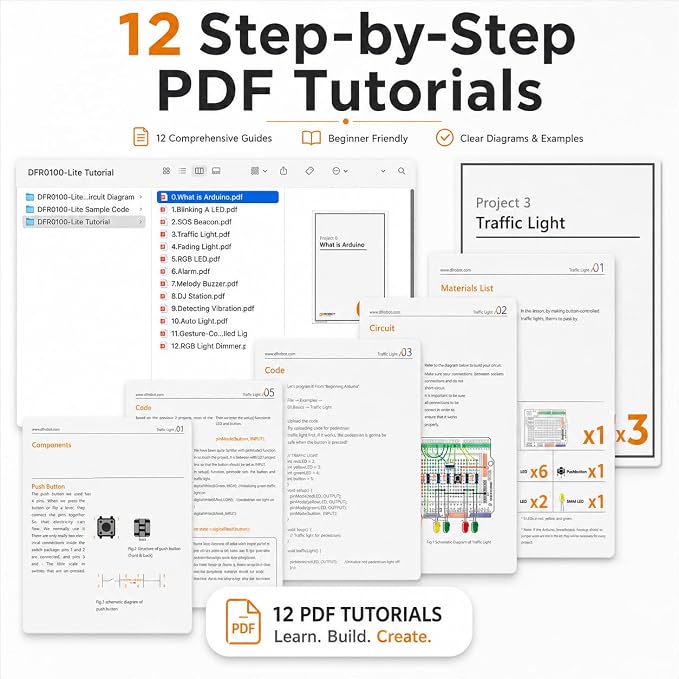
With easy-to-follow tutorials and step-by-step instructions, this Arduino UNO starter kit can make 12 fun projects.
Fast
Shipping
Free
Return*
安全な梱包
100%本物
PCI DSS 準拠
ISO 27001 保証
この商品の利点
製品詳細
| Item Weight | 1.7 lbs (770 grams) |
どんな人にお勧めですか?
-
Beginners in Electronics
Ideal for novices looking to learn the basics of electronics and programming using Arduino components.
-
Students & Educators
Great for classroom settings where hands-on learning of programming and electronics principles is essential.
-
Hobbyists and Tinkerers
Perfect for hobbyists interested in building electronic projects and improving their coding skills creatively.
-
Advanced Programmers
Experienced users may find the components and instructions too basic for their advanced projects and ideas.
-
Specialized Projects
Not suitable for users needing specific components for unique or specialized electronic projects beyond the kit’s offerings.
-
Professional Developers
Professionals seeking robust, commercial-quality components may find the kit lacking in durability and performance features.
製品説明書
DFRobot Basic Electronics Starter Kit for Beginners - with UNO R3 Board, Compatible with Arduino IDE, 83 Labeled Components & 12 Step-by-Step Tutorials - Frustration-Free for College STEM
顧客の質問と回答
-
質問:
What is included in the DFRobot Beginner-Friendly Starter Kit for Arduino?
答え: The DFRobot Beginner-Friendly Starter Kit comes with a comprehensive set of components including an Arduino Uno R3 board, a breadboard, jumper wires, labeled electronic components, and a user-friendly guide. This kit is designed to provide all the essential tools needed for beginners to start experimenting with electronics and programming. The labeled components make it easier for learners to understand connections and functionalities. Use this kit to build various Arduino projects, from simple LED circuits to more complex sensor applications. -
質問:
How can I learn electronics with the DFRobot Starter Kit?
答え: Using the DFRobot Starter Kit, learners can engage in hands-on projects that teach basic electronics principles. The included guide features step-by-step tutorials that allow users to create engaging projects while developing their coding and electronic skills. Each project progressively builds upon previous concepts, ensuring a thorough understanding of both hardware and software. Practical examples include blinking LEDs, motor control, and sensor integration, which prepare you for more advanced projects in the future. -
質問:
Is the DFRobot Starter Kit suitable for children?
答え: Yes, the DFRobot Beginner-Friendly Starter Kit is designed for users of all ages, including children. The labeled components facilitate an intuitive learning experience, making it easier for young learners to grasp electronic concepts. The kit encourages creativity and problem-solving skills through hands-on experimentation. It's an ideal introductory tool to engage young minds in STEM education, sparking interest in electronics and programming fields. -
質問:
Can I use the DFRobot Starter Kit for advanced projects?
答え: Absolutely! While the DFRobot Starter Kit is perfect for beginners, it also offers the foundational skills needed for more advanced projects. As you become comfortable with the basic concepts, you can expand your projects by incorporating additional sensors, actuators, or even connecting it to the internet. This adaptability makes it an excellent long-term investment for anyone interested in evolving their electronics and programming knowledge over time. -
質問:
What programming language is used with the DFRobot Starter Kit?
答え: The DFRobot Starter Kit uses the Arduino programming language, which is based on C/C++. This language is particularly user-friendly, making it accessible for beginners while remaining robust enough for advanced users. The Arduino Integrated Development Environment (IDE) provides a straightforward interface for writing and uploading code. This opens up endless possibilities for programming projects and teaches valuable coding practices that can apply to other programming languages. -
質問:
Are there online resources or communities for DFRobot Starter Kit users?
答え: Yes, there are numerous online resources and communities available for DFRobot Starter Kit users. Websites such as GitHub, Arduino forums, and DFRobot's own community platform feature tutorials, project ideas, and invaluable user insights. Participating in these communities not only provides additional learning resources but also facilitates collaboration and support with fellow electronics enthusiasts. Engaging with others can enhance your learning journey and inspire new project ideas. -
質問:
What type of projects can I make with the DFRobot Starter Kit?
答え: The DFRobot Starter Kit allows you to create a variety of engaging projects. Examples include simple LED displays, temperature sensors, sound-activated switches, and motor controls. As you progress, you can implement more complex applications such as robotics, automated systems, and interactive displays. The versatility of the components included in the kit fosters creativity and experimentation, which enriches your learning experience and project outcomes. -
質問:
Is a computer required to use the DFRobot Starter Kit?
答え: Yes, a computer is required to program the Arduino Uno R3 board included in the DFRobot Starter Kit. The Arduino IDE must be installed on your computer to write and upload code to the board. This connection allows you to experiment with different sketches (programs) and project designs. A computer is essential for creating more complex projects, enabling you to leverage the full capabilities of the Arduino platform. -
質問:
What age group is recommended for the DFRobot Beginner-Friendly Starter Kit?
答え: The DFRobot Beginner-Friendly Starter Kit is recommended for individuals aged 10 and up. It’s designed to cater to beginners, making it suitable for students, hobbyists, and anyone interested in getting started with electronics and programming. The kit's instructional resources are crafted to foster learning, ensuring that users can successfully navigate through projects. It’s an excellent option for schools and educational programs to introduce young learners to STEM subjects. -
質問:
Where can I buy the DFRobot Beginner-Friendly Starter Kit for Arduino in Japan?
答え: You can purchase the DFRobot Beginner-Friendly Starter Kit for Arduino at Ubuy in Japan. Ubuy offers a convenient platform for sourcing this kit, along with detailed product descriptions and customer reviews. Shopping at Ubuy ensures that you have access to reliable products and options for delivery directly to your location. Explore Ubuy for your purchasing needs to embark on your electronics journey.
DFROBOT Single Board Computers Editorial Review
The UNO R3 Starter Kit has garnered positive reviews from customers, highlighting its suitability for both beginners and experienced hobbyists in the world of Arduino projects. Reviewers appreciate the comprehensive nature of the kit, which includes all essential components necessary for completing 12 different projects. The well-organized contents, with clearly labeled parts, make the learning process accessible and enjoyable for newcomers to electronics and programming. Customers have remarked on the kit's affordability, noting that it provides excellent value without overwhelming users with unnecessary components. This focused approach is seen as a significant advantage, particularly for beginners who might find other kits with excessive options daunting. The clear instructions and user-friendly Arduino IDE compatibility contribute to a smooth learning experience, facilitating hands-on engagement with the technology. The kit is equipped with the indispensable Arduino Uno R3 board and various basic components like pots, resistors, LEDs, and sensors, making it ideal for foundational projects. Users have especially liked the inclusion of high-quality tutorials, although some mentioned that certain resources link to additional components not included in the kit, such as temperature sensors or LCD modules, leaving them wanting more for complex projects. Overall, the UNO R3 Starter Kit is celebrated as a reliable introduction to electronics, fostering creativity and STEM learning while being engaging for students and hobbyists alike. **
お客様のレビュー&評価
-
5 星
100%
-
4 星
0%
-
3 星
0%
-
2 星
0%
-
1 星
0%
この商品のレビュー
お考えをお聞かせください
長所
- Comprehensive kit with essential components for beginners
- Components are well-labeled for ease of use
- Excellent value for money
- Clear instructions and high-quality tutorials available
- Ideal for a variety of foundational projects
短所
- Lacks advanced components like temperature and humidity sensors
Product Price History
重要な情報
- 注意:国際運送の商品に関して、製造会社保障は無効になる可能性、アフターサービスは受けれない可能性、取説や安全情報は発送先の言語になっていない可能性ある。商品とその付属品は配送先の国の規格、仕様、ラベル表示法などに適応していない可能性があります。また、配送先の国の電力企画に適応しいない(アダプタや変換器を必要とする)可能性があります。ご注文の商品は配送先の国に輸入することは合法なのかを確認するのは購入者の責任になります。Ubuyからご購入の際、受け取り者は正式な輸入者となり、配送先の全ての法律やルールに遵守する必要があります。
- Ubuyはグローバル検索エンジンのためリストにある全ての商品が購入できないことがあります。商品は輸出規制、貿易規制があります。
JPY 2983
今すぐ注文すると 頃に届きます Monday, 7月 06
This item is not restrict in my country.(Please click on above link if this item is not restrict in your country, So our team will review and allow.)
QTY:
Ubuyはお客様のセキュリティとプライバシーの保護に努めています。当社の高度な決済セキュリティシステムは、AES(高度暗号化標準)およびSSL(セキュアソケットレイヤー)プロトコルを使用して送信中の情報を暗号化することで機密性を確保しています。お客様の決済情報は第三者の販売者と共有されることはなく、100%安全に保護されています。
特徴と利点
- Ideal for beginners eager to learn electronics and programming.
- Fully compatible with Arduino UNO R3 and Arduino IDE.
- Includes easy-to-follow tutorials for 12 fun projects.
- Components are individually packaged with clear labeling.
- No driver installation required for Linux or Mac.
- Quick project setup with prototyping shield and mini breadboard.