- ホームページ /
- 楽器 /
- スタジオレコーディング機器 /
- Computer Recording Equipment /
- Software /
- Music Creation & Sequencing /
- Digital Performer 11 Audio Workstation Softwa...
Digital Performer 11 Audio Workstation Software boxed full version
JPY 100047
Price Details
Excluding Shipping & Custom charges ( Shipping and custom charges will be calculated on checkout )
*All items will import from アメリカ
Ubuyはお客様のセキュリティとプライバシーの保護に努めています。当社の高度な決済セキュリティシステムは、AES(高度暗号化標準)およびSSL(セキュアソケットレイヤー)プロトコルを使用して送信中の情報を暗号化することで機密性を確保しています。お客様の決済情報は第三者の販売者と共有されることはなく、100%安全に保護されています。
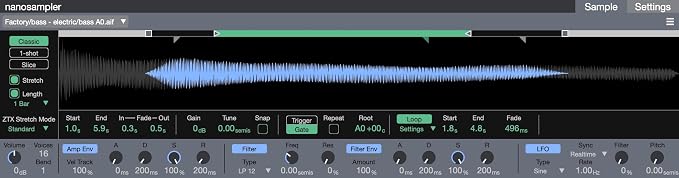
Drop in a sample and start stretching, slicing, randomizing and transforming audio into just about any sound or instrument you can imagine.
Fast
Shipping
Free
Return*
安全な梱包
100%本物
PCI DSS 準拠
ISO 27001 保証
この商品の利点
製品詳細
| Item Weight | 1.5 lbs (680 grams) |
どんな人にお勧めですか?
-
Professional Musicians
Ideal for musicians seeking advanced features for recording, mixing, and producing high-quality audio tracks efficiently.
-
Sound Engineers
Excellent choice for sound engineers who need an intuitive platform for detailed audio editing and mastering processes.
-
Creative Composers
Perfect for composers creating film scores or complex arrangements, offering robust MIDI capabilities and virtual instrument support.
-
Beginner Users
Not ideal for beginners due to its complexity; simpler software may be more user-friendly for newcomers to music production.
-
Casual Music Makers
Casual users looking for easy recording solutions may find this software over-complicated and feature-heavy for basic tasks.
-
Budget-Constrained Users
Not suitable for users on a tight budget as it carries a higher price tag compared to basic entry-level software.
製品説明書
Digital Performer 11 Audio Workstation Software boxed full version
顧客の質問と回答
-
質問:
What are the key features of Digital Performer 11?
答え: Digital Performer 11 boasts a myriad of features including enhanced MIDI editing, an updated audio engine, and a multitude of virtual instruments. Its intuitive interface allows for seamless workflow, enabling musicians and producers to compose, edit, and mix audio and MIDI tracks effectively. For instance, the new Plugins Manager simplifies the management of third-party effects and instruments, making it easier to tailor your project’s sound. -
質問:
Is Digital Performer 11 compatible with Windows and Mac?
答え: Yes, Digital Performer 11 is fully compatible with both Windows and Mac operating systems. This cross-platform functionality allows users to work seamlessly across different devices, maintaining project integrity. If you're collaborating with others who use different systems, Digital Performer ensures that you can share and work on projects without compatibility issues. -
質問:
Can I use Digital Performer 11 for live performances?
答え: Absolutely! Digital Performer 11 is equipped with features specifically designed for live performance settings. The software includes a robust chunk system that allows you to create set lists and trigger sections of your music on-the-fly. Musicians often rely on this so they can adapt their performances in real time, enhancing spontaneity and audience engagement. -
質問:
What types of music can I create with Digital Performer 11?
答え: With Digital Performer 11, you can create a wide variety of music genres ranging from classical compositions to modern electronic tracks. Its advanced MIDI capabilities and extensive library of virtual instruments cater to composers and producers of all styles. For example, if you're producing a film score, its orchestration tools can seamlessly handle complex arrangements alongside electronic music production. -
質問:
Does Digital Performer 11 support VST and AU plugins?
答え: Yes, Digital Performer 11 supports both VST and AU plugin formats. This flexibility enables you to incorporate a vast array of third-party instruments and effects, enhancing your creative possibilities. Whether you're adding unique synths to your tracks or employing specific audio effects, this compatibility is essential for sound designers and music producers looking to customize their toolkit. -
質問:
What updates have been made in Digital Performer 11 compared to previous versions?
答え: Digital Performer 11 includes significant upgrades such as an improved audio engine, enhanced graphic interface, and standout features like the new Chunks system. Updates make navigation and editing more intuitive, catering to the needs of modern musicians. These enhancements streamline workflows for both complex studio projects and straightforward recording sessions. -
質問:
Can I collaborate with others using Digital Performer 11?
答え: Yes, collaboration is made easy with Digital Performer 11 through the use of its cloud sharing capabilities. You can share project files and receive input from collaborators no matter their location. This is particularly beneficial for songwriters and producers who thrive on feedback, allowing for quicker iterations and faster completion of projects. -
質問:
Is there a learning curve for new users of Digital Performer 11?
答え: While Digital Performer 11 offers an extensive range of features which may seem daunting, users can quickly get acquainted with its user-friendly interface. There are ample tutorials and resources available online, making it easier for beginners to start creating music. New users, especially those with some experience in other DAWs, will likely find the transition smoother than expected. -
質問:
Where can I find support for Digital Performer 11?
答え: Support for Digital Performer 11 is readily available through the official website, where you can find user manuals, video tutorials, and community forums. Additionally, many independent forums and YouTube channels offer tips and troubleshooting advice. Engaging with the user community can also be a valuable resource for specific queries. -
質問:
Where can I buy Digital Performer 11 Audio Workstation Software boxed full version in Japan?
答え: You can purchase the Digital Performer 11 Audio Workstation Software boxed full version from Ubuy in Japan. Ubuy offers a reliable platform to find Digital Performer along with various other software and products, ensuring that you can access this powerful music creation tool with ease.
MOTU Music Creation & Sequencing Editorial Review
お客様のレビュー&評価
-
5 星
100%
-
4 星
0%
-
3 星
0%
-
2 星
0%
-
1 星
0%
この商品のレビュー
お考えをお聞かせください
Product Price History
重要な情報
- 注意:国際運送の商品に関して、製造会社保障は無効になる可能性、アフターサービスは受けれない可能性、取説や安全情報は発送先の言語になっていない可能性ある。商品とその付属品は配送先の国の規格、仕様、ラベル表示法などに適応していない可能性があります。また、配送先の国の電力企画に適応しいない(アダプタや変換器を必要とする)可能性があります。ご注文の商品は配送先の国に輸入することは合法なのかを確認するのは購入者の責任になります。Ubuyからご購入の際、受け取り者は正式な輸入者となり、配送先の全ての法律やルールに遵守する必要があります。
- Ubuyはグローバル検索エンジンのためリストにある全ての商品が購入できないことがあります。商品は輸出規制、貿易規制があります。
JPY 100047
今すぐ注文すると 頃に届きます 土曜日, 7月 04
This item is not restrict in my country.(Please click on above link if this item is not restrict in your country, So our team will review and allow.)
QTY:
Ubuyはお客様のセキュリティとプライバシーの保護に努めています。当社の高度な決済セキュリティシステムは、AES(高度暗号化標準)およびSSL(セキュアソケットレイヤー)プロトコルを使用して送信中の情報を暗号化することで機密性を確保しています。お客様の決済情報は第三者の販売者と共有されることはなく、100%安全に保護されています。
特徴と利点
- Nanosampler 2.0 for creating unique beats, instruments, and sounds
- Over 300 different instruments, 1100 instrument presets, and 500 loops available
- Support for MIDI Polyphonic Expression (MPE) and Articulation Maps
- Drag-and-drop audio and MIDI clips into Clips window for live performance
- 90 real-time audio and MIDI effect plug-ins included
- Articulation Maps feature for full control of orchestral sound libraries