- ホームページ /
- 電子機器 /
- Computer Accessories /
- Computer Accessories & Peripherals /
- Keyboards, Mice & Accessories /
- Mice /
- 3Dconnexion SpaceMouse Wireless - Bluetooth E...
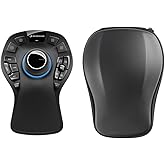
3Dconnexion SpaceMouse Wireless - Bluetooth Edition 3DX-700115
JPY 59380
Price Details
Excluding Shipping & Custom charges ( Shipping and custom charges will be calculated on checkout )
*All items will import from アメリカ
Ubuyはお客様のセキュリティとプライバシーの保護に努めています。当社の高度な決済セキュリティシステムは、AES(高度暗号化標準)およびSSL(セキュアソケットレイヤー)プロトコルを使用して送信中の情報を暗号化することで機密性を確保しています。お客様の決済情報は第三者の販売者と共有されることはなく、100%安全に保護されています。
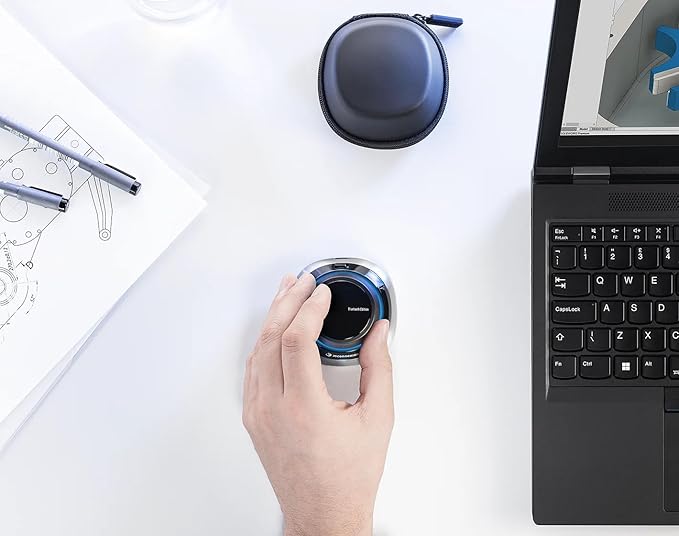
Navigate, sculpt, and design effortlessly with the advanced 3D navigation of the SpaceMouse Wireless, allowing for seamless control in various settings.
Fast
Shipping
Free
Return*
安全な梱包
100%本物
PCI DSS 準拠
ISO 27001 保証
この商品の利点
製品詳細
| Package Weight | 2 Pound |
どんな人にお勧めですか?
-
3D Designers
Ideal for 3D modeling professionals needing precise control in software applications like CAD and Maya.
-
Architects
Perfect for architects who frequently interact with 3D architectural software for efficient navigation and design.
-
Gamers
Beneficial for gamers using 3D environments to enhance movement and control during gameplay.
-
Casual Users
Not suitable for casual users who only need basic mouse functions without 3D navigation capabilities.
-
Budget-Conscious
May not be affordable for users prioritizing budget over specialized features in peripherals.
-
Non-Technical Users
Difficulty in utilizing advanced features likely makes this product unsuitable for non-technical individuals.
製品説明書
3Dconnexion SpaceMouse Wireless - Bluetooth Edition 3DX-700115
顧客の質問と回答
-
質問:
What is the 3Dconnexion SpaceMouse Wireless Bluetooth Edition?
答え: The 3Dconnexion SpaceMouse Wireless Bluetooth Edition is a specialized input device designed for professionals using 3D applications. This device features a 3D control cap that allows users to intuitively navigate through virtual environments with precision. With its wireless Bluetooth connectivity, it provides a seamless experience without the clutter of wires, particularly beneficial for workflows in architecture, engineering, product design, and multimedia editing. -
質問:
How does the SpaceMouse improve my workflow?
答え: The SpaceMouse enhances workflow efficiencies by allowing simultaneous input for navigation and object manipulation, which is especially useful in CAD and 3D modeling tasks. Users can pan, zoom, and rotate models fluidly while simultaneously making modifications using their primary mouse. This ability to interact with 3D models swiftly can significantly boost productivity and reduce time spent on projects. -
質問:
Is the SpaceMouse compatible with my software?
答え: Yes, the 3Dconnexion SpaceMouse Wireless Bluetooth Edition is compatible with a variety of leading 3D applications, including popular software like AutoCAD, Blender, SolidWorks, and 3ds Max. This wide compatibility ensures that it can be integrated into many professional workflows, making it a versatile tool for designers, engineers, and architects alike. It's recommended to check the official 3Dconnexion website for a full list of compatible applications. -
質問:
What benefits does the wireless feature provide?
答え: The wireless functionality of the SpaceMouse allows for a clutter-free workspace, enabling users to move freely without being tethered by cables. This flexibility improves comfort and allows for dynamic movement during design sessions. Additionally, it makes the device portable, fitting into mobile setups for those who work in different locations like workshops, offices, or client meetings. -
質問:
Can I customize the buttons on the SpaceMouse?
答え: Yes, the 3Dconnexion SpaceMouse Wireless Bluetooth Edition comes with customizable buttons that can be programmed to execute specific commands or shortcuts within your software. This customization enhances usability by allowing users to tailor the device to fit their workflow preferences, resulting in quicker access to frequently used tools or commands. -
質問:
What is the battery life of the SpaceMouse?
答え: The SpaceMouse Wireless Bluetooth Edition boasts an impressive battery life, allowing for extensive use between charges. It utilizes efficient power management to maximize the operational time, making it ideal for prolonged sessions in design or engineering tasks. Users can conveniently check battery status and recharge when needed, ensuring minimal interruptions in productivity. -
質問:
How portable is the SpaceMouse Wireless?
答え: The compact design of the SpaceMouse Wireless makes it highly portable, allowing professionals to easily transport it between workspaces or on business trips. Its lightweight structure and included travel case make it convenient for those who frequently move between project sites or prefer working in different environments. This portability is advantageous for artists, engineers, and architects who may work in various locations. -
質問:
What types of users benefit the most from the SpaceMouse?
答え: The 3Dconnexion SpaceMouse Wireless Bluetooth Edition is particularly beneficial for users in design and engineering fields, including architects, product designers, and 3D animators. The device allows these professionals to navigate complex 3D environments more effectively, enhancing their creativity and productivity. Whether drafting architectural models or creating intricate animations, the SpaceMouse provides significant advantages. -
質問:
What can I do with the 3D control cap?
答え: The 3D control cap on the SpaceMouse allows users to smoothly manipulate 3D models with a single hand. With intuitive gestures, users can rotate, pan, or zoom into a model, which greatly simplifies the navigation process. This intuitive control facilitates a more hands-on approach to design, empowering users to refine their projects swiftly and accurately as they envision them. -
質問:
In what scenarios would the SpaceMouse be particularly advantageous?
答え: The SpaceMouse is particularly advantageous in scenarios where precision 3D navigation is crucial. For example, during detailed architectural modeling, users can easily adjust views and angles with fluid movements. Similarly, in product design, engineers can inspect components in 3D space to ensure everything fits together accurately. The focused control of the SpaceMouse enables creative exploration and productivity during complex design tasks. -
質問:
Where can I buy the 3Dconnexion SpaceMouse Wireless Bluetooth Edition in Japan?
答え: You can buy the 3Dconnexion SpaceMouse Wireless Bluetooth Edition in Japan at Ubuy, which offers a great selection of electronic products, ensuring you have access to this essential tool for your 3D design needs.
3Dconnexion Mice Editorial Review
** 3Dconnexion SpaceMouse Wireless Bluetooth Edition** The 3Dconnexion SpaceMouse Wireless Bluetooth Edition has garnered a divided reception among users, particularly regarding its software experience and compatibility, especially for Mac users. While many praise its exceptional hardware and core functionality, the setup process and accompanying software have been substantial barriers to a seamless experience. Users have highlighted the SpaceMouse as an invaluable tool for navigating complex 3D environments in applications such as EPLAN Pro Panel, AutoCAD, and Inventor. Many have expressed that it significantly enhances their precision and manipulation of 3D models, with the 6-degree-of-freedom sensor providing fluid control through intuitive movements. The promise of extensive customization via the 3DxWare®10 software, as well as the device's innovative design, has led to high expectations. However, significant frustration arises from the setup process, mainly for Mac users. Customers report issues with driver installation that require a full system reboot and do not present necessary security permission prompts—an ordeal that has left many puzzled. Poor software performance, including a cumbersome UI and limited functionality without the proprietary USB dongle, negatively impacts overall satisfaction. Users have described the configuration software as unintuitive and poorly designed, complicating what should be a straightforward setup. In summary, while the SpaceMouse Wireless Bluetooth Edition demonstrates impressive hardware capabilities and potential for enhancing workflows in 3D applications, its software inadequacies, particularly on Mac systems, have left many users feeling disappointed and frustrated. **
お客様のレビュー&評価
-
5 星
100%
-
4 星
0%
-
3 星
0%
-
2 星
0%
-
1 星
0%
この商品のレビュー
お考えをお聞かせください
長所
- Excellent hardware quality and 6-degree-of-freedom navigation.
- Smooth control for 3D modeling applications.
- Intuitive physical interactions (push, pull, twist, tilt).
- Customizable buttons and features through software.
- Portable design with a carry case and long battery life.
短所
- Complicated and frustrating setup process, especially on Mac.
Product Price History
重要な情報
- 注意:国際運送の商品に関して、製造会社保障は無効になる可能性、アフターサービスは受けれない可能性、取説や安全情報は発送先の言語になっていない可能性ある。商品とその付属品は配送先の国の規格、仕様、ラベル表示法などに適応していない可能性があります。また、配送先の国の電力企画に適応しいない(アダプタや変換器を必要とする)可能性があります。ご注文の商品は配送先の国に輸入することは合法なのかを確認するのは購入者の責任になります。Ubuyからご購入の際、受け取り者は正式な輸入者となり、配送先の全ての法律やルールに遵守する必要があります。
- Ubuyはグローバル検索エンジンのためリストにある全ての商品が購入できないことがあります。商品は輸出規制、貿易規制があります。
JPY 59380
今すぐ注文すると 頃に届きます Sunday, 7月 19
This item is not restrict in my country.(Please click on above link if this item is not restrict in your country, So our team will review and allow.)
QTY:
Ubuyはお客様のセキュリティとプライバシーの保護に努めています。当社の高度な決済セキュリティシステムは、AES(高度暗号化標準)およびSSL(セキュアソケットレイヤー)プロトコルを使用して送信中の情報を暗号化することで機密性を確保しています。お客様の決済情報は第三者の販売者と共有されることはなく、100%安全に保護されています。
特徴と利点
- Designed for professionals and enthusiasts
- Patented 6-DoF sensor for precise manipulation
- Customizable with programmable side buttons
- Reliable connectivity with wireless technology
- Comes with a carry case for portability
- Suitable for engineers, architects, and 3D creators