- ホームページ /
- アート・クラフト・手芸 /
- ビーズ・アクセサリー作り /
- Engraving Machines & Tools /
- xTool Button Switch for xTool F1 & F1 Ultra & F2 Ultra
0 ratings






商品#:
85042619
xTool Button Switch for xTool F1 & F1 Ultra & F2 Ultra
商品#:
85042619
JPY 6183
価格の詳細
Excluding Shipping & Custom charges ( Shipping and custom charges will be calculated on checkout )
*All items will import from アメリカ
在庫あり
 USA ストアからの輸入品
数量:
在庫は残り10点のみです。
今すぐ注文すると 頃に届きます 土曜日, 8月 22
安全な取引
Ubuyはお客様のセキュリティとプライバシーの保護に努めています。当社の高度な決済セキュリティシステムは、AES(高度暗号化標準)およびSSL(セキュアソケットレイヤー)プロトコルを使用して送信中の情報を暗号化することで機密性を確保しています。お客様の決済情報は第三者の販売者と共有されることはなく、100%安全に保護されています。
最高の物流パートナー


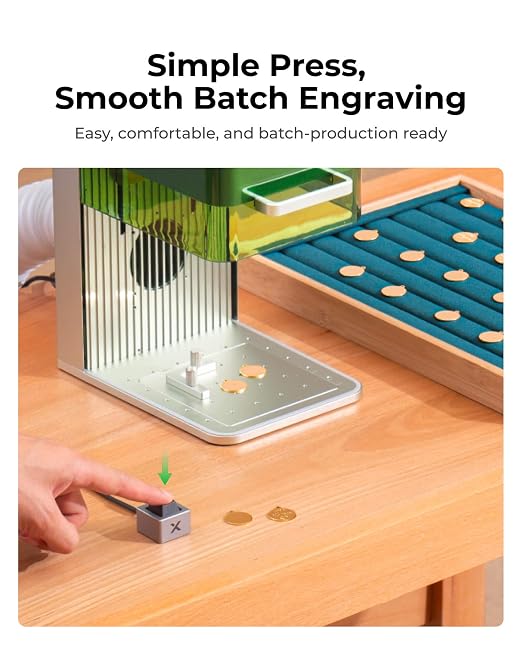
Boost batch engraving efficiency with the F1 Pedal Switch for laser engraver.

Fast
Shipping

Free
Return*

安全な梱包

100%正規品

PCI DSS 準拠

ISO 27001認証取得


この商品の利点
Enhanced Control
The xTool Button Switch offers precise and convenient control for xTool F1 and F1 Ultra laser engravers, improving user workflow and ensuring effortless operation during projects.
Durable Design
Crafted from high-quality materials, the button switch ensures longevity and resistance against wear, making it a reliable companion for frequent laser engraving tasks.
Easy Installation
Simple plug-and-play setup enables users to quickly integrate the button switch into their existing xTool engravers, minimizing downtime and maximizing productivity.
製品詳細
| Operation Mode | Manual |
| Contact Type | Normally Open |
| Connector Type | Screw Terminals |
| Switch Type | Push Button |
| Terminal | Screw |
| Circuit Type | 1-way |
| Mounting Type | Surface Mount |
| Control Method | Push Button |
| Control Type | Single Action |
| Compatible Devices | xTool F1, xTool F1 Ultra, xTool F2 Ultra |
| Number of Items | 1 |
| Material Type | Aluminum |
| Contact Material | Metal |
| Brand Name | xTool |
| Manufacturer | Makeblcok Co.,Ltd |
| Part Number | P5010364 |
| Brand | xTool |
| Material | Aluminum |
| Item Weight | 1 lbs (450 grams) |
どんな人にお勧めですか?

-
Laser Engraving Hobbyists
Ideal for enthusiasts who frequently use xTool laser engravers for personal projects and seek improved operational efficiency.
-
Small Business Owners
Perfect for small businesses involved in laser engraving, enhancing productivity with convenient switch access during operations.
-
DIY Makers
Great for makers and crafters wanting an easy-to-use solution that streamlines the engraving process for creativity.

-
Advanced Users
Not suitable for experienced users seeking complex functionalities or advanced automation features that this switch lacks.
製品説明書
何か質問はありますか? チャットでお問い合わせください
お客様の質問と回答
-
質問:
What is the xTool Button Switch for xTool F1 & F1 Ultra Laser Engraver?
回答: The xTool Button Switch is a specialized accessory designed for the xTool F1 and F1 Ultra Laser Engravers. It serves as a control device that allows users to seamlessly operate their engraving machines with ease. This switch enhances user interaction by providing precise control over start, stop, and other functions, helping to streamline the engraving process for projects. For instance, artists and makers can quickly pause their work for adjustments without needing to access the main control panel. -
質問:
How does the xTool Button Switch enhance my engraving experience?
回答: The xTool Button Switch enhances the engraving experience by offering an intuitive and accessible way to manage your laser engraver. Rather than navigating through software or a digital interface, users can engage directly with the hardware. This is particularly beneficial for complex projects that require frequent adjustments. For example, during detailed carvings, being able to quickly pause or resume operations can lead to improved precision and efficiency. -
質問:
Is the xTool Button Switch compatible with all xTool F1 models?
回答: Yes, the xTool Button Switch is specifically designed to be compatible with all versions of the xTool F1 and F1 Ultra models. This ensures that regardless of the specific F1 engraver you own, you can easily integrate the Button Switch into your setup for enhanced functionality. This compatibility allows users to take full advantage of the switch’s capabilities for various projects, ensuring flexibility and adaptability in your engraving work. -
質問:
What types of projects can I use the xTool Button Switch for?
回答: The xTool Button Switch is ideal for a wide array of engraving projects, including woodworking, metal engraving, and crafting with various materials. Artists, hobbyists, or businesses can benefit from the efficiency it offers, whether they are creating intricate designs, personalizing items, or developing prototypes. For instance, when you are working on a multi-step engraving process, the button switch allows quick interruptions to check alignment or make adjustments without disturbing the workflow. -
質問:
Do I need any special tools to install the xTool Button Switch?
回答: No special tools are required to install the xTool Button Switch; it can be set up easily with the components that come in the package. Basic instructions are provided to guide users through the installation process. This straightforward setup makes it accessible for both amateur and professional engravers, letting them quickly enhance their equipment without extensive technical knowledge. For example, just plug it in and follow the steps to get started immediately. -
質問:
Can I use the xTool Button Switch with software controls?
回答: Absolutely, the xTool Button Switch can be used in conjunction with existing software controls. While it provides a physical means to operate the engraver, it doesn't replace the software; rather, it complements it. This dual approach allows users to benefit from both precise physical adjustments and comprehensive digital settings. For example, artists can use the software for detailed design adjustments while controlling the machine manually with the switch. -
質問:
What features should I look for in the xTool Button Switch?
回答: Key features to look for in the xTool Button Switch include its responsive activation, ergonomic design, and compatibility with various xTool F1 models. These characteristics are vital for ensuring smooth operation during intricate engraving tasks. An ergonomic design, for example, allows users to work longer without discomfort, making it perfect for high-volume projects or extended periods of creation. -
質問:
What safety features does the xTool Button Switch offer?
回答: The xTool Button Switch is designed with safety in mind, often featuring a fail-safe mechanism to prevent accidental activation. This helps to ensure that your engraving operations remain controlled and deliberate. Additionally, the button’s design often prevents accidental presses, allowing users to focus on their projects confidently. For creators working on delicate or detailed pieces, this safety feature can be crucial in avoiding mishaps. -
質問:
What materials is the xTool Button Switch made from?
回答: The xTool Button Switch is crafted from durable materials that are engineered to withstand the rigors of regular use. High-quality plastics and metals are typically used, ensuring longevity and resilience against wear. This choice of materials also contributes to reliable operation, helping users maintain a consistent engraving experience over time. For instance, the robust construction allows users to work in various environments without worrying about the durability of the switch. -
質問:
Where can I buy the xTool Button Switch for xTool F1 & F1 Ultra Laser Engraver in Japan?
回答: You can purchase the xTool Button Switch for the xTool F1 and F1 Ultra Laser Engraver from Ubuy. They offer a reliable platform with a straightforward purchasing process, ensuring you have access to this essential accessory for your engraving needs. Ubuy is known for its customer service and efficient processing, making it a great choice for sourcing xTool products in your region.
xTool Engraving Machines & Tools Editorial Review
The xTool Button Switch for the xTool F1 & F1 Ultra Laser Engraver has garnered a positive reception among users for its functionality and innovative design. Many customers appreciate the simplicity and efficiency this product introduces to their workflow, noting that it allows them to save precious time and multitask more effectively during laser engraving jobs. The convenience of having the start button positioned close to their computer mouse has been highlighted as a significant benefit, particularly for those managing multiple jobs simultaneously. However, while the majority of feedback is favorable, there is a notable sentiment regarding the initial learning curve associated with the product. Users have expressed frustration with the lack of clear written instructions in the supplied documentation, which is primarily visual. Some customers reported almost returning the device due to the difficulty they experienced in connecting it correctly, demonstrating the need for more comprehensive guidance for first-time users. On a positive note, once set up properly, users found the product to be reliable and easy to use. Overall, the xTool Button Switch stands out as a valuable accessory for laser engraver users, particularly in settings where efficiency and ease of use are paramount, such as live events. **
お客様のレビュー&評価
108 カスタマー評価
-
5 星
88%
-
4 星
4%
-
3 星
2%
-
2 星
4%
-
1 星
2%
この商品のレビュー
お考えをお聞かせください
長所
- Saves time and increases efficiency during multi-job tasks.
- Easy to use with a plug-and-play design.
- Convenient placement allows for quick and effective operation.
- Highly beneficial in dynamic environments such as events.
短所
- Lack of clear written instructions may confuse first-time users.
プラットフォームの信頼性とお客様の安心

MA
Mohammad
Verified buyer
“Excellent quality and original too,when ubuy send original things I will appreciate that ,I very satisfied thank you”
23 July 2026 · via Trustpilot
CK
Chitra
Verified buyer
“The order and delivery progress was communicated very well. Package arrived within the estimated time. Products arrived as expected in good condition.”
22-Jul-26 · via Trustpilot
K
kund
Verified buyer
“Good supply of products. Safe payment methods, and shipment worldwide! Genuine products.”
23-Jul-26 · via Trustpilot
OO
Onesi
Verified buyer
“Was my first time buying a product from Ubuy, but I found it so helpful. This is reliable. Gonna place a new order!”
22 July 2026 · via Trustpilot
SJ
SAO JOHN
Verified buyer
“Ubuy is a great online platform to buy stuff. Reliable, fast delivery time and great value for money. I've been using Ubuy online shopping platform for three years now and will continue to do so.”
23 July 2026 · via Trustpilot
安全な決済
国際配送
簡単返品
正規品保証
価格推移
重要な情報
- 注意:国際運送の商品に関して、製造会社保障は無効になる可能性、アフターサービスは受けれない可能性、取説や安全情報は発送先の言語になっていない可能性ある。商品とその付属品は配送先の国の規格、仕様、ラベル表示法などに適応していない可能性があります。また、配送先の国の電力企画に適応しいない(アダプタや変換器を必要とする)可能性があります。ご注文の商品は配送先の国に輸入することは合法なのかを確認するのは購入者の責任になります。Ubuyからご購入の際、受け取り者は正式な輸入者となり、配送先の全ての法律やルールに遵守する必要があります。
- Ubuyはグローバル検索エンジンのためリストにある全ての商品が購入できないことがあります。商品は輸出規制、貿易規制があります。
JPY 6183
今すぐ注文すると 頃に届きます 土曜日, 8月 22
This item is not restrict in my country.(Please click on above link if this item is not restrict in your country, So our team will review and allow.)
数量:
在庫は残り10点のみです。
安全な取引
PCI DSS準拠・ISO 27001:2022認証取得。すべてのご注文に暗号化決済と充実したバイヤープロテクションが適用されます。
最高の物流パートナー
最速の国際配送
特徴と利点
- Work uninterrupted and boost creativity with seamless workflow.
- Hands-free engraving helps prevent hand fatigue during long sessions.
- Focus on creating with flawless high-precision engraving.
- Lightweight aluminum alloy design for durability and aesthetics.
Ubuyの安心保証
100%正規品、PCI DSS準拠の決済セキュリティ、ISO 27001認証のデータ保護、最速の国際配送、無料返品※、安全な梱包をすべてのご注文でお届けします。