- ホームページ /
- おもちゃ、ゲーム /
- Remote & App Controlled Vehicles & Parts /
- Remote & App Controlled Vehicle Parts /
- Servos & Parts /
- Servos /
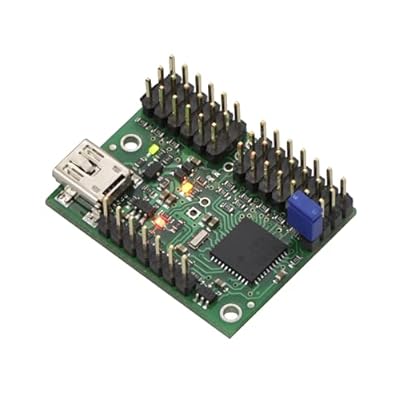
- Mini Maestro 12-Channel USB Servo Controller
0 ratings


商品#:
6437598
Mini Maestro 12-Channel USB Servo Controller
商品#:
6437598
JPY 9860
Price Details
Excluding Shipping & Custom charges ( Shipping and custom charges will be calculated on checkout )
*All items will import from アメリカ
0 ratings
レビューを書く
在庫あり
 USA ストアからの輸入品
今すぐ注文すると 頃に届きます Sunday, 7月 05
安全な取引
Ubuyはお客様のセキュリティとプライバシーの保護に努めています。当社の高度な決済セキュリティシステムは、AES(高度暗号化標準)およびSSL(セキュアソケットレイヤー)プロトコルを使用して送信中の情報を暗号化することで機密性を確保しています。お客様の決済情報は第三者の販売者と共有されることはなく、100%安全に保護されています。
最高の物流パートナー


The 12-channel Mini Maestro 12 raises the performance bar for serial servo controllers with features such as a native USB interface and internal scripting control.

Fast
Shipping

Free
Return*

安全な梱包

100%本物

PCI DSS 準拠

ISO 27001 保証


この商品の利点
12 Channels
Supports up to 12 independent channels, allowing for complex control of multiple servos in various applications, such as robotics and automation.
Internal Scripting
Equipped with internal scripting capabilities, enabling users to program sophisticated behaviors directly on the controller, streamlining setup and enhancing performance.
USB Connectivity
Features easy USB connectivity for seamless integration with computers and other devices, ensuring efficient programming and real-time control without additional adapters.
製品詳細
| Item Weight | 0.3 lbs (140 grams) |
どんな人にお勧めですか?

-
Hobbyist Robotics
Ideal for hobbyists building robots that require control over multiple servos for various movements and functionalities.
-
Educational Projects
Perfect for educators and students learning about robotics, providing hands-on experience with servo control and programming.
-
Custom Automation
Counts for professionals needing to automate tasks by controlling multiple servos effectively with programmable scripts.

-
Beginners
Not suitable for absolute beginners who lack programming knowledge or experience with servo control systems.
-
High-Performance Needs
May not meet the requirements of projects needing high-speed response times or precise servo control beyond basic capabilities.
-
Limited Budget
Those on a tight budget might find more cost-efficient solutions than this controller for basic applications.
製品説明書
Mini Maestro 12-Channel USB Servo Controller
何か質問はありますか? おしゃべりしましょう
顧客の質問と回答
-
質問:
What is the Mini Maestro 12-Channel USB Servo Controller used for?
答え: The Mini Maestro 12-Channel USB Servo Controller is designed for controlling multiple servos or motors in robotics and automation projects. It allows you to generate precise movements and actions based on your programming needs. This device is ideal for hobbyists and professionals alike, as it supports up to 12 servos and can be connected to a computer via USB to facilitate programming and real-time control. Whether you're building a robotic arm, an animatronic character, or any project requiring servo control, the Mini Maestro is a flexible and powerful tool. -
質問:
How many servos can I control with the Mini Maestro?
答え: You can control up to 12 servos with the Mini Maestro 12-Channel USB Servo Controller. This ample capacity allows for the creation of complex movements and coordinated actions without the need for additional controllers. Each channel can be individually configured and programmed to perform precise movements, making it particularly useful for advanced robotics projects or applications where multiple servos must work together seamlessly. -
質問:
Is the Mini Maestro compatible with different programming languages?
答え: Yes, the Mini Maestro is compatible with various programming languages, including Python, C++, and more. This versatility allows users to integrate it into their existing projects regardless of their programming preferences. The included Pololu Maestro Control Center software provides a graphical interface for testing and configuring the servos, while the serial commands enable deeper integration into custom software, making it an excellent choice for hobbyists and developers. -
質問:
What kind of power supply does the Mini Maestro require?
答え: The Mini Maestro 12-Channel USB Servo Controller can be powered by a USB connection or an external power supply. When utilizing multiple servos, it is recommended to use an external power supply to ensure sufficient current is available for all connected servos. This flexibility in power supply options means you can use it in a desktop setup or field applications, accommodating various power requirements depending on your project's scale. -
質問:
Can I use the Mini Maestro for continuous rotation servos?
答え: Absolutely! While the Mini Maestro is great for standard servos, it also supports continuous rotation servos. You can program the controller to send PWM signals suitable for continuous rotation, allowing you to control the speed and direction of your servos accurately. This feature makes the Mini Maestro a versatile option for projects that require mobility, such as robotic vehicles or other dynamic systems. -
質問:
What types of applications can benefit from the Mini Maestro?
答え: The Mini Maestro can be used in a vast range of applications including robotics, automation, animatronics, and more. From robotic arms conducting intricate tasks to simple remote control projects, this servo controller can enhance functionality and creativity. Additionally, it’s suitable for educational purposes in STEM programs, helping students learn about robotics and programming in a hands-on manner. -
質問:
Is there a limit to how long the servos can be connected to the Mini Maestro?
答え: The Mini Maestro does not impose a strict limit on the length of time servos can be connected, but practical considerations apply. Continuous heavy usage might require monitoring for overheating or wear and tear on both the servos and the controller. For projects requiring extended operation, consider implementing a cooling mechanism or duty cycle control to manage heat. This ensures long-lasting and reliable performance in your applications. -
質問:
Does the Mini Maestro support feedback from servos?
答え: The Mini Maestro does not directly support feedback from servos, as it primarily functions as a controller for sending signals. However, you can implement external feedback mechanisms using additional sensors or encoders. By integrating sensors with your servo setup, you can track position and performance, allowing for advanced control tactics in your robotics projects, making the functionality of the Mini Maestro even more powerful. -
質問:
What software is required to program the Mini Maestro?
答え: To program the Mini Maestro, you will need the Pololu Maestro Control Center software. This user-friendly application provides a graphical interface for configuring and controlling the servos, without requiring extensive programming knowledge. For more advanced users, it is possible to use serial commands in custom software or scripts, allowing a tailored programming experience. This flexibility ensures that both beginners and experts can effectively utilize the Mini Maestro. -
質問:
Where can I buy the Mini Maestro 12-Channel USB Servo Controller in Japan?
答え: You can purchase the Mini Maestro 12-Channel USB Servo Controller from Ubuy in Japan. Ubuy provides a reliable platform to find this advanced servo controller, ensuring you have access to quality products tailored for your robotics and automation needs.
Pololu Servos Editorial Review
The Mini Maestro 12-Channel USB Servo Controller is well received by customers and is Considered to be a great product for DIY projects. One customer had difficulty getting it to work at first, but was able to resolve the issue by updating the firmware. Customers praise the documentation and free software that comes with the product. The Maestro is lauded for its ease of use and versatility. Customers have used the Maestro for a range of projects from creating a pinewood derby car sensor to laser pen shooting gallery game.
お客様のレビュー&評価
1 カスタマー評価
-
5 星
0%
-
4 星
100%
-
3 星
0%
-
2 星
0%
-
1 星
0%
この商品のレビュー
お考えをお聞かせください
長所
- Easy to use
- Versatile
- Top-notch documentation and software
- Great for DIY projects
短所
- Does not come with a cord
Product Price History
重要な情報
- 注意:国際運送の商品に関して、製造会社保障は無効になる可能性、アフターサービスは受けれない可能性、取説や安全情報は発送先の言語になっていない可能性ある。商品とその付属品は配送先の国の規格、仕様、ラベル表示法などに適応していない可能性があります。また、配送先の国の電力企画に適応しいない(アダプタや変換器を必要とする)可能性があります。ご注文の商品は配送先の国に輸入することは合法なのかを確認するのは購入者の責任になります。Ubuyからご購入の際、受け取り者は正式な輸入者となり、配送先の全ての法律やルールに遵守する必要があります。
- Ubuyはグローバル検索エンジンのためリストにある全ての商品が購入できないことがあります。商品は輸出規制、貿易規制があります。
JPY 9860
今すぐ注文すると 頃に届きます Sunday, 7月 05
This item is not restrict in my country.(Please click on above link if this item is not restrict in your country, So our team will review and allow.)
QTY:
安全な取引
Ubuyはお客様のセキュリティとプライバシーの保護に努めています。当社の高度な決済セキュリティシステムは、AES(高度暗号化標準)およびSSL(セキュアソケットレイヤー)プロトコルを使用して送信中の情報を暗号化することで機密性を確保しています。お客様の決済情報は第三者の販売者と共有されることはなく、100%安全に保護されています。
最高の物流パートナー
最速の国際配送
特徴と利点
- Highly advanced servo control
- Native USB interface for easy connectivity
- Versatile device with three control methods
- Precise pulse width resolution
- Wide pulse range for flexibility
- Ability to program complex actions