0 ratings

商品#:
3077575
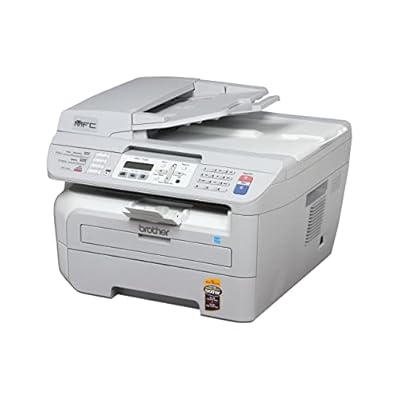
Brother MFC-7340 Flatbed Laser Multi-Function Center
商品#:
3077575
JPY 258936
Price Details
Excluding Shipping & Custom charges ( Shipping and custom charges will be calculated on checkout )
*All items will import from アメリカ
0 ratings
レビューを書く
在庫切れ
 USA ストアからの輸入品
安全な取引
Ubuyはお客様のセキュリティとプライバシーの保護に努めています。当社の高度な決済セキュリティシステムは、AES(高度暗号化標準)およびSSL(セキュアソケットレイヤー)プロトコルを使用して送信中の情報を暗号化することで機密性を確保しています。お客様の決済情報は第三者の販売者と共有されることはなく、100%安全に保護されています。
最高の物流パートナー


Fast
Shipping

Free
Return*

安全な梱包

100%本物

PCI DSS 準拠

ISO 27001 保証


この商品の利点
All-in-One Functionality
Combining printing, scanning, copying, and faxing, the Brother MFC-7340 streamlines office tasks, reducing equipment clutter and saving time, making it perfect for home and small office setups.
High-Quality Printing
With laser technology, this multi-function center delivers sharp monochrome prints at resolutions up to 600x600dpi, ensuring professional-quality documents for any business need.
Cost-Efficient Performance
Using high-yield toner cartridges, the MFC-7340 minimizes printing costs while maximizing output, providing exceptional value for money, ideal for budget-conscious users.
製品詳細
| Item Weight | 24.2 lbs (10.98 kg) |
どんな人にお勧めですか?

-
Small Offices
Ideal for small businesses needing cost-effective printing, scanning, and faxing with reliable laser technology.
-
Home Offices
Great for home-based workers who require efficient multi-function capabilities without occupying significant space.
-
Budget-Conscious Users
Perfect for users looking for a durable device with low running costs and affordable consumables.

-
High Volume Users
Not suitable for businesses requiring large printing volumes as it may not handle heavy usage efficiently.
-
Modern Connectivity Needs
Lacks advanced wireless features and cloud printing options desired by tech-savvy users.
-
Photo Printing
Not ideal for users focused on high-quality color photo printing, as it primarily excels in document printing.
製品説明書
Brother MFC-7340 Flatbed Laser Multi-Function Center
何か質問はありますか? おしゃべりしましょう
顧客の質問と回答
-
質問:
What are the primary functions of the Brother MFC-7340 Flatbed Laser Multi-Function Center?
答え: The Brother MFC-7340 is a versatile all-in-one device that combines printing, scanning, copying, and faxing capabilities. This multi-function center is designed for both home and small office environments, allowing users to manage a variety of tasks seamlessly. You can print high-quality documents up to 2400 x 600 dpi, scan and save documents with clarity, make quick copies, and send faxes with ease, making it a practical solution for multitasking productivity. -
質問:
What type of connectivity does the Brother MFC-7340 support?
答え: The Brother MFC-7340 supports USB connectivity, enabling you to connect it directly to your computer for a straightforward setup and operation. This type of connection is ideal for users who prefer a reliable, wired connection, ensuring fast communication between the device and the computer. Additionally, this machine can be used in a networked environment with multiple users, making it excellent for small offices where multiple devices may need to access the multifunctionality. -
質問:
Is the Brother MFC-7340 compatible with Mac and Windows operating systems?
答え: Yes, the Brother MFC-7340 is compatible with both Mac and Windows operating systems. This compatibility ensures that users can easily integrate this multi-function center into their existing computer setup, whether they're using a PC or a Mac. Just download the appropriate drivers from Brother's website to get started, which allows for straightforward installation and optimal performance across different platforms, catering well to diverse user needs. -
質問:
What is the printing speed of the Brother MFC-7340?
答え: The Brother MFC-7340 boasts a printing speed of up to 23 pages per minute. This efficiency is especially beneficial in busy environments where documents need to be printed quickly to meet deadlines. The fast printing speed helps reduce wait time, allowing users to print larger volumes of documents without significant interruptions, which is ideal for offices that require high productivity. -
質問:
How does the flatbed scanner feature work in Brother MFC-7340?
答え: The flatbed scanner feature of the Brother MFC-7340 allows you to place documents directly on the scanner bed for accurate scanning. This design is particularly useful for scanning books, fragile materials, or documents that cannot be fed through a sheet-fed scanner. You can scan in both color and monochrome, making it versatile for personal and business use, allowing for high-quality image reproduction, whether you need it for archiving or sharing. -
質問:
Can the Brother MFC-7340 print duplex (double-sided) documents?
答え: The Brother MFC-7340 does not have automatic duplex printing capabilities but does allow for manual duplexing. This means you can print pages on both sides of the paper by changing the paper orientation manually after printing on one side. This is helpful for users looking to save paper and reduce costs for larger printing projects, especially in an office setting where sustainability is important. -
質問:
What types of media can the Brother MFC-7340 handle?
答え: The Brother MFC-7340 can handle various media types, including plain paper, envelopes, and labels. This versatility means you can print everything from standard documents to marketing materials, which is essential for small businesses that need to produce different types of printed items. It supports multiple paper sizes, allowing you to achieve professional printing results for all your needs. -
質問:
How can I maintain the Brother MFC-7340 for optimal performance?
答え: To maintain optimal performance of the Brother MFC-7340, you should regularly clean the printer’s interior and exterior to prevent dust build-up. Replace toner cartridges as needed for clear print quality and run printhead cleaning cycles regularly to ensure consistent ink flow. Establishing a regular maintenance routine will help extend the life of the machine, ensuring that it remains efficient and reliable for your needs. -
質問:
What is the capacity of the paper tray in the Brother MFC-7340?
答え: The Brother MFC-7340 features a 250-sheet capacity paper tray, making it efficient for typical office needs. This capacity allows you to print large volumes of documents without frequently needing to refill the tray. It is especially beneficial in environments where high printing demands are common, as it minimizes interruptions and helps maintain productivity throughout your workday. -
質問:
Where can I buy the Brother MFC-7340 Flatbed Laser Multi-Function Center?
答え: You can purchase the Brother MFC-7340 Flatbed Laser Multi-Function Center on Ubuy. This platform provides users in Japan with a reliable source for obtaining authentic Brother products, coupled with a user-friendly buying experience. Ubuy often offers various purchasing options, ensuring that you can find the right model that fits your specific requirements.
Brother Laser Printers Editorial Review
Brother MFC-7340 Flatbed Laser Multi-Function Center The Brother MFC-7340 is a reliable and long-lasting multi-function center that continues to impress customers even ten years after its release. It offers great value for money with its inexpensive ink and regular software updates available online. While the printer does not have wireless capability or the ability to print on 11x17 ledger size paper, it excels in its core functionalities. Printing is efficient and produces high-quality black and white and grayscale prints. The only drawback mentioned by some users is that it occasionally has trouble recognizing paper, but this can be resolved by adding or removing sheets until it grabs paper. The scanning feature offers variable settings and produces accurate results, from black and white to full-color scans. However, higher resolutions may slow down the scan process, potentially due to computer memory limitations. Faxing and copying functionalities work great, providing accurate reproductions. The installation of the software is seamless and customization options are user-friendly. One notable advantage of the Brother MFC-7340 is its high-capacity laser cartridge which lasts long and prints well past the "toner low" message. This makes it more cost-effective compared to inkjet printers. Some users mentioned that they had to replace the drum after five years of use, but overall, the machine is reliable and continues to perform well. In conclusion, despite its age, the Brother MFC-7340 Flatbed Laser Multi-Function Center remains a highly recommended choice for those in need of a durable and functional printer.
お客様のレビュー&評価
1 カスタマー評価
-
5 星
100%
-
4 星
0%
-
3 星
0%
-
2 星
0%
-
1 星
0%
この商品のレビュー
お考えをお聞かせください
長所
- Long-lasting and reliable performance
- Affordable ink
- Regular software updates available online
- Efficient and high-quality printing
- Accurate scanning, with variable settings
- Seamless software installation and customization
- Cost-effective high-capacity laser cartridge
短所
- No wireless capability
Product Price History
重要な情報
- 注意:国際運送の商品に関して、製造会社保障は無効になる可能性、アフターサービスは受けれない可能性、取説や安全情報は発送先の言語になっていない可能性ある。商品とその付属品は配送先の国の規格、仕様、ラベル表示法などに適応していない可能性があります。また、配送先の国の電力企画に適応しいない(アダプタや変換器を必要とする)可能性があります。ご注文の商品は配送先の国に輸入することは合法なのかを確認するのは購入者の責任になります。Ubuyからご購入の際、受け取り者は正式な輸入者となり、配送先の全ての法律やルールに遵守する必要があります。
- Ubuyはグローバル検索エンジンのためリストにある全ての商品が購入できないことがあります。商品は輸出規制、貿易規制があります。
JPY 258936
Currently unavailable.
We don't know when or if this item will be back in stock.
This item is not restrict in my country.(Please click on above link if this item is not restrict in your country, So our team will review and allow.)
安全な取引
Ubuyはお客様のセキュリティとプライバシーの保護に努めています。当社の高度な決済セキュリティシステムは、AES(高度暗号化標準)およびSSL(セキュアソケットレイヤー)プロトコルを使用して送信中の情報を暗号化することで機密性を確保しています。お客様の決済情報は第三者の販売者と共有されることはなく、100%安全に保護されています。
最高の物流パートナー
最速の国際配送