- ホームページ /
- ビデオゲーム /
- PC /
- アクセサリー /
- Controllers /
- Joysticks /
- Zero Delay USB PC Encoder, Game Controller US...
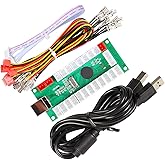
Zero Delay USB PC Encoder, Game Controller USB Encoder Board with Wire and 5 pin Joystick Cable, for PC for MAME for RetropieQM070916 single
JPY 2902
Price Details
Excluding Shipping & Custom charges ( Shipping and custom charges will be calculated on checkout )
*All items will import from アメリカ
QTY:
Ubuyはお客様のセキュリティとプライバシーの保護に努めています。当社の高度な決済セキュリティシステムは、AES(高度暗号化標準)およびSSL(セキュアソケットレイヤー)プロトコルを使用して送信中の情報を暗号化することで機密性を確保しています。お客様の決済情報は第三者の販売者と共有されることはなく、100%安全に保護されています。
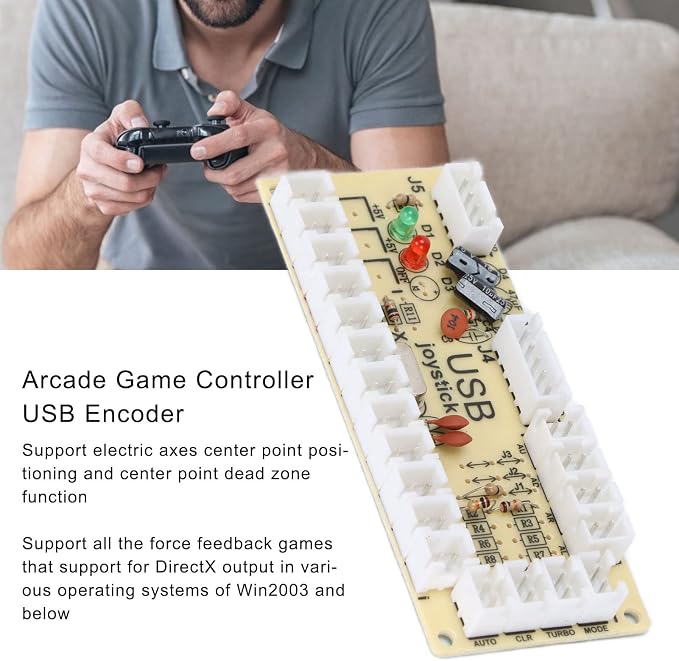
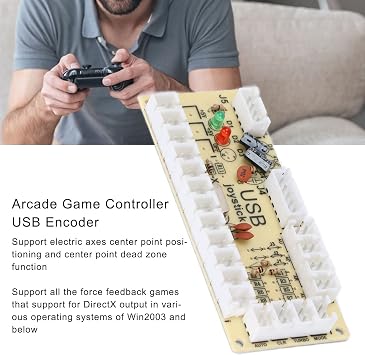
The zero delay USB PC encoder is the most cost effective encoder option, which is easy to install.
Fast
Shipping
Free
Return*
安全な梱包
100%本物
PCI DSS 準拠
ISO 27001 保証
この商品の利点
製品詳細
| Item Weight | 0.5 lbs (230 grams) |
どんな人にお勧めですか?
-
Retro Gamers
Ideal for gamers who enjoy emulators like MAME and Retropie, allowing easy connectivity for arcade controls.
-
DIY Enthusiasts
Suitably designed for hobbyists creating custom arcade machines or controllers, facilitating easier configurations.
-
Budget Builders
Perfect for those on a budget who still want a quality encoder for their gaming setups without overspending.
-
Console Gamers
Not suitable for those focused on console gaming, as it primarily targets PC and arcade setups.
-
Casual Users
May not meet the needs of casual gamers who prefer plug-and-play solutions without technical setup.
-
Non-Technical Users
Not ideal for individuals lacking technical skills, as configuration may require some understanding of arcade setups.
製品説明書
Zero Delay USB PC Encoder, Game Controller USB Encoder Board with Wire and 5 pin Joystick Cable, for PC for MAME for RetropieQM070916 single
顧客の質問と回答
-
質問:
What is the Zero Delay USB PC Encoder used for?
答え: The Zero Delay USB PC Encoder is designed for connecting arcade controls to a PC, making it ideal for retro gaming setups such as MAME and RetroPie. This encoder translates the inputs from buttons and joysticks into signals that your PC can process. It allows users to build their custom arcade systems, enhancing the gaming experience with authentic arcade controls. -
質問:
How does the installation of the Zero Delay USB PC Encoder work?
答え: Installing the Zero Delay USB PC Encoder involves connecting the encoder board to your joystick and buttons using the provided wires. Once wired, simply plug the encoder into a USB port on your PC, and the system will recognize it instantly. This straightforward process is perfect for enthusiasts looking to create a personalized arcade setup with minimal complexity. -
質問:
Can the Zero Delay USB PC Encoder be used with different gaming systems?
答え: Yes, the Zero Delay USB PC Encoder is versatile and compatible with various gaming systems. While it's primarily intended for PCs, it works seamlessly with retro emulators like MAME and RetroPie. This adaptability allows gamers to use their encoder with different setups, offering flexibility for diverse gaming preferences and experiences. -
質問:
What types of joystick and buttons can be used with the Zero Delay USB PC Encoder?
答え: The Zero Delay USB PC Encoder is compatible with most standard arcade joysticks and push buttons. It supports a range of configurations, allowing users to customize their control schemes. Whether you're setting up classic arcade controls or modern button layouts, the encoder can accommodate your specific gaming needs, making it a great choice for DIY enthusiasts. -
質問:
Is any special software required to use the Zero Delay USB PC Encoder?
答え: No special software is required to use the Zero Delay USB PC Encoder. Once connected to your PC, it utilizes standard drivers, allowing easy plug-and-play functionality. This makes it accessible even for those who may not be technically savvy, enabling a smooth setup for gaming right out of the box without the need for additional installations. -
質問:
What are the benefits of using the Zero Delay USB PC Encoder for RetroPie?
答え: Using the Zero Delay USB PC Encoder with RetroPie enhances the gaming experience by allowing players to utilize actual arcade controls, which can improve accuracy and enjoyment. This setup is particularly beneficial for classic arcade games, where authentic joystick movements and button presses can significantly affect gameplay. It creates a more immersive environment for retro game enthusiasts. -
質問:
How many buttons can I connect to the Zero Delay USB PC Encoder?
答え: The Zero Delay USB PC Encoder typically supports up to 12 button inputs and 1 joystick, which is suitable for most arcade-style games. This ample input capacity allows users to create a console that mimics traditional arcade settings, accommodating a variety of gaming styles and preferences. It's an excellent option for building personalized setups or multi-game cabinets. -
質問:
Does the Zero Delay USB PC Encoder have an option for LED buttons?
答え: Yes, the Zero Delay USB PC Encoder can support LED buttons, depending on your wiring and setup. Many gamers pair this encoder with illuminated buttons to enhance visual aesthetics and functionality during gameplay. Incorporating LEDs not only serves a decorative purpose but can also provide useful feedback, indicating which buttons are active. -
質問:
Is the Zero Delay USB PC Encoder suitable for arcade cabinet builds?
答え: Absolutely! The Zero Delay USB PC Encoder is an excellent choice for anyone looking to build their arcade cabinet. Its compact design allows for easy integration into confined spaces, and it can connect directly to both joysticks and buttons, thus simplifying the construction process. This makes it a popular choice among DIY builders seeking a simple yet effective solution for their arcade projects. -
質問:
Where can I buy the Zero Delay USB PC Encoder?
答え: You can purchase the Zero Delay USB PC Encoder from Ubuy in Japan. Ubuy offers a reliable platform for acquiring this encoder, ensuring you receive quality products for your gaming setup. With Ubuy, you can easily find the encoder and accessories needed to enhance your gaming experience.
ASHATA Joysticks Editorial Review
お客様のレビュー&評価
-
5 星
100%
-
4 星
0%
-
3 星
0%
-
2 星
0%
-
1 星
0%
この商品のレビュー
お考えをお聞かせください
Product Price History
重要な情報
- 注意:国際運送の商品に関して、製造会社保障は無効になる可能性、アフターサービスは受けれない可能性、取説や安全情報は発送先の言語になっていない可能性ある。商品とその付属品は配送先の国の規格、仕様、ラベル表示法などに適応していない可能性があります。また、配送先の国の電力企画に適応しいない(アダプタや変換器を必要とする)可能性があります。ご注文の商品は配送先の国に輸入することは合法なのかを確認するのは購入者の責任になります。Ubuyからご購入の際、受け取り者は正式な輸入者となり、配送先の全ての法律やルールに遵守する必要があります。
- Ubuyはグローバル検索エンジンのためリストにある全ての商品が購入できないことがあります。商品は輸出規制、貿易規制があります。
JPY 2902
今すぐ注文すると 頃に届きます 金曜日, 7月 03
This item is not restrict in my country.(Please click on above link if this item is not restrict in your country, So our team will review and allow.)
QTY:
Ubuyはお客様のセキュリティとプライバシーの保護に努めています。当社の高度な決済セキュリティシステムは、AES(高度暗号化標準)およびSSL(セキュアソケットレイヤー)プロトコルを使用して送信中の情報を暗号化することで機密性を確保しています。お客様の決済情報は第三者の販売者と共有されることはなく、100%安全に保護されています。
特徴と利点
- Plug and play design with no driver required.
- Perfect for building custom game machines.
- Supports various game device formats, including digital and analog modes.
- Compatible with all Windows systems and Retropie projects.
- Features turbo and auto mode functionalities.
- Cost-effective solution for DIY game console enthusiasts.