- ホームページ /
- 家電・カメラ /
- パソコンアクセサリー /
- Computer Accessories & Peripherals /
- Keyboards, Mice & Accessories /
- Mice /
- Logitech Lift for Mac Vertical Ergonomic Wire...
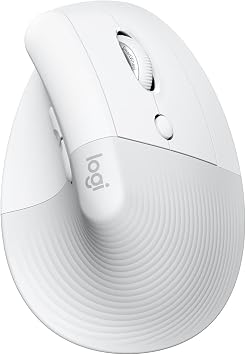
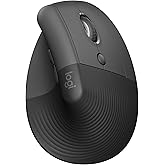
Logitech Lift for Mac Vertical Ergonomic Wireless Mouse - Off White
回答者の86%がこの商品を友人に勧めたいと回答
JPY 14734
価格の詳細
配送料と関税を除く ( 配送料と関税は購入手続き時に計算されます )
*すべての商品はアメリカから輸入されます
12%
Ubuyはお客様のセキュリティとプライバシーの保護に努めています。当社の高度な決済セキュリティシステムは、AES(高度暗号化標準)およびSSL(セキュアソケットレイヤー)プロトコルを使用して送信中の情報を暗号化することで機密性を確保しています。お客様の決済情報は第三者の販売者と共有されることはなく、100%安全に保護されています。
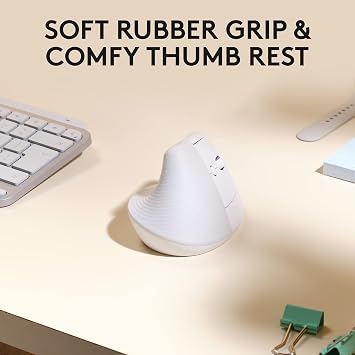
Lift for Mac is an ergonomic wireless vertical mouse crafted for all-day comfort - a great fit for small to medium hands.
Fast
Shipping
Free
Return*
安全な梱包
100%正規品
PCI DSS 準拠
ISO 27001認証取得

この商品の利点
製品詳細
| Connectivity Technology | Bluetooth |
| Additional Features | Ergonomic Design |
| Movement Detection | Optical |
| Button Quantity | 4 |
| Hand Orientation | Right |
| Compatible Devices | Personal Computer |
| Operating System | macOS, iPadOS |
| Battery Average Life | 24 months |
| Number of Batteries | 1 Lithium Polymer batteries required. (included) |
| Hardware Platform | Mac |
| Power Source | Battery Powered |
| Mouse Maximum Sensitivity | 4000 dots_per_inch (10160 cm) |
| Minimum Required Operating System Version | Mac OS 10.15 Catalina |
| Range | 10.0 meters |
| Item Dimensions L x W | 4.25"L x 2.8"W (10.8 cm) |
| Unit Count | 1 Count |
| Brand | Logitech |
| Model Name | Lift for Mac |
| Antenna Location | Office |
| Model Number | 910-006471 |
| Included Components | 1x AA battery |
| Manufacturer | Logitech |
| UPC | 097855171016 |
| Mfr Part Number | 910-006471 |
| Color | Off White |
| Style Name | Mouse |
| Enclosure Material | Plastic |
| Special Feature | Ergonomic Design |
| Movement Detection Technology | Optical |
| Package Weight | 1.0000 Pound |
内容物
1x AA battery
どんな人にお勧めですか?
-
Ergonomic Enthusiasts
Users focused on comfort and ergonomic design will appreciate this vertical mouse to alleviate wrist strain.
-
Quiet Environments
Ideal for quiet offices or shared spaces where noise reduction is essential, due to silent clicks and smooth scrolling.
-
Mac Users
Designed specifically for MacOS/iPadOS, it integrates seamlessly with Mac devices for enhanced productivity and user experience.
-
Gamers
This mouse may lack the rapid response and features desired by gamers, which are critical in competitive environments.
製品説明書
お客様の質問と回答
-
質問:
What makes the Logitech Wave Keys for Mac an ergonomic choice?
回答: The Logitech Wave Keys for Mac is designed with ergonomics in mind, featuring a wave-shaped keyframe that encourages a natural hand position for comfortable typing. This design helps reduce wrist strain and fatigue, making it ideal for long working hours. Additionally, the cushioned palm rest offers added support, further enhancing the typing experience. Users who spend a lot of time on their devices, whether for work, gaming, or content creation, will find this keyboard a beneficial addition to their setup. -
質問:
How does the Bluetooth connectivity work on the Logitech Wave Keys?
回答: The Logitech Wave Keys utilize Bluetooth technology for wireless connectivity, allowing you to easily connect it to your Mac without cluttering your workspace with cables. This keyboard supports multiple Bluetooth devices and can switch between them seamlessly, which is perfect for those who use more than one device regularly. For example, if you are working on your MacBook and want to quickly switch to your iPad, the Easy-Switch feature facilitates this transition smoothly. -
質問:
Is the Logitech Wave Keys compatible with other devices besides Mac?
回答: While the Logitech Wave Keys for Mac is optimized for macOS, it also offers compatibility with other Bluetooth-enabled devices. This means you can use it with a variety of devices like tablets and smartphones. However, function keys may have limited functionality on non-Mac devices. For users who have a mixed ecosystem, the keyboard's versatility makes it a practical choice, enabling you to type comfortably across multiple platforms. -
質問:
What kind of typing experience can I expect from the Logitech Wave Keys?
回答: Users can expect a comfortable and natural typing experience with the Logitech Wave Keys, thanks to its low-profile keys designed for responsive feedback. The wave-shaped keyframe enhances typing posture, making it suitable for both casual and professional use. People who frequently type reports, emails, or even long essays will appreciate the reduced finger fatigue over extended typing sessions compared to standard flat keyboards. -
質問:
Does the Logitech Wave Keys come with a palm rest?
回答: Yes, the Logitech Wave Keys for Mac features a cushioned palm rest specifically designed to provide comfort during extended typing sessions. The palm rest supports your wrists, encouraging a neutral positioning that minimizes strain and enhances comfort. For users who often find themselves typing for hours on end, this feature adds significant value to the overall typing experience. -
質問:
How do I set up the Logitech Wave Keys for Mac?
回答: Setting up the Logitech Wave Keys for Mac is straightforward. Turn the keyboard on, then activate Bluetooth on your Mac. From the Bluetooth settings, select the Wave Keys to establish a connection. The entire process typically takes a few minutes. This user-friendly setup allows for quick connectivity, ensuring you can start enjoying your new keyboard without hassle. -
質問:
What features does the Easy-Switch functionality offer?
回答: The Easy-Switch feature on the Logitech Wave Keys allows users to connect and switch between up to three Bluetooth devices effortlessly. This is especially useful for those who may use multiple devices simultaneously, such as a MacBook, tablet, and smartphone. With just a simple key press, you can switch your typing focus from one device to another, making multitasking seamless and efficient. -
質問:
Is the Logitech Wave Keys good for gaming?
回答: While the Logitech Wave Keys for Mac is primarily designed for typing comfort and productivity, casual gaming is certainly feasible. The keyboard's responsive keys can handle quick inputs, although it may not feature the mechanical feel that dedicated gaming keyboards offer. Gamers looking for a comfortable typing experience that can accommodate occasional gameplay will find this keyboard suitable. -
質問:
How long does the battery last on the Logitech Wave Keys?
回答: The Logitech Wave Keys is designed with power efficiency in mind, providing long-lasting battery life that can span months with standard use. The keyboard features power-saving modes, helping to extend the battery further. Users who want a reliable keyboard without constant battery replacements will appreciate these efficient features, making it low-maintenance. -
質問:
Where can I buy Logitech Wave Keys for Mac?
回答: You can purchase the Logitech Wave Keys for Mac from Ubuy, a trusted online retailer that offers a wide range of Logitech products. Ubuy often provides various purchasing options, making it a convenient choice for acquiring your ergonomic keyboard while enjoying reliable service and support.
お客様のレビュー&評価
-
5 星
74%
-
4 星
10%
-
3 星
8%
-
2 星
4%
-
1 星
4%
この商品のレビュー
お考えをお聞かせください
長所
- Excellent build quality
- User-friendly design
- Great performance
- Stylish appearance
- Highly rated by users
短所
- A bit heavier than expected.
プラットフォームの信頼性とお客様の安心
“Excellent quality and original too,when ubuy send original things I will appreciate that ,I very satisfied thank you”
“The order and delivery progress was communicated very well. Package arrived within the estimated time. Products arrived as expected in good condition.”
“Good supply of products. Safe payment methods, and shipment worldwide! Genuine products.”
“Was my first time buying a product from Ubuy, but I found it so helpful. This is reliable. Gonna place a new order!”
“Ubuy is a great online platform to buy stuff. Reliable, fast delivery time and great value for money. I've been using Ubuy online shopping platform for three years now and will continue to do so.”
価格推移
重要な情報
- 注意:国際運送の商品に関して、製造会社保障は無効になる可能性、アフターサービスは受けれない可能性、取説や安全情報は発送先の言語になっていない可能性ある。商品とその付属品は配送先の国の規格、仕様、ラベル表示法などに適応していない可能性があります。また、配送先の国の電力企画に適応しいない(アダプタや変換器を必要とする)可能性があります。ご注文の商品は配送先の国に輸入することは合法なのかを確認するのは購入者の責任になります。Ubuyからご購入の際、受け取り者は正式な輸入者となり、配送先の全ての法律やルールに遵守する必要があります。
- Ubuyはグローバル検索エンジンのためリストにある全ての商品が購入できないことがあります。商品は輸出規制、貿易規制があります。
JPY 14734
今すぐ注文すると 頃に届きます 木曜日, 9月 10
This item is not restrict in my country.(Please click on above link if this item is not restrict in your country, So our team will review and allow.)
数量:
PCI DSS準拠・ISO 27001:2022認証取得。すべてのご注文に暗号化決済と充実したバイヤープロテクションが適用されます。
特徴と利点
- Ergonomic design specifically for small to medium hands.
- Unique 57-degree angle for wrist relief and comfortable posture.
- Whisper-quiet clicks and silent SmartWheel for seamless scrolling.
- Four customizable buttons for enhanced productivity.
- Compatible with macOS and iPadOS, easy Bluetooth connection.
- Long-lasting battery life of up to 2 years on a single AA battery.
Ubuyの安心保証
100%正規品、PCI DSS準拠の決済セキュリティ、ISO 27001認証のデータ保護、最速の国際配送、無料返品※、安全な梱包をすべてのご注文でお届けします。