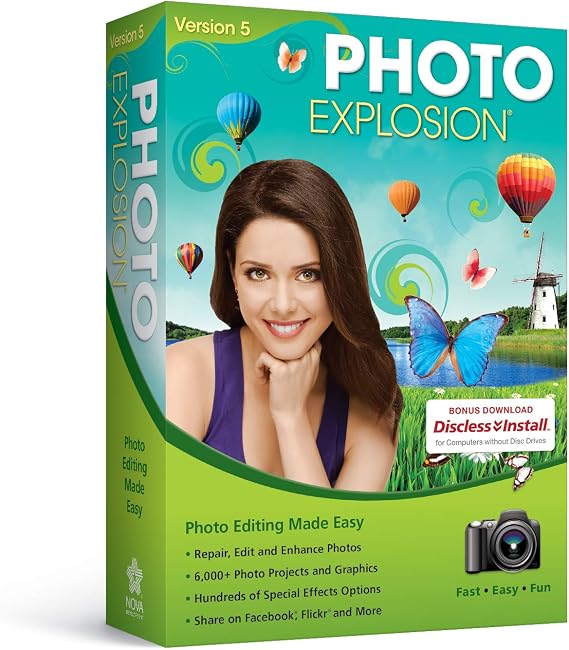
Photo Explosion 5.0
回答者の65%がこの商品を友人に勧めたいと回答
JPY 6362
価格の詳細
配送料と関税を除く ( 配送料と関税は購入手続き時に計算されます )
*すべての商品はアメリカから輸入されます
Ubuyはお客様のセキュリティとプライバシーの保護に努めています。当社の高度な決済セキュリティシステムは、AES(高度暗号化標準)およびSSL(セキュアソケットレイヤー)プロトコルを使用して送信中の情報を暗号化することで機密性を確保しています。お客様の決済情報は第三者の販売者と共有されることはなく、100%安全に保護されています。
Photo Explosion 5 makes creating with digital photography easier than ever with a brand new user interface and improved workflow for editing, archiving and sharing digital photographs.
Fast
Shipping
Free
Return*
安全な梱包
100%正規品
PCI DSS 準拠
ISO 27001認証取得

この商品の利点
製品詳細
- Millions of creative combinations with advanced color manipulation and special effects
- Add backgrounds, frames, props, balloons, and more
- Get started quickly with a video tutorial
- Retouch portraits easily with new tools for removing red-eye, wrinkles, and other flaws
- Powerful drawing tools enhanced for better functionality
- Create stunning photos with unparalleled painting tools
| Product Dimensions | 1.63 x 5.25 x 7.5 inches (4.1 x 13.3 x 19.1 cm); 3.84 ounces (108.86 grams) |
| Our Recommended age | 5 - 20 years |
| Item model number | 41325 |
| Date First Available | September 27, 2012 |
| Manufacturer | Nova Development US |
| Country of Origin | This item will be imported from US |
| What is in the box | Photo Explosion 5.0... For more details, please check description/product details |
どんな人にお勧めですか?
-
Casual Photographers
Ideal for users who want to edit and enhance personal photos without advanced technical skills. User-friendly interface.
-
Memory Keepers
Great for creating scrapbook projects and photo memories. Offers various templates for personalized keepsakes.
-
Social Media Users
Perfect for users wanting to create eye-catching graphics and collages to share on social media platforms.
-
Professional Editors
Not suitable for professionals requiring advanced editing tools and features that high-end software offers.
製品説明書
Photo Explosion 5.0
About This Item
Are you looking for a powerful and user-friendly software to revolutionize your photo editing experience? Look no further than Photo Explosion 5.0! This cutting-edge software has everything you need to bring your photos to life and take your creativity to new heights. With Photo Explosion 5.0, you can unleash your imagination with easy-to-use editing tools and stunning special effects. Let your photos shine with enhanced color and clarity, perfect blemish removal, and advanced retouching features. Whether you are a professional photographer or a hobbyist, this software will exceed your expectations. Downloading and installing Photo Explosion 5.0 is a breeze.
Simply visit our website and get ready to explore a world of endless possibilities. The user-friendly interface makes navigating through the software a breeze, allowing you to focus on what matters most - your photos. Windows 10 and Mac compatibility ensures that no matter what operating system you're using, Photo Explosion 5.0 will seamlessly integrate into your workflow. Upgrade your current software to version 5.0 and embrace the power of enhanced performance and expanded capabilities. Not sure where to start? No worries! Photo Explosion 5.0 offers comprehensive tutorials and support to help you make the most of every feature.
From basic edits to advanced techniques, we've got you covered. Our team of experts is always here to answer any questions and provide assistance when needed. Priced competitively, Photo Explosion 5.0 offers incredible value for the price. Don't break the bank for professional-grade software when you can get everything you need with Photo Explosion 5.0.
Plus, with free video tutorials, you'll be a pro in no time. Don't miss out on the opportunity to own this revolutionary photo editing software. Order your copy of Photo Explosion 5.0 today and bring your photos to life like never before. Unleash your creativity and capture breathtaking moments with ease.
Get ready to be amazed!.
お客様の質問と回答
-
質問:
What features does Photo Explosion 5.0 offer for photo editing?
回答: Photo Explosion 5.0 provides a comprehensive suite of photo editing tools including advanced retouching features, creative effects, and customizable templates. Users can enhance their images through filters, text overlays, and frames, ensuring a professional touch. Beyond basic editing, the software allows for detailed color adjustments and advanced layer management, making it ideal for both novice and experienced users. Whether you’re creating a scrapbook or preparing images for social media, Photo Explosion 5.0 equips you with tools to produce stunning visual content. -
質問:
Can I use Photo Explosion 5.0 for graphic design projects?
回答: Yes, Photo Explosion 5.0 is versatile enough to be utilized for graphic design projects. It features tools that allow users to create invitations, posters, and other graphic materials seamlessly. With a library of templates and design elements, users can easily drag and drop components into their projects. This makes it a great resource for individuals or businesses looking to create promotional graphics or personalized designs without needing advanced design skills. -
質問:
What types of files can I import and export with Photo Explosion 5.0?
回答: Photo Explosion 5.0 supports a variety of file formats for both import and export, including JPEG, PNG, BMP, and TIFF. This flexibility ensures that users can work with their preferred formats easily. Whether you're starting with photos from a digital camera or wanting to export a finished project for printing or online sharing, the software accommodates numerous formats to meet diverse user needs. This flexibility is especially beneficial for those who frequently share content across different platforms or require specific formats for printing. -
質問:
Is Photo Explosion 5.0 user-friendly for beginners?
回答: Absolutely! Photo Explosion 5.0 is designed with an intuitive interface that caters to users of all skill levels, making it particularly friendly for beginners. The software includes guided tutorials and clear navigation, helping new users familiarize themselves with its capabilities without feeling overwhelmed. For instance, someone new to photo editing can easily learn to enhance their images or create artistic projects by following step-by-step instructions, allowing them to unlock their creativity while gaining confidence in their editing skills. -
質問:
Can Photo Explosion 5.0 be used for creating photo albums and collages?
回答: Yes, one of the standout features of Photo Explosion 5.0 is its ability to create stunning photo albums and collages. Users can select from a variety of pre-designed layouts and easily drag and drop their photos into these templates. This feature is particularly useful for events like weddings, birthdays, or family gatherings, where one might want to encapsulate memories in a visually appealing format. By offering customization options, users can ensure that their albums reflect their unique style and storytelling. -
質問:
Does Photo Explosion 5.0 support printing directly from the software?
回答: Yes, Photo Explosion 5.0 supports direct printing from the software, allowing users to produce physical copies of their edited photos without needing to export them separately. This function simplifies the workflow, as users can edit their images and print them in one go. For example, someone creating a last-minute gift, such as a framed photo or a printed card, can seamlessly transition from editing to printing, making it a convenient solution for personal and professional needs. -
質問:
What are the system requirements for Photo Explosion 5.0?
回答: Photo Explosion 5.0 requires a compatible Windows operating system, ideally Windows 7 or later, along with a minimum of 2GB RAM and sufficient hard drive space to accommodate the software and user files. Having a modern processor and graphics card can also enhance performance, especially when editing high-resolution images. By ensuring your system meets these requirements, users can enjoy a smooth and efficient editing experience, allowing them to focus on creativity rather than technical issues. -
質問:
Can I find tutorials for Photo Explosion 5.0 online?
回答: Yes, there are numerous online resources and tutorials available for Photo Explosion 5.0. Users can find video tutorials, forums, and blogs that provide tips and techniques specific to this software. This wealth of information is incredibly valuable for both beginners and seasoned users looking to refine their skills. Engaging with these tutorials allows users to discover advanced features and creative ways to utilize the software effectively, enhancing their overall experience and output. -
質問:
Can I customize the interface of Photo Explosion 5.0?
回答: Photo Explosion 5.0 offers a customizable interface that allows users to tailor their workspace to suit their preferences. Users can adjust toolbars, icons, and layouts to enhance their workflow. This flexibility is particularly beneficial for those who use specific tools frequently, as they can streamline their editing process. For instance, a user focused on collage-making might prefer to have all relevant tools readily accessible, allowing for a more efficient creative experience. -
質問:
Where can I buy Photo Explosion 5.0 in Japan?
回答: You can purchase Photo Explosion 5.0 from Ubuy in Japan. Ubuy is a trusted online retailer that offers a wide selection of software products, including Photo Explosion 5.0. Shoppers can enjoy the convenience of browsing through product specifications and selecting the ideal version for their needs, making Ubuy a reliable choice for your software purchases.
Nova Development US Lifestyle & Hobbies 41325 Editorial Review
Photo Explosion 5.0, designed for ages 5 to 20, is a photo editing software that claims to work with Windows 10, yet many users report issues with its functionality, as it often freezes and lacks the features present in its older versions. Customers have expressed disappointment in the complexity of the interface, finding it hard to navigate, especially with the unstable performance which leads to crashes after making adjustments. Although it organizes photos reasonably well, expectations for a simpler experience and rich features are not met, indicating a need for improvement in the overall design and usability of the software.
お客様のレビュー&評価
-
5 星
100%
-
4 星
0%
-
3 星
0%
-
2 星
0%
-
1 星
0%
この商品のレビュー
お考えをお聞かせください
長所
- Compatible with Windows 10 for basic users
- Lightweight and easy to install
- Provides basic photo organization features
- User-friendly for younger audiences
- Compact design for easy handling
プラットフォームの信頼性とお客様の安心
“Excellent quality and original too,when ubuy send original things I will appreciate that ,I very satisfied thank you”
“The order and delivery progress was communicated very well. Package arrived within the estimated time. Products arrived as expected in good condition.”
“Good supply of products. Safe payment methods, and shipment worldwide! Genuine products.”
“Was my first time buying a product from Ubuy, but I found it so helpful. This is reliable. Gonna place a new order!”
“Ubuy is a great online platform to buy stuff. Reliable, fast delivery time and great value for money. I've been using Ubuy online shopping platform for three years now and will continue to do so.”
価格推移
重要な情報
- 注意:国際運送の商品に関して、製造会社保障は無効になる可能性、アフターサービスは受けれない可能性、取説や安全情報は発送先の言語になっていない可能性ある。商品とその付属品は配送先の国の規格、仕様、ラベル表示法などに適応していない可能性があります。また、配送先の国の電力企画に適応しいない(アダプタや変換器を必要とする)可能性があります。ご注文の商品は配送先の国に輸入することは合法なのかを確認するのは購入者の責任になります。Ubuyからご購入の際、受け取り者は正式な輸入者となり、配送先の全ての法律やルールに遵守する必要があります。
- Ubuyはグローバル検索エンジンのためリストにある全ての商品が購入できないことがあります。商品は輸出規制、貿易規制があります。
JPY 6362
今すぐ注文すると 頃に届きます 木曜日, 9月 03
This item is not restrict in my country.(Please click on above link if this item is not restrict in your country, So our team will review and allow.)
数量:
PCI DSS準拠・ISO 27001:2022認証取得。すべてのご注文に暗号化決済と充実したバイヤープロテクションが適用されます。
特徴と利点
- First software to deliver powerful editing features, special effects, and professional-quality photo projects in one program.
- Packed with more than 100 exciting new features and over 6,000 photo projects and graphics.
- Upload photos, slideshows, and video projects to popular social networking websites.
- Organize photos into on-screen albums with easy drag and drop interface.
- Compatible with all types of digital cameras and offers multimedia file browser/viewer.
- Includes editing features such as straighten, crop, adjust brightness, and remove red-eye for perfect portraits.
- Apply artistic effects like sepia, watercolor, cubism, monochrome, and blur backgrounds.
Ubuyの安心保証
100%正規品、PCI DSS準拠の決済セキュリティ、ISO 27001認証のデータ保護、最速の国際配送、無料返品※、安全な梱包をすべてのご注文でお届けします。




