- ホームページ /
- オフィス製品 /
- オフィス電子装置 /
- その他のオフィス機器 /
- Label Makers /
- Phomemo Label Maker,M220 Label Printer,3 Inch...
0 ratings






商品#:
222897131
Phomemo Label Maker,M220 Label Printer,3 Inch Bluetooth Thermal Label Maker Machine with 7900+ Icons,1900+ Templates,550+ Fonts,for Kids School
商品#:
222897131
JPY 9762
Price Details
Excluding Shipping & Custom charges ( Shipping and custom charges will be calculated on checkout )
*All items will import from アメリカ
29%
在庫あり
 USA ストアからの輸入品
QTY:
今すぐ注文すると 頃に届きます 木曜日, 6月 25
Secured transaction
Ubuy works hard to protect your security and privacy. Our advanced payment security system ensures confidentiality by encrypting your information during transmission using AES (Advanced Encryption Standards) and SSL (Secure Socket Layer) protocols. Your payment details are 100% secure as we do not share your payment details with third party sellers.
最高の物流パートナー


A handy multifunctional, versatile and compact device, it connects well with Bluetooth and the app making it easy to print labels using thermal technology.

Fast
Shipping

Free
Return*

Secure Packaging

100%本物

PCI DSS 準拠

ISO 27001 保証


この商品の利点
Bluetooth Connectivity
Easily connect to smartphones and PCs via Bluetooth for seamless printing of labels, barcodes, and addresses, enhancing convenience and efficiency in your labeling tasks.
Portable Design
Compact and lightweight, the Phomemo M220 can be taken anywhere, making it perfect for on-the-go labeling needs without sacrificing functionality or print quality.
User-Friendly Interface
Designed for effortless operation, it features intuitive controls that simplify the labeling process, making it suitable for all users, from beginners to professionals.
製品詳細
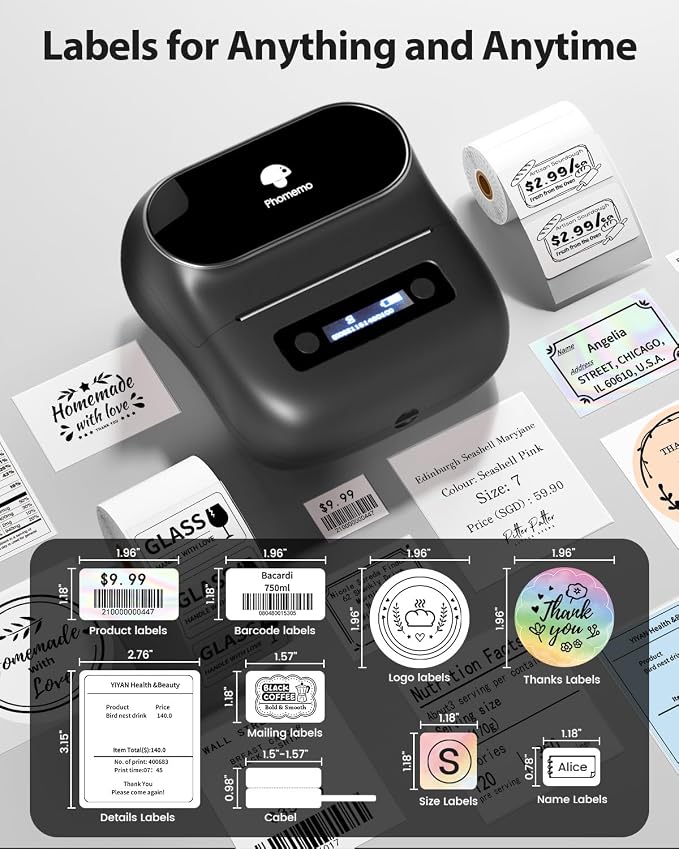
- Compact Design :This portable thermal label marker has smooth lines and stylish appearance. with half light weight than traditional label maker machince and compact desigh, M220 thermal label printer saves desktop space and is easy to carry, making it ideal for individuals,teachers,and business.The label maker printer works with thermal label width from 0.78'' to 3.14''. Choose Phomemo label printer for Home,organizing clothes,food storage,cosmetics items. For office,organization files,price,reminder tags and other office supplies. For School,remarking for classroom teacher and kids school items, school supplies labeling,personal item identification, name tags.Note: Not work for 4 x 6 label.
- User Friendly & Simple Operation: Phomemo M220 label maker is a popular and classic model of the moment,adopt advanced thermal technology to make sure printing clear, easy to scan and read,built in 2200mAh rechargeable battary,equipped with a powerful app "print master'', allowing create barcode label, text, icon, photo,AI sticker etc. to release your infinite creativity. The thermal printer for fast operation in just three steps :1.Download " print master" from Google Play or App Store 2.Turn on the printer and your Bluetooth 3.Connect the printer via Bluetooth on the App,then enjoy your label trip. All device can't via Bluetooth directly with the label maker,PC connect via USB data cable
- Multiple Creative Function & Templates : The app "print master" for the label maker provides various features and templates, choose from 7900+ icons, 458 borders,1900+ templates and 550+ fonts easy to create various design label stickers from App with Text, QR code, Barcode, Logos, Images, Time and Borders, etc., plus, the app support excel imports, scanning , OCR, and voice recognition, Enjoy convenience, fun, effortless and save time with the label maker machine.
- Design and Create Your Own Labels : The label maker machine with tape is widely used in home, office, store and life. For home organizing, organizing your kitchen, clothes,food stroage, cosmetics items, and mailings. For Store, price tag, barcode, qr code, product name. For office, office organization includes notebook tags, reminder tags, and other office supplies,kids school items and teacher classrom supplies (name labels, study notes, office files), cable and personal item identification, and small business use (jewelry tags, and more); Labeler makers bring you fun and convenience
- Long Lasting - The Phomemo M220 thermal label maker printer, measuring 6.2 x 5.7 x 3.4 inches and weighing only 400g, capable of printing at least 36 rolls of labels continuously. Experience the efficiency and joy that this mini Bluetooth label printer brings to your labeling tasks
- The Label Maker Complete Package - The box includes one Phomemo M220 label maker machine black, an instruction manual, a USB data cable, 100Pcs 40mm x 30mm thermal labels (alreadly put into the label maker). Phomemo M220 label maker machine with tape is suitable as a gift for kids, wife, business partner and more
- Phone and Tablet Start Printing - Step 1: Download the App 'Print Master'. Step 2: Turn on the M220 label maker and your phone's or tablet's Bluetooth. Step 3: Click the 'Printer' icon in the App to search for the M220 portable label printer, connect it via Bluetooth in the App, select the label size, and edit the content to start printing
- Laptop/PC Starts Printing - Step 1: Please check your laptop/PC's operating system (OS) and download and install the correct M220 driver and the 'Labelife' app from the Phomemo website. Step 2: Use the USB data cable to connect the M220 label maker to your computer. Step 3: Select the label size, edit the content, and choose M220 from the printer list
| Printer Type | Thermal |
| Other Special Features of the Product | Phone and tablet connected by Bluetooth, PC connected by USB, Portable, Print without ink,toner, Thermal Printing Directly |
| Printer Output Type | Monochrome |
| Item Weight | 14.11 ounces (400.02 grams) |
| Item Dimensions D x W x H | 3.9"D x 4.33"W x 1.38"H (9.9 x 11 x 3.5 cm) |
| Controller Type | iOS,Android, Ipad OS, Mac OS, Windows10 |
| Print media | Labels |
| Scanner Type | Portable |
| Maximum Copy Speed Black and White | 7 ppm |
| Compatible Devices | Android & iOS Phone / Tablet (Connection Via Bluetooth on The App Not Phone or Tablet Directly), Chrome OS v3 and above laptop /PC (Connection Via USB Not Bluetooth), Linux laptop/PC (Connection Via USB Not Bluetooth), Windows x86 / Windows 7/8/10/11 and above laptop / PC (Connection Via USB Not Bluetooth), macOS 10.14 and above laptop/PC(Connection Via USB Not Bluetooth) |
| Ink Color | Black |
| Additional Printer Functions | Print Only |
| Control Method | App |
| Number of Trays | 1 |
| Resolution | 203 x 203 DPI |
| Color | Black |
| Color Depth | 1 bpp |
| Maximum Print Resolution Black and White | 203 x 203 DPI |
| Wattage | 2200 milliamp_hours |
| Dual-sided printing | No |
| Duplex | Simplex |
| Brand | Phomemo |
| Model Name | Phomemo M220 label maker |
| Model Number | M220 |
| Built-In Media | 1 x 1.57'' x 1.18'' thermal labels, 1 x Phomemo m220 label maker, 1 x USB type-c data cable, 1 x user manual |
| Series Number | 220 |
| Model Series | M220 |
| Specific Uses For Product | General label printing, home organization, office organization,library management, laboratory marking, medical supplies identification, warehouse management, school asset management, document filing system, handicraft identification, supermarket labeling, store labeling, clothing labeling, jewelry labeling, small business labeling |
| Manufacturer | Phomemo |
| B&W Pages per Minute | 70 ppm |
| Maximum Media Size | 3.14 inch (8 cm) |
| Maximum Sheet Capacity | 1 |
| Paper Size | width from 20mm-80mm Millimeters |
| Output sheet capacity | 1 |
| Printer Connectivity Type | Bluetooth, USB-Type-C |
| Hardware Interface | USB Type C |
| Total Usb Ports | 1 |
| Maximum Copy Resolution Black and White | 203 x 203 DPI |
| Connectivity Technology | Bluetooth, USB-Type-C |
| Printing Technology | Thermal |
| Special Feature | Phone and tablet connected by Bluetooth, PC connected by USB, Portable, Print without ink,toner, Thermal Printing Directly See more |
| Printer Output | Monochrome |
| Max Printspeed Monochrome | 70 ppm |
| Product Dimensions (L x W x H) | 3.9"D x 4.33"W x 1.38"H (9.9 x 11 x 3.5 cm) |
What's in the box
1 x Phomemo m220 label maker
1 x 1.57'' x 1.18'' thermal labels
1 x user manual
1 x USB type-c data cable
どんな人にお勧めですか?

-
Small Business Owners
Ideal for entrepreneurs needing quick and efficient labeling solutions for products and shipping.
-
Organizational Enthusiasts
Perfect for individuals who love maintaining a tidy and organized space using labels.
-
Craft and Hobby Users
Great for crafters wanting to personalize their projects with labels for gifts or scrapbooking.

-
Heavy Industrial Use
Not suitable for industries requiring high durability and heavy-duty labeling under tough conditions.
-
Infrequent Users
May not justify the investment for those who label infrequently or only occasionally.
-
Advanced Label Requirements
Users needing complex labeling capabilities might find limitations with this compact thermal printer.
製品説明書
何か質問はありますか? おしゃべりしましょう
顧客の質問と回答
-
質問:
What devices are compatible with the M220 label maker?
答え: The M220 label maker is compatible with Windows 7, 8, 10, 11, macOS 10.14 and above, and ChromeOS. -
質問:
How do I connect the label maker to my smartphone?
答え: Download the Print Master app from the App Store or Google Play, then turn on Bluetooth and connect through the app. -
質問:
What kind of printing technology does the M220 use?
答え: It uses thermal printing technology, which eliminates the need for ink, toner, or ribbon.
Phomemo Label Makers M220 Editorial Review


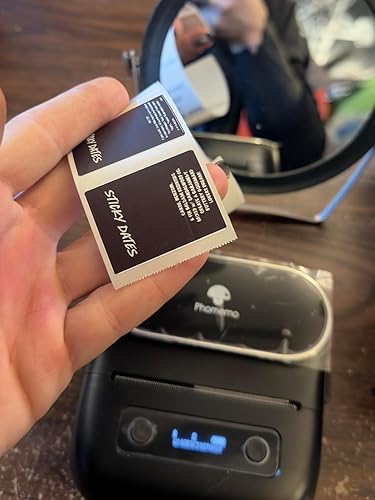


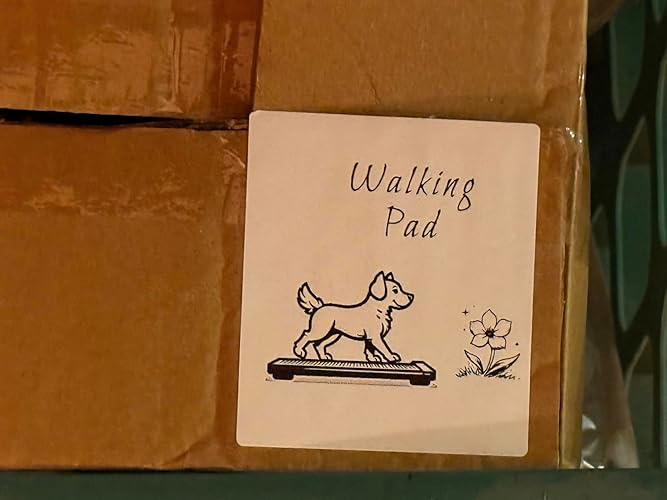
**** The Phomemo M220 Label Maker has garnered a positive reception from users, with multiple reviews highlighting its impressive performance and user-friendly features. Customers have noted the exceptional clarity of the labels, comparable to higher-end models like the MUNBYN 300dpi printer, with the added bonus of printing vibrant TRUE BLACK backgrounds that deliver a striking contrast with white text. This capability has drawn praise from users who struggled to achieve similar results with previous models. The refreshed Print Master app is another aspect that has delighted users, who appreciate its robust features compared to the bare-bones software provided with larger Phomemo printers. The ease of connecting the device to a smartphone is noted as a significant plus, enabling quick setup and immediate usability. Portability and speed are cited as standout features, with one user reporting the machine's capability to produce up to 50 labels in just 15 seconds, a stark contrast to the hours spent hand-labeling in the past. This efficiency makes it an appealing choice for both personal and professional use. Despite the predominantly positive feedback, there are some areas for improvement. A few users expressed a desire for the ability to use flat labels and for the Print Master software to be compatible with PCs, as they find it easier to design labels using a mouse. Nonetheless, the overall sentiment is that the Phomemo M220 offers excellent value for its price, with users looking forward to utilizing it for organization and labeling tasks effectively. **
お客様のレビュー&評価
3454 カスタマー評価
-
5 星
72%
-
4 星
11%
-
3 星
6%
-
2 星
3%
-
1 星
8%
この商品のレビュー
お考えをお聞かせください
長所
- High-quality, clear labeling capable of producing TRUE BLACK backgrounds with white text.
- User-friendly Print Master app with extensive features.
- Quick connectivity to smartphones.
- Fast printing speed (up to 50 labels in 15 seconds).
- Portable and easy to use, making it ideal for home and professional applications.
- No ink required, leading to cost savings.
短所
- Limited to specific label types; some users wish for compatibility with flat labels.
Product Price History
重要な情報
- 注意:国際運送の商品に関して、製造会社保障は無効になる可能性、アフターサービスは受けれない可能性、取説や安全情報は発送先の言語になっていない可能性ある。商品とその付属品は配送先の国の規格、仕様、ラベル表示法などに適応していない可能性があります。また、配送先の国の電力企画に適応しいない(アダプタや変換器を必要とする)可能性があります。ご注文の商品は配送先の国に輸入することは合法なのかを確認するのは購入者の責任になります。Ubuyからご購入の際、受け取り者は正式な輸入者となり、配送先の全ての法律やルールに遵守する必要があります。
- Ubuyはグローバル検索エンジンのためリストにある全ての商品が購入できないことがあります。商品は輸出規制、貿易規制があります。
JPY 9762
今すぐ注文すると 頃に届きます 木曜日, 6月 25
This item is not restrict in my country.(Please click on above link if this item is not restrict in your country, So our team will review and allow.)
QTY:
Secured transaction
Ubuy works hard to protect your security and privacy. Our advanced payment security system ensures confidentiality by encrypting your information during transmission using AES (Advanced Encryption Standards) and SSL (Secure Socket Layer) protocols. Your payment details are 100% secure as we do not share your payment details with third party sellers.
最高の物流パートナー
Fastest cross-border delivery
特徴と利点
- Compact, multifunctional device for easy label printing.
- Utilizes thermal technology—no ink or toner needed.
- Built-in 2200mAh rechargeable battery for convenience.
- High compatibility with multiple operating systems.
- Fast printing with powerful Print Master app and templates.
- Increases productivity by eliminating handwriting labels.