0 ratings





商品#:
39541555
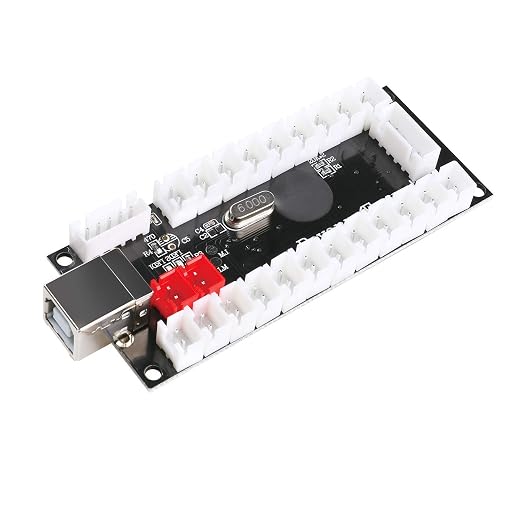
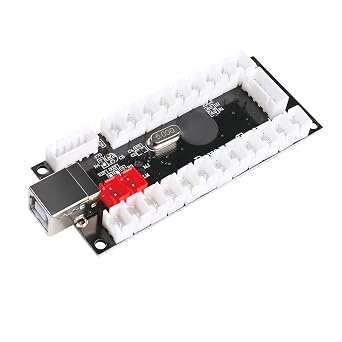
BEYEE Zero Delay Arcade USB Encoder PC to Joystick For MAME & Raspberry Pi Retropie Projects (2Pin+4.8mm)
回答者の86%がこの商品を友人に勧めたいと回答
商品#:
39541555
JPY 3377
価格の詳細
配送料と関税を除く ( 配送料と関税は購入手続き時に計算されます )
*すべての商品はアメリカから輸入されます
在庫あり
 USA ストアからの輸入品
数量:
在庫は残り11点のみです。
今すぐ注文すると 頃に届きます 水曜日, 9月 16
安全な取引
Ubuyはお客様のセキュリティとプライバシーの保護に努めています。当社の高度な決済セキュリティシステムは、AES(高度暗号化標準)およびSSL(セキュアソケットレイヤー)プロトコルを使用して送信中の情報を暗号化することで機密性を確保しています。お客様の決済情報は第三者の販売者と共有されることはなく、100%安全に保護されています。
最高の物流パートナー


The Zero delay USB Pc Encoder is the most cost effective encoder option. Use this encoder set you can easily DIY your own arcade game machine.

Fast
Shipping

Free
Return*

安全な梱包

100%正規品

PCI DSS 準拠

ISO 27001認証取得





この商品の利点
Zero Delay Technology
Experience seamless gameplay with zero lag between your inputs and on-screen actions, enhancing the overall gaming experience for enthusiasts and retro gamers alike.
Universal Compatibility
Designed for MAME and Raspberry Pi projects, this encoder easily integrates with various arcade systems, ensuring versatility for DIY enthusiasts and hobbyists.
Easy Installation
The straightforward plug-and-play design simplifies setup, making it approachable for users of all skill levels to create their custom arcade gaming setup effortlessly.
製品詳細
| Compatible Devices | Windows |
| Controller Type | Joystick |
| Connectivity Technology | USB |
| Additional Features | Zero Delay USB Encoder |
| Button Quantity | 16 |
| Hardware Platform | Windows XP, Windows 98, Windows 2000, Windows Me |
| Power Source | Corded Electric |
| Item Weight | 0.14 kg |
| Package Quantity | 1 |
| Brand Name | BEYEE |
| Model Name | Zero delay USB Pc Encoder |
| Manufacturer | BEYEE |
| UPC | 791328178273 |
| Manufacturer Part Number | GM-0014 |
どんな人にお勧めですか?

-
Retro Gamers
Ideal for retro gamers looking to create custom arcade experiences using MAME or Raspberry Pi systems.
-
DIY Arcade Builders
Perfect for hobbyists constructing their own arcade cabinets, allowing easy connectivity of joysticks and buttons.
-
Technological Enthusiasts
Great for tech enthusiasts who enjoy hands-on projects and customizing their gaming setups with various controllers.

-
Casual Gamers
Not suitable for casual gamers who prefer plug-and-play solutions without technical modifications or setups.
製品説明書
何か質問はありますか? チャットでお問い合わせください
お客様の質問と回答
-
質問:
What is the BEYEE Zero Delay Arcade USB Encoder used for?
回答: The BEYEE Zero Delay Arcade USB Encoder is used to connect arcade joystick and buttons to a PC or gaming console for projects like MAME or Raspberry Pi Retropie. This encoder converts the signals from your arcade components into USB inputs, making it ideal for vintage gaming setups. It is perfect for DIY enthusiasts who want to create custom arcade cabinets or gaming builds, offering a seamless connection for a responsive gaming experience. -
質問:
Is the BEYEE encoder compatible with Mac and Linux?
回答: Yes, the BEYEE Zero Delay Arcade USB Encoder is compatible with Mac and Linux systems, in addition to Windows PCs. Thanks to its basic USB HID profile, this encoder requires no additional drivers, allowing for plug-and-play use across different platforms. This versatility makes it a great choice for users wishing to set up retro gaming systems on multiple operating systems without encountering compatibility issues. -
質問:
How do I set up the BEYEE Zero Delay Arcade USB Encoder?
回答: To set up the BEYEE Zero Delay Arcade USB Encoder, simply connect your joystick and buttons to the encoder's terminals, following the labeling for each input. After this, plug the encoder into a USB port on your PC or Raspberry Pi. Upon connection, the device will automatically be recognized, allowing you to configure controls within your gaming software. This straightforward installation process is ideal for beginners as well as experienced gamers looking to personalize their arcade experience. -
質問:
What types of arcade buttons and joysticks can I use with this encoder?
回答: The BEYEE encoder is compatible with most standard arcade buttons and joysticks, particularly those that use a 2-pin, 4.8mm connection. This ensures versatility in your project, allowing you to select components that suit your gaming setup best. Whether you prefer traditional push buttons or unique joystick types, this encoder supports a wide array of arcade input devices, making it suitable for all types of arcade builds. -
質問:
Can I use multiple encoders for a more extensive arcade setup?
回答: Absolutely! You can connect multiple BEYEE Zero Delay Arcade USB Encoders to a single PC or Raspberry Pi to support a more extensive arcade setup. This is particularly handy for multiplayer arcade gaming, where you can assign different encoders for various players. Simply plug in additional encoders and configure the controls accordingly in your emulator or gaming software for a comprehensive gaming experience tailored to larger groups. -
質問:
What makes the BEYEE encoder a good choice for retro gaming?
回答: The BEYEE Zero Delay Arcade USB Encoder is designed with retro gaming in mind, as it delivers low-latency connections that enhance responsiveness. It allows users to replicate the classic arcade experience, providing the necessary inputs for arcade buttons and joysticks. For anyone looking to build a retro gaming machine or DIY arcade cabinet, this encoder is a reliable choice that captures the nostalgia of arcade gaming while ensuring performance. -
質問:
Does the encoder support turbo functions for buttons?
回答: Yes, the BEYEE Zero Delay Arcade USB Encoder supports turbo functions for buttons. This feature can be beneficial for games that require rapid button presses, allowing you to hold down a button for continuous input. It trains well for fighting games or action-packed titles where speed is essential for gameplay, providing an edge in competitive situations. -
質問:
Is this encoder suitable for programmable features in gaming software?
回答: The BEYEE Zero Delay Arcade USB Encoder allows for programming via gaming software that supports key mapping. This means you can assign some inputs to perform multiple functions or to emulate specific commands. The flexibility in programming makes it fit for various games, providing an enhanced gaming experience tailored to your preferences. -
質問:
Where can I buy the BEYEE Zero Delay Arcade USB Encoder in Japan?
回答: You can purchase the BEYEE Zero Delay Arcade USB Encoder from Ubuy in Japan. Ubuy provides a user-friendly shopping experience and a wide range of electronic products, ensuring you find what you need for your gaming projects. With Ubuy's efficient platform, you can easily explore various options and place your order confidently.
BEYEE Editorial Review
BEYEE Zero Delay Arcade USB Encoder PC to Joystick For MAME & Raspberry Pi Retropie Projects (2Pin+4.8mm) offers seamless compatibility with Windows operating systems and is designed for joystick connections, making it ideal for retro gaming enthusiasts. Users appreciate its 'plug and play' functionality, which allows for easy connection without requiring any coding experience. Its zero delay feature ensures that inputs are registered instantly, enhancing the gaming experience. This encoder can handle up to 16 buttons, allowing for extensive customization in gaming setups. Customers have found it reliable for various applications, including flight simulation controls.
お客様のレビュー&評価
95 カスタマー評価
-
5 星
77%
-
4 星
10%
-
3 星
5%
-
2 星
4%
-
1 星
4%
この商品のレビュー
お考えをお聞かせください
長所
- Easy 'plug and play' setup for all users
- Compatible with multiple Windows versions
- Can support up to 16 buttons
- No coding experience required for setup
- Ideal for MAME and Retropie projects
短所
- Soldering required for some connections may be tedious
プラットフォームの信頼性とお客様の安心

JG
Jazz
Verified buyer
“Easy to use and always helpful and sorts any issues I've had past and present”
1 September 2026 · via Trustpilot
EK
Emmanuel
Verified buyer
“I always receive support when I engage customer service. Overall my experience with UBUY has been top notch. Keep up the good work.”
31 August 2026 · via Trustpilot
F
fnd
Verified buyer
“The delivery was fast and the product came undamaged and authentic.”
29 August 2026 · via Trustpilot
LC
Leana
Verified buyer
“Ubuy is extremely efficient and to order online is an easy process. The verity of products to buy is really unlimited! My order was urgent and I got it on time. The products are great! Thank you Ubuy!”
25 August 2026 · via Trustpilot
HL
Hengo
Verified buyer
“Fast, convenient and cheap. Great store!”
27 August 2026 · via Trustpilot
安全な決済
国際配送
簡単返品
正規品保証
価格推移
重要な情報
- 注意:国際運送の商品に関して、製造会社保障は無効になる可能性、アフターサービスは受けれない可能性、取説や安全情報は発送先の言語になっていない可能性ある。商品とその付属品は配送先の国の規格、仕様、ラベル表示法などに適応していない可能性があります。また、配送先の国の電力企画に適応しいない(アダプタや変換器を必要とする)可能性があります。ご注文の商品は配送先の国に輸入することは合法なのかを確認するのは購入者の責任になります。Ubuyからご購入の際、受け取り者は正式な輸入者となり、配送先の全ての法律やルールに遵守する必要があります。
- Ubuyはグローバル検索エンジンのためリストにある全ての商品が購入できないことがあります。商品は輸出規制、貿易規制があります。
JPY 3377
今すぐ注文すると 頃に届きます 水曜日, 9月 16
This item is not restrict in my country.(Please click on above link if this item is not restrict in your country, So our team will review and allow.)
数量:
在庫は残り11点のみです。
安全な取引
PCI DSS準拠・ISO 27001:2022認証取得。すべてのご注文に暗号化決済と充実したバイヤープロテクションが適用されます。
最高の物流パートナー
最速の国際配送
特徴と利点
- Perfect encoder for USB MAME Cabinet DIY Projects & Raspberry Pi Retropie Projects
- Supports Windows XP, Windows 7, Windows Vista & Windows 8
- Compatible with Raspberry Pi Retropie Projects & Raspberry Pi 2 Retropie Projects
- Each Encoder has its own USB Cable for multiplayer gaming
- Compact size: 8.5 cm X 3.5 cm X 1 cm
- Includes encoder board, USB cable, joystick cables, and button cables
Ubuyの安心保証
100%正規品、PCI DSS準拠の決済セキュリティ、ISO 27001認証のデータ保護、最速の国際配送、無料返品※、安全な梱包をすべてのご注文でお届けします。