- ホームページ /
- 本 /
- パソコン、テクノロジー /
- Operating Systems /
- Windows /
- Windows Desktop /
- Windows 10 /
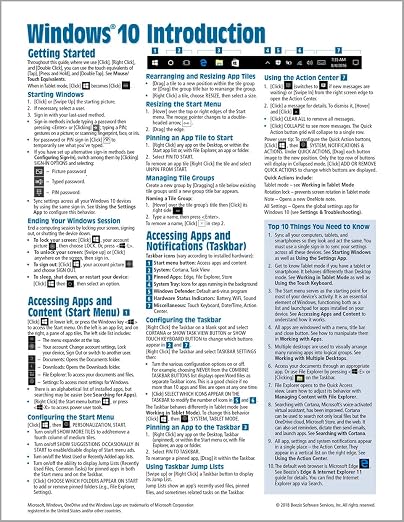
- Windows 10 Introduction Quick Reference Guide...
0 ratings




商品#:
15451465
Windows 10 Introduction Quick Reference Guide (Cheat Sheet of Instructions, Tips & Shortcuts - Laminated) Updated May 2021
回答者の86%がこの商品を友人に勧めたいと回答
商品#:
15451465
JPY 1959
価格の詳細
配送料と関税を除く ( 配送料と関税は購入手続き時に計算されます )
*すべての商品はアメリカから輸入されます
在庫あり
 USA ストアからの輸入品
数量:
在庫は残り8点のみです。
今すぐ注文すると 頃に届きます 水曜日, 9月 16
安全な取引
Ubuyはお客様のセキュリティとプライバシーの保護に努めています。当社の高度な決済セキュリティシステムは、AES(高度暗号化標準)およびSSL(セキュアソケットレイヤー)プロトコルを使用して送信中の情報を暗号化することで機密性を確保しています。お客様の決済情報は第三者の販売者と共有されることはなく、100%安全に保護されています。
最高の物流パートナー


Four-page laminated Windows 10 quick reference guide with step-by-step instructions and shortcuts for any type of user

Fast
Shipping

Free
Return*

安全な梱包

100%正規品

PCI DSS 準拠

ISO 27001認証取得





この商品の利点
Laminated Durability
This guide is laminated, ensuring protection against wear and tear, making it ideal for frequent use without fading, tearing, or spilling damage during your Windows 10 navigation.
Quick Tips & Shortcuts
Provides concise instructions, essential tips, and keyboard shortcuts, allowing users to boost productivity and navigate Windows 10 efficiently, catering to both beginners and experienced users.
Easy Reference Format
Designed as a quick reference guide, it presents information in an easily digestible format, enabling users to find solutions swiftly, streamlining their experience with Windows 10.
製品詳細
- Updated May 2021 laminated quick reference guide for Microsoft Windows 10
- Includes step-by-step instructions and shortcuts, suitable for all user types
- Covers various topics like accessing apps, notifications, working with apps, managing content with File Explorer, working in tablet mode, settings, troubleshooting, users & security
- Also includes a Top 10 Things You Need to Know list, Keyboard Shortcuts, and Mouse/Touch Equivalents
| Publisher | Beezix Quick Reference Cards |
| Publication date | August 17, 2018 |
| Language | English |
| Print length | 4 pages |
| ISBN-10 | 1944684514 |
| ISBN-13 | 978-1944684518 |
| Item Weight | 1.76 ounces (49.9 grams) |
どんな人にお勧めですか?

-
New Users
Ideal for beginners who need concise instructions for navigating Windows 10's features and functionalities effectively.
-
Educators and Trainers
Useful for teachers or trainers providing lessons on Windows 10, offering quick access to essential tips and shortcuts.
-
Office Workers
Beneficial for professionals looking to enhance productivity through shortcuts and efficient usage of Windows 10 tools.

-
Advanced Users
Experienced users may find the guide too basic, lacking the depth needed for complex tasks or troubleshooting.
製品説明書
何か質問はありますか? チャットでお問い合わせください
お客様の質問と回答
-
質問:
What is the Windows 10 Introduction Quick Reference Guide?
回答: The Windows 10 Introduction Quick Reference Guide is a concise, laminated pamphlet that provides essential instructions, tips, and shortcuts for navigating Windows 10. This guide serves as a handy reference tool for both beginners and seasoned users looking for quick ways to improve efficiency while using the operating system. The laminated format enhances durability, making it easy to keep handy on your desk or workstation, ensuring that you can access vital information whenever needed. -
質問:
What topics are covered in the Windows 10 Quick Reference Guide?
回答: The guide covers a comprehensive range of topics, including system navigation, essential keyboard shortcuts, settings adjustments, and tips for utilizing built-in applications like File Explorer and Microsoft Edge. Each section is crafted to facilitate quick understanding and application, allowing users to maximize their efficiency and effectiveness within the Windows 10 environment. By focusing on practical tips and shortcuts, users can streamline common tasks and navigate their systems with ease. -
質問:
Who would benefit from using this Quick Reference Guide?
回答: This guide is ideal for anyone who uses Windows 10, including new users, professionals seeking to improve their computing efficiency, and those needing a refresher on features and shortcuts. Students, educators, and office employees can all find value in having this easy-to-use resource on hand, as it provides quick answers to common questions and helps boost productivity through efficient software navigation and usage practices. -
質問:
Is this guide suitable for all Windows 10 users?
回答: Yes, the Windows 10 Introduction Quick Reference Guide is designed to cater to users of all skill levels, from complete beginners to those with more advanced knowledge. The straightforward layout and well-organized information make it accessible for anyone looking to improve their familiarity and efficiency with the operating system. Whether you are learning the basics or seeking to optimize your use of advanced features, this guide has something for everyone. -
質問:
How often is the guide updated?
回答: This particular guide was updated in May 2021 to reflect the latest features and enhancements in Windows 10. Regular updates ensure that the information is current and aligns with the latest software changes, providing users with the most relevant and useful tips. Keeping guides like this updated is essential for staying aligned with evolving technology and maximizing user experience. -
質問:
Can the guide be used in professional settings?
回答: Absolutely! The laminated Windows 10 Quick Reference Guide is perfect for professional environments. Its compact size allows it to be conveniently placed near a workstation or office desk, providing team members quick access to essential tips and shortcuts that can enhance productivity. It can also serve as a training tool for new employees or as a resource for ongoing professional development. -
質問:
What makes this Quick Reference Guide different from other resources?
回答: Unlike lengthy manuals or online help files, the Windows 10 Introduction Quick Reference Guide distills essential information into a user-friendly format that is easy to digest. The laminated design ensures durability and usability, allowing for frequent reference without wear and tear. This contrasts sharply with digital resources that may require searching through numerous pages or links, making the guide a more efficient option for instant access to information. -
質問:
Where can I buy the Windows 10 Introduction Quick Reference Guide?
回答: You can purchase the Windows 10 Introduction Quick Reference Guide at Ubuy. Ubuy offers a convenient online shopping experience, making it easy for you to find the guide and have it delivered straight to your home. By choosing Ubuy, you can take advantage of a seamless transaction process, customer reviews for informed decision-making, and reliable shipping, simplifying the process of acquiring this useful resource. -
質問:
Is the guide comprehensive enough for advanced users?
回答: Yes, while the Windows 10 Quick Reference Guide is aimed at providing essential tips for all users, it includes valuable shortcuts and insights that can be beneficial even for advanced users. Those familiar with Windows 10 can deepen their knowledge and discover new functionalities that may have been overlooked. This guide serves as a great way to optimize your workflow, regardless of your experience level. -
質問:
How can I use the guide to enhance my Windows 10 experience?
回答: To enhance your Windows 10 experience, utilize the guide as a daily reference when performing tasks like file management, software updates, or system configurations. By implementing the tips and shortcuts found within, you can reduce the time spent on repetitive tasks, navigate your system more intuitively, and discover new features that can improve your overall productivity. This practical engagement with the guide can turn it into a valuable tool in your daily digital routine.
Windows 10 Editorial Review

エディターレビューはまだありません
お客様のレビュー&評価
1815 カスタマー評価
-
5 星
63%
-
4 星
19%
-
3 星
12%
-
2 星
4%
-
1 星
2%
この商品のレビュー
お考えをお聞かせください
プラットフォームの信頼性とお客様の安心

JG
Jazz
Verified buyer
“Easy to use and always helpful and sorts any issues I've had past and present”
1 September 2026 · via Trustpilot
EK
Emmanuel
Verified buyer
“I always receive support when I engage customer service. Overall my experience with UBUY has been top notch. Keep up the good work.”
31 August 2026 · via Trustpilot
F
fnd
Verified buyer
“The delivery was fast and the product came undamaged and authentic.”
29 August 2026 · via Trustpilot
LC
Leana
Verified buyer
“Ubuy is extremely efficient and to order online is an easy process. The verity of products to buy is really unlimited! My order was urgent and I got it on time. The products are great! Thank you Ubuy!”
25 August 2026 · via Trustpilot
HL
Hengo
Verified buyer
“Fast, convenient and cheap. Great store!”
27 August 2026 · via Trustpilot
安全な決済
国際配送
簡単返品
正規品保証
価格推移
重要な情報
- 注意:国際運送の商品に関して、製造会社保障は無効になる可能性、アフターサービスは受けれない可能性、取説や安全情報は発送先の言語になっていない可能性ある。商品とその付属品は配送先の国の規格、仕様、ラベル表示法などに適応していない可能性があります。また、配送先の国の電力企画に適応しいない(アダプタや変換器を必要とする)可能性があります。ご注文の商品は配送先の国に輸入することは合法なのかを確認するのは購入者の責任になります。Ubuyからご購入の際、受け取り者は正式な輸入者となり、配送先の全ての法律やルールに遵守する必要があります。
- Ubuyはグローバル検索エンジンのためリストにある全ての商品が購入できないことがあります。商品は輸出規制、貿易規制があります。
JPY 1959
今すぐ注文すると 頃に届きます 水曜日, 9月 16
This item is not restrict in my country.(Please click on above link if this item is not restrict in your country, So our team will review and allow.)
数量:
在庫は残り8点のみです。
安全な取引
PCI DSS準拠・ISO 27001:2022認証取得。すべてのご注文に暗号化決済と充実したバイヤープロテクションが適用されます。
最高の物流パートナー
最速の国際配送
特徴と利点
- Suitable as a training handout or reference guide
- Topics covered include starting Windows, managing content with file explorer, and working in tablet mode
- Includes a Top 10 Things You Need to Know list, keyboard shortcuts, and mouse/touch equivalents
Ubuyの安心保証
100%正規品、PCI DSS準拠の決済セキュリティ、ISO 27001認証のデータ保護、最速の国際配送、無料返品※、安全な梱包をすべてのご注文でお届けします。