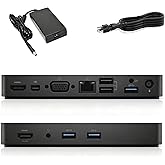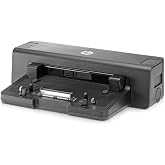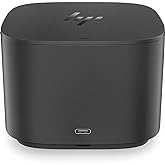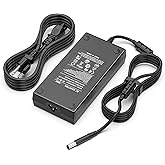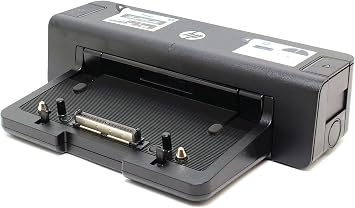
HP A7E32 90W Docking Station - Port Replicator - A7E32AA
Desktop convenience with full port replication capability in a space-saving design.
HP A7E32 90W Docking Station - Port Replicator - A7E32AA
商品#: 814878

HP A7E32 90W Docking Station - Port Replicator - A7E32AA

商品#: 814878

JPY 7774

価格の詳細

Excluding Shipping & Custom charges ( Shipping and custom charges will be calculated on checkout )

*All items will import from アメリカ

在庫あり
アメリカ USA ストアからの輸入品
今すぐ注文すると 頃に届きます 金曜日, 8月 28
最高の物流パートナー
  • fedex
  • dhl
Desktop convenience with full port replication capability in a space-saving design.
U-Care保証:
なし
プランを選択してください
fast shipping

Fast
Shipping

free return

Free
Return*

安全な梱包

安全な梱包

100%正規品

100%正規品

pci-dss

PCI DSS 準拠

iso certified

ISO 27001認証取得


paypal payment
visa payment
mastercard payment
american express payment
jcb payment

この商品の利点

Multiple Connectivity
The HP A7E32 Docking Station offers extensive connectivity options, including USB, HDMI, and Ethernet ports, enabling seamless connection to various devices for increased productivity and convenience.
Compact Design
Its compact design minimizes desk clutter while providing essential ports, appealing to professionals seeking efficiency without sacrificing valuable workspace.
Power Delivery
With 90W power delivery, this docking station charges compatible laptops while providing robust connectivity, ensuring devices are powered during consistent use without interruptions.

製品詳細

Shop the HP 90W Docking Station Port Replicator A7E32 at Ubuy 日本. Enjoy comfortable port replication, cable management, backward compatibility and more. Buy now!
Hardware InterfaceUSB 3.0
Compatible DevicesHP ELITEBOOK 8xxx Series
Total Usb Ports4
Number of Ports14
Wattage90 watts
Smart Home CompatibilityNot Smart Home Compatible
Item Weight4.3 Pounds (1.95 kg)
ColorBlack
BrandHEWLETT-PACKARD
UPC887111347237 804066549561 886112501693
Manufacturerhp
Model NumberA7E32AA#ABA
Mfr Part NumberA7E32AA#ABA
Total USB Ports4
Number of Items1

どんな人にお勧めですか?

Suitable For
  • Business Professionals

    Ideal for professionals needing multiple connections for monitors, printers, and peripherals in a workstation setup.

  • Frequent Travelers

    Lightweight and efficient, perfect for users who require easy docking and undocking while on the go.

  • Home Office Users

    Great solution for home office setups, providing essential connectivity without cluttering desk space.

Not Suitable For
  • Gaming Enthusiasts

    May not support high-performance graphics required for gaming, limiting graphics-intensive tasks.

製品説明書

HP A7E32 90W Docking Station - Port Replicator - A7E32AA

何か質問はありますか? チャットでお問い合わせください

お客様の質問と回答

  • 質問: What devices are compatible with the HP A7E32 90W Docking Station?

    回答: The HP A7E32 90W Docking Station is primarily designed for HP laptops that feature a Smart Ac connector, USB Type-C, or legacy USB connections. It supports various HP professional series laptops like EliteBook, ProBook, and ZBook models. This versatility ensures that users can connect multiple devices, such as monitors, keyboards, and mice, enhancing their productivity. This makes it ideal for users working in office environments or for those looking to create an efficient workstation setup at home.
  • 質問: What ports does the HP A7E32 Docking Station offer?

    回答: The HP A7E32 Docking Station features a comprehensive array of ports, including HDMI, DisplayPort, USB-C, and USB-A ports, as well as Ethernet and audio jacks. This rich selection allows users to connect multiple peripherals and displays, essential for multitasking and creating a seamless workflow. For instance, a user can connect a dual monitor setup while also having printers and external storage devices connected, making it ideal for professionals who rely on multiple tools for their work.
  • 質問: Does the HP A7E32 Docking Station support dual monitors?

    回答: Yes, the HP A7E32 Docking Station supports dual monitor setups. With one HDMI and one DisplayPort, users can easily extend their workspace to two external displays. This capability is particularly beneficial for graphic designers, financial analysts, or anyone requiring detailed multitasking across multiple applications. Consider a situation where a user has a spreadsheet open on one monitor while running a presentation on another, boosting their efficiency and productivity.
  • 質問: Is the HP A7E32 Docking Station plug and play?

    回答: Yes, the HP A7E32 Docking Station is designed for plug-and-play functionality, allowing for a hassle-free setup. Users can simply connect their laptop to the dock, and it will automatically recognize the connected devices without needing to install additional software. This means that even those who may not be tech-savvy can quickly set up their workstation without technical difficulties. Such simplicity is a real advantage for temporary setups, such as occasionally working from home or in shared offices.
  • 質問: What is the power output of the HP A7E32 Docking Station?

    回答: The HP A7E32 Docking Station provides up to 90W of power to connected devices, which is adequate for most HP laptops and ensures that users can work without worrying about battery life. This means you can plug in your laptop for charging while using multiple peripherals. For instance, connecting to a monitor and keyboard while ensuring your laptop remains charged, allows for uninterrupted productivity, especially during long working hours.
  • 質問: Can I charge my laptop through the HP A7E32 Docking Station?

    回答: Yes, the HP A7E32 Docking Station allows for charging your laptop while it is docked, providing a convenient all-in-one solution. With its 90W power output, it ensures that compatible HP laptops receive sufficient power during use. This feature is particularly advantageous in preventing downtime, as you can work and charge simultaneously. Imagine an office setup where your laptop is charging as you conduct a presentation on a large screen–it enhances both productivity and efficiency.
  • 質問: What type of chargers or cables are needed for the HP A7E32 Docking Station?

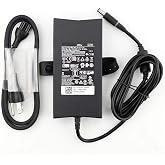
    回答: The HP A7E32 Docking Station typically comes with a compatible power adapter, allowing users to easily connect it to a power source. For connectivity, standard USB-C cables or HDMI/DisplayPort cables for additional monitors are generally recommended. Using the right type of cables ensures optimal performance without data bottlenecks or charging issues. Consider a scenario where a user sets up an efficient multi-monitor display for enhanced productivity in graphic design workflows.
  • 質問: Is the HP A7E32 Docking Station compatible with non-HP laptops?

    回答: The HP A7E32 Docking Station is primarily designed for HP laptops and may not completely support non-HP devices. While certain functions like USB connections might work, key features such as power delivery and display outputs could be limited. This is crucial for users who may need a universal docking solution. If you're using non-HP devices extensively, you might want to ensure compatibility before investing in this dock.
  • 質問: What is included in the package of HP A7E32 Docking Station?

    回答: The HP A7E32 Docking Station package typically includes the docking station itself and a power adapter. Some versions may include documentation for setup and troubleshooting. Expect to receive everything needed to begin connecting your laptop and peripherals right out of the box. This seamless initial setup is especially appealing for businesses looking to deploy multiple workstations efficiently without the hassle of additional purchases.
  • 質問: Where can I buy HP A7E32 90W Docking Station - Port Replicator - A7E32AA?

    回答: You can purchase the HP A7E32 90W Docking Station on Ubuy. Ubuy is a reliable e-commerce platform that offers a range of products, including electronics and accessories. Their user-friendly site makes it simple to find the docking station you need alongside product specifications and customer reviews to aid in your decision-making process.

HEWLETT PACKARD Docking Stations A7E32AA#ABA Editorial Review

The HP 90W Docking Station Port Replicator (A7E32) has garnered a mix of appreciation and criticism in the customer feedback provided. Many users expressed satisfaction with its functionality and ease of use, particularly for those who work from home and are looking to eliminate the hassle of Constantly reconnecting multiple peripherals. Several reviewers noted how the docking station seamlessly integrated with their existing setups, allowing for multiple external displays and connections for older peripherals like PS2-style keyboards and mice. One user even highlighted how the docking station made traveling with a laptop significantly more manageable. Many customers praised the docking station's value for money, especially given its competitive price point compared to similar products that have had more problems. The convenience of having additional USB ports and various connectivity options was also a recurring theme among positive reviews. However, the product isn't without its drawbacks. Some users reported critical issues with the LAN port failing after a few months, rendering the docking station ineffective for wired connections. This posed a significant challenge for those who rely on stable internet connections for work. Others reported problems with the power supply, including defective units upon receipt, leading to additional inconvenience. Overall, while the HP 90W Docking Station Port Replicator is generally well-received for its convenience and functionality, potential buyers should be aware of the occasional issues that can arise regarding build quality and component reliability. **

お客様のレビュー&評価

1 カスタマー評価
  • 5 星
    100%
  • 4 星
    0%
  • 3 星
    0%
  • 2 星
    0%
  • 1 星
    0%

この商品のレビュー

お考えをお聞かせください

長所

  • Easy to set up and use, especially for teleworking.
  • Conveniently connects multiple peripherals, including displays and old devices.
  • Offers additional USB ports and various connection options.
  • Good value for money compared to other docking stations.

短所

  • A few users experienced problems with the power supply being defective.

プラットフォームの信頼性とお客様の安心

trustpilot logo
4.2/5 9250 + reviews
レビューを読む
MA
Mohammad
Verified buyer

“Excellent quality and original too,when ubuy send original things I will appreciate that ,I very satisfied thank you”

23 July 2026 · via Trustpilot
CK
Chitra
Verified buyer

“The order and delivery progress was communicated very well. Package arrived within the estimated time. Products arrived as expected in good condition.”

22-Jul-26 · via Trustpilot
K
kund
Verified buyer

“Good supply of products. Safe payment methods, and shipment worldwide! Genuine products.”

23-Jul-26 · via Trustpilot
OO
Onesi
Verified buyer

“Was my first time buying a product from Ubuy, but I found it so helpful. This is reliable. Gonna place a new order!”

22 July 2026 · via Trustpilot
SJ
SAO JOHN
Verified buyer

“Ubuy is a great online platform to buy stuff. Reliable, fast delivery time and great value for money. I've been using Ubuy online shopping platform for three years now and will continue to do so.”

23 July 2026 · via Trustpilot
安全な決済 国際配送 簡単返品 正規品保証

価格推移

重要な情報

  • 注意:国際運送の商品に関して、製造会社保障は無効になる可能性、アフターサービスは受けれない可能性、取説や安全情報は発送先の言語になっていない可能性ある。商品とその付属品は配送先の国の規格、仕様、ラベル表示法などに適応していない可能性があります。また、配送先の国の電力企画に適応しいない(アダプタや変換器を必要とする)可能性があります。ご注文の商品は配送先の国に輸入することは合法なのかを確認するのは購入者の責任になります。Ubuyからご購入の際、受け取り者は正式な輸入者となり、配送先の全ての法律やルールに遵守する必要があります。
  • Ubuyはグローバル検索エンジンのためリストにある全ての商品が購入できないことがあります。商品は輸出規制、貿易規制があります。