0 ratings







商品#:
7163135
Blackmagic Design DaVinci Resolve 14 Studio License Key Item black
回答者の86%がこの商品を友人に勧めたいと回答
商品#:
7163135
JPY 67434
価格の詳細
配送料と関税を除く ( 配送料と関税は購入手続き時に計算されます )
*すべての商品はアメリカから輸入されます
0 ratings
レビューを書く
在庫あり
 USA ストアからの輸入品
今すぐ注文すると 頃に届きます 土曜日, 9月 12
安全な取引
Ubuyはお客様のセキュリティとプライバシーの保護に努めています。当社の高度な決済セキュリティシステムは、AES(高度暗号化標準)およびSSL(セキュアソケットレイヤー)プロトコルを使用して送信中の情報を暗号化することで機密性を確保しています。お客様の決済情報は第三者の販売者と共有されることはなく、100%安全に保護されています。
最高の物流パートナー


Blackmagic helps true creativity thrive with innovative video technologies.

Fast
Shipping

Free
Return*

安全な梱包

100%正規品

PCI DSS 準拠

ISO 27001認証取得





この商品の利点
Professional Editing
DaVinci Resolve Studio provides advanced editing tools, enabling filmmakers to create top-tier content effortlessly. The interface is intuitive, designed for professionals and hobbyists alike to enhance their storytelling capabilities.
Comprehensive Color Grading
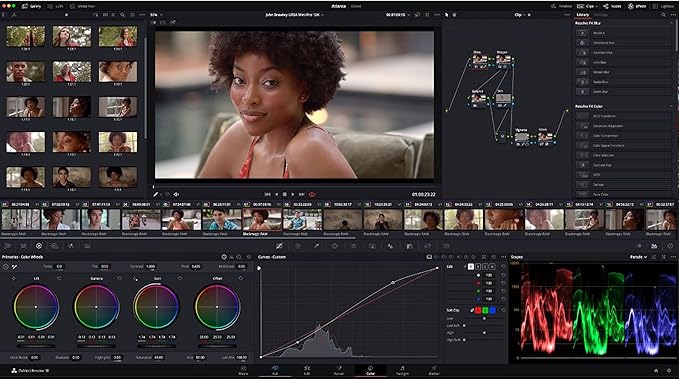
With its industry-leading color grading tools, this software allows users to achieve stunning visual results. It addresses the need for precise color control, making it indispensable for filmmakers seeking perfection in their projects.
Multi-User Collaboration
The software supports multi-user collaboration, allowing teams to work simultaneously on projects. This feature significantly improves workflow efficiency, especially in fast-paced production environments, giving it an edge over competitors.
製品詳細
- Revolutionary editing, color correction, and professional audio post-production in a single application
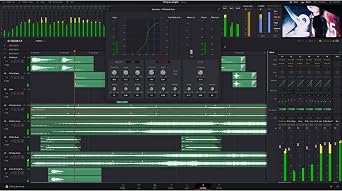
- Incredible new Fairlight audio tools designed for film and television post-production
- Features a high-performance playback engine for faster editing and trimming
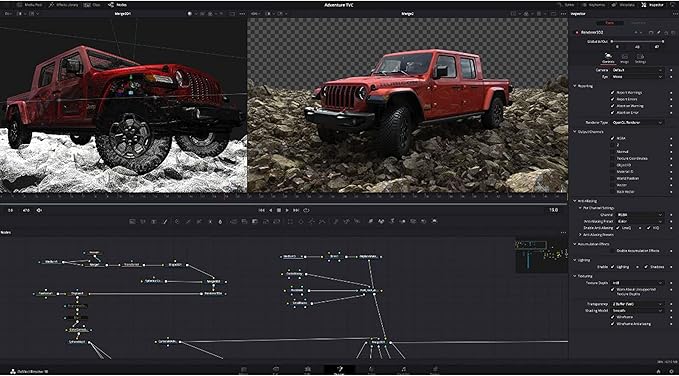
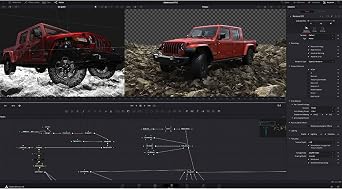
- Includes Fusion VFX with over 250 built-in tools for advanced 3D compositing
- Legendary color tools with powerful primary and secondary tools, curves, tracking, and stabilization
- Fully integrated digital audio workstation with full mixer, EQ, dynamics processing, and more
| Product Dimensions | 6 x 9 x 2 inches (15.2 x 22.9 x 5.1 cm); 0.95 ounces (26.93 grams) |
| Item model number | BM-DV/RESSTUD |
| Date First Available | October 11, 2017 |
| Manufacturer | Blackmagic Design |
| Package Weight | 1 Pound |
どんな人にお勧めですか?

-
Professional Editors
Ideal for professional video editors needing advanced color correction and editing features for high-quality projects.
-
Filmmakers
Great for independent filmmakers looking for comprehensive editing solutions without financial burden on software licenses.
-
Content Creators
Suitable for YouTube and social media content creators who want powerful tools for enhancing visual quality.

-
Casual Users
Not suitable for casual users who require simple editing tools without advanced features or capabilities.
製品説明書
何か質問はありますか? チャットでお問い合わせください
お客様の質問と回答
-
質問:
What is the Blackmagic Design DaVinci Resolve 14 Studio License Key?
回答: The Blackmagic Design DaVinci Resolve 14 Studio License Key is a digital product that unlocks the full features and capabilities of DaVinci Resolve 14 Studio software. This software is renowned for its professional video editing, color correction, audio post-production, and visual effects functionality. It empowers video creators to enhance and streamline their editing workflow, providing advanced tools not available in the free version, such as 3D tools, collaboration features, and enhanced performance on high-resolution projects. -
質問:
What are the main features included in DaVinci Resolve 14 Studio?
回答: DaVinci Resolve 14 Studio includes an array of powerful features such as advanced color grading tools, multi-user collaboration options, built-in visual effects, and Fairlight audio tools for professional audio post-production. These features make it a preferred choice among filmmakers, content creators, and video professionals looking to produce high-quality content efficiently. Users can seamlessly integrate these tools to achieve a smooth workflow from editing to color correction. -
質問:
Is DaVinci Resolve 14 Studio compatible with my operating system?
回答: Yes, DaVinci Resolve 14 Studio is compatible with various operating systems, including Windows, macOS, and Linux. This flexibility allows users to install the software on a variety of devices, making it accessible for freelancers and studios alike. Regardless of your choice of operating system, you can leverage the powerful editing capabilities of DaVinci Resolve to create stunning projects. -
質問:
Can I upgrade from the free version of DaVinci Resolve to the Studio version?
回答: Absolutely! You can upgrade from the free version of DaVinci Resolve to the Studio version by purchasing the Studio License Key. Doing so grants you access to additional features that significantly enhance your editing experience. This upgrade is particularly beneficial for users who have outgrown the limitations of the free version and are looking to expand their creative possibilities. -
質問:
Is there a trial version available for DaVinci Resolve 14 Studio?
回答: While there is no separate trial for DaVinci Resolve 14 Studio, the free version of DaVinci Resolve allows users to explore the software’s capabilities and get accustomed to the interface. Users can then decide if the additional features in the Studio version align with their editing needs. This approach ensures that creators can evaluate the software without immediate financial commitment. -
質問:
What type of projects can I create with DaVinci Resolve 14 Studio?
回答: DaVinci Resolve 14 Studio is versatile enough to handle a vast range of projects, from short films and YouTube videos to high-end commercials and feature films. Its robust editing, color grading, and audio tools enable creators to craft cinematic-quality content tailored to their specific needs. Whether you are a hobbyist or a professional, this software can adapt to your project requirements. -
質問:
How does the color grading in DaVinci Resolve 14 Studio compare to other software?
回答: DaVinci Resolve 14 Studio is a leader in the field of color grading, offering unmatched precision and flexibility. The software includes advanced tools like Curves, Color Wheels, and LUTs that allow for intricate color adjustments. Compared to other editors, DaVinci’s color grading tools are designed specifically for filmmakers, providing deep control and a professional finish that enhances the storytelling aspect of each project. -
質問:
Can multiple users collaborate on a project using DaVinci Resolve 14 Studio?
回答: Yes, DaVinci Resolve 14 Studio supports multi-user collaboration. This feature allows multiple editors, colorists, and audio professionals to work on the same project simultaneously, making it ideal for larger projects with tight deadlines. Collaboration tools enable seamless workflow management, allowing teams to share inputs and produce high-quality content effectively while enhancing creativity through real-time feedback. -
質問:
What is the best way to learn how to use DaVinci Resolve 14 Studio?
回答: The best way to learn DaVinci Resolve 14 Studio is through a combination of tutorials, online courses, and hands-on practice. Numerous resources are available, including official Blackmagic Design training videos, community forums, and educational platforms like Udemy and Coursera. Engaging with these materials while working on your own projects will help you quickly grasp the software's functionalities and enhance your editing skills. -
質問:
Where can I buy Blackmagic Design DaVinci Resolve 14 Studio License Key in Japan?
回答: You can purchase the Blackmagic Design DaVinci Resolve 14 Studio License Key from Ubuy. This platform provides an easy way to acquire the license key, ensuring you get the official product for unlocking all the features of DaVinci Resolve 14 Studio. Ubuy often offers international shipping options, making it convenient for users looking to enhance their video editing capabilities.
Blackmagic Design Graphics Cards BM-DV/RESSTUD Editorial Review


Blackmagic Design DaVinci Resolve 14 Studio License Key Item black offers an advanced video editing experience with extensive features and tools tailored for both amateurs and professionals. This software requires a separate installation after entering the key at the Blackmagic site, ensuring users unlock the full potential of the studio version. Users appreciate the one-time purchase model, which includes future updates without additional fees, reflecting a strong value proposition. The transition from a free version to a studio version involves downloading the different program, enhancing performance significantly, especially with resource-heavy tasks. However, new users may experience a learning curve due to its complex interface.
お客様のレビュー&評価
406 カスタマー評価
-
5 星
83%
-
4 星
6%
-
3 星
3%
-
2 星
3%
-
1 星
5%
この商品のレビュー
お考えをお聞かせください
長所
- One-time purchase includes future updates
- Wide range of professional editing tools
- Performance boosts from studio version
- Great for both amateurs and professionals
- Seamless installation with download
- Compatible with various Blackmagic equipment
短所
- Initial learning curve is steep for new users
プラットフォームの信頼性とお客様の安心

JG
Jazz
Verified buyer
“Easy to use and always helpful and sorts any issues I've had past and present”
1 September 2026 · via Trustpilot
EK
Emmanuel
Verified buyer
“I always receive support when I engage customer service. Overall my experience with UBUY has been top notch. Keep up the good work.”
31 August 2026 · via Trustpilot
F
fnd
Verified buyer
“The delivery was fast and the product came undamaged and authentic.”
29 August 2026 · via Trustpilot
LC
Leana
Verified buyer
“Ubuy is extremely efficient and to order online is an easy process. The verity of products to buy is really unlimited! My order was urgent and I got it on time. The products are great! Thank you Ubuy!”
25 August 2026 · via Trustpilot
HL
Hengo
Verified buyer
“Fast, convenient and cheap. Great store!”
27 August 2026 · via Trustpilot
安全な決済
国際配送
簡単返品
正規品保証
People also bought these Items






価格推移
重要な情報
- 注意:国際運送の商品に関して、製造会社保障は無効になる可能性、アフターサービスは受けれない可能性、取説や安全情報は発送先の言語になっていない可能性ある。商品とその付属品は配送先の国の規格、仕様、ラベル表示法などに適応していない可能性があります。また、配送先の国の電力企画に適応しいない(アダプタや変換器を必要とする)可能性があります。ご注文の商品は配送先の国に輸入することは合法なのかを確認するのは購入者の責任になります。Ubuyからご購入の際、受け取り者は正式な輸入者となり、配送先の全ての法律やルールに遵守する必要があります。
- Ubuyはグローバル検索エンジンのためリストにある全ての商品が購入できないことがあります。商品は輸出規制、貿易規制があります。
JPY 67434
今すぐ注文すると 頃に届きます 土曜日, 9月 12
This item is not restrict in my country.(Please click on above link if this item is not restrict in your country, So our team will review and allow.)
数量:
安全な取引
PCI DSS準拠・ISO 27001:2022認証取得。すべてのご注文に暗号化決済と充実したバイヤープロテクションが適用されます。
最高の物流パートナー
最速の国際配送
特徴と利点
- Leading innovator in creative video technologies.
- Includes extended node-based color correction.
- Features a new Fairlight audio processing engine.
- Offers a filled nonlinear professional editor.
- Includes multi-user collaboration capabilities.
- Comes with an activation code for easy access.
Ubuyの安心保証
100%正規品、PCI DSS準拠の決済セキュリティ、ISO 27001認証のデータ保護、最速の国際配送、無料返品※、安全な梱包をすべてのご注文でお届けします。