- ホームページ /
- ビデオゲーム /
- Legacy Systems /
- Nintendo Systems /
- Nintendo NES /
- アクセサリー /
- Intec Gaming NES Converter- Support PS5/PS4, ...
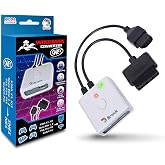
Intec Gaming NES Converter- Support PS5/PS4, Xbox One, Switch Pro Wire-Less Controller Play Retro Console, Consoles Adapter for Famicom FC Console
JPY 4393
Price Details
Excluding Shipping & Custom charges ( Shipping and custom charges will be calculated on checkout )
*All items will import from アメリカ
Ubuyはお客様のセキュリティとプライバシーの保護に努めています。当社の高度な決済セキュリティシステムは、AES(高度暗号化標準)およびSSL(セキュアソケットレイヤー)プロトコルを使用して送信中の情報を暗号化することで機密性を確保しています。お客様の決済情報は第三者の販売者と共有されることはなく、100%安全に保護されています。
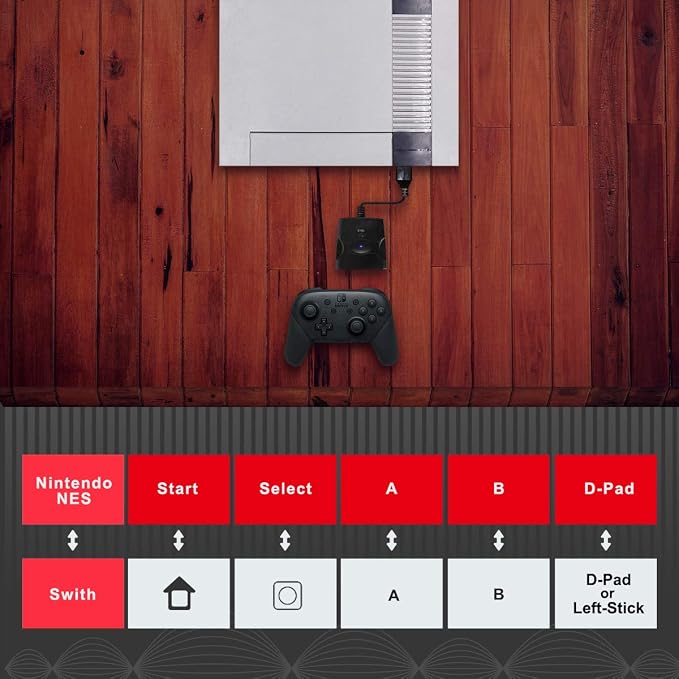
Play the retro console with PS4/Xbox One/Switch Pro gamepad
Fast
Shipping
Free
Return*
安全な梱包
100%本物
PCI DSS 準拠
ISO 27001 保証
この商品の利点
製品詳細
| Item Weight | 0.3 lbs (140 grams) |
どんな人にお勧めですか?
-
Retro Gamers
Ideal for enthusiasts wanting to use modern controllers on retro Famicom consoles for an enhanced gaming experience.
-
Multiplatform Users
Perfect for players who own various consoles like PS4 and Xbox One and enjoy a unified gaming setup.
-
Budget-Conscious Players
Great for gamers looking to utilize existing controllers instead of purchasing new ones for their retro gaming needs.
-
Series X/S Owners
Not suitable for users with Xbox Series X/S controllers since they are incompatible with this NES converter.
-
Non-Console Gamers
Not designed for users who do not engage with retro consoles and prefer only current-generation gaming experiences.
-
Casual Gamers
May not appeal to occasional players who do not prioritize using modern controllers with vintage gaming systems.
製品説明書
Intec Gaming NES Converter- Support PS5/PS4, Xbox One, Switch Pro Wire-Less Controller Play Retro Console, Consoles Adapter for Famicom FC Console (Not Compatible with Xbox Series X/S Controller)
About This Item
Introducing the WL BT Controller Adapter for NES, PS4, Xbox One, Switch Pro Controller - the perfect accessory for retro console enthusiasts! With this versatile Bluetooth controller adapter, you can now use your favorite wireless controllers with your NES, PS4, Xbox One, Switch Pro Controller, and even your favorite retro consoles. Say goodbye to tangled wires and limited mobility, and say hello to a seamless gaming experience. This adapter is not only compatible with the standard controllers, but it also works with the latest Nintendo Switch Pro Controller, delivering precision control and incredible response times. Enjoy a comfortable grip and precise button placements as you navigate through your favorite games.
Feel the nostalgia as you immerse yourself in classic titles on your favorite retro consoles. The WL BT Controller Adapter is designed to provide a hassle-free setup. Simply plug it into your console, pair it with your wireless controller, and you're ready to go. It's quick, easy, and convenient.
Plus, it's compact and portable, making it the perfect travel companion for gaming on the go. Experience the freedom and flexibility that this Bluetooth controller adapter has to offer. Take your gaming to the next level with the WL BT Controller Adapter for NES, PS4, Xbox One, Switch Pro Controller, and retro consoles. Upgrade your gaming setup and enjoy a truly immersive gaming experience like never before. Please note that this controller adapter is not compatible with Xbox Series X/S controllers.
Order the WL BT Controller Adapter today and elevate your gaming experience to new heights!.
顧客の質問と回答
-
質問:
What is the NES Converter and how does it work?
答え: The NES Converter is an adapter designed to allow modern wireless controllers, such as the PS5, PS4, Xbox One, and Switch Pro, to connect to retro consoles like the Famicom FC. It works by converting signals from the wireless controllers into a format that the nostalgic console can understand. This means you can enjoy classic NES games with updated controllers that provide a comfortable grip and enhanced functionality. It's perfect for gamers who love retro gaming but want the benefits of modern control technology. -
質問:
Can I use the NES Converter with multiple controllers at the same time?
答え: No, the NES Converter supports one controller at a time. When using it with your Famicom FC console, you will need to sync your desired controller before playing. This is a common setup for retro gaming adapters to avoid conflict between multiple inputs. If you want to switch controllers, simply disconnect the current one and connect a new one. This flexibility allows you to customize your gaming experience based on your preferences. -
質問:
Is the NES Converter compatible with all retro consoles?
答え: The NES Converter is specifically designed for the Famicom FC console and is not compatible with other retro consoles. This focused functionality ensures that it works optimally with the intended device, providing the best gaming experience available on that platform. If you're planning to use it with another system, check compatibility before making a decision to ensure a smooth setup. -
質問:
How do I connect my PS5 controller to the NES Converter?
答え: Connecting your PS5 controller to the NES Converter is straightforward. First, ensure the NES Converter is plugged into the Famicom FC console. Then, put your PS5 controller into pairing mode and press the appropriate button on the converter. When they are paired successfully, you will be ready to enjoy your favourite NES games. This allows players to utilize modern gaming technology while relishing retro experiences. -
質問:
What features does the NES Converter offer?
答え: The NES Converter comes with features that enhance the gaming experience, including support for modern wireless controllers, easy pairing functionality, and the ability to play classic games without the hassle of wired connections. These features provide enhanced gameplay freedom, allowing players to comfortably sit back and enjoy their gaming sessions without being tethered to the console. This makes the converter an excellent choice for both traditional and new gamers. -
質問:
Does the NES Converter support rumble or motion controls?
答え: The NES Converter does not support rumble or motion controls. It is primarily designed to facilitate basic controller functions for retro gaming on the Famicom FC console. Users should expect a straightforward experience focused on button input rather than advanced features found in newer gaming systems. This simplicity often appeals to gamers looking for a nostalgic and uncomplicated experience with classic titles. -
質問:
Can I use the NES Converter to play online multiplayer games?
答え: No, the NES Converter is intended for offline use with the Famicom FC console and does not support online multiplayer gaming. Retro games designed for these consoles typically do not include online features due to their original architecture. If you're interested in online multiplayer gameplay, consider modern games or consoles that offer robust online capabilities, while reserving the NES Converter for enjoying local multiplayer sessions with friends or family. -
質問:
What should I do if my NES Converter isn't working?
答え: If your NES Converter isn't working, first check the connections to ensure it is properly plugged into the Famicom FC console. Next, ensure your wireless controller is charged and in pairing mode. If the issue persists, try resetting the converter by unplugging it and re-inserting it. Reference the user manual for troubleshooting tips for any specific problems, as they may offer useful instructions for getting back to gaming quickly. -
質問:
Is the NES Converter portable?
答え: Yes, the NES Converter is compact and lightweight, making it easy to transport for gaming sessions at friends' houses or gaming events. Its small size allows for easy storage alongside other gaming accessories. Whether you’re looking to set up a gaming corner at your friends' place or simply want to enjoy retro gaming on the go, this portability is a key feature that enhances your flexibility. -
質問:
Where can I buy NES Converter in Japan?
答え: You can purchase the NES Converter from Ubuy, a reliable online platform offering a wide range of gaming accessories. With Ubuy, you can easily navigate their selection, compare different products, and find the NES Converter that fits your needs. They provide detailed product information and customer reviews, ensuring a well-informed shopping experience for all your gaming requirements.
Intec Gaming Accessories Editorial Review
お客様のレビュー&評価
-
5 星
0%
-
4 星
100%
-
3 星
0%
-
2 星
0%
-
1 星
0%
この商品のレビュー
お考えをお聞かせください
長所
- Supports multiple controllers
- Easy to set up
- Good retro gaming experience
- Compatible with various consoles
短所
- Some minor connectivity issues.
Product Price History
重要な情報
- 注意:国際運送の商品に関して、製造会社保障は無効になる可能性、アフターサービスは受けれない可能性、取説や安全情報は発送先の言語になっていない可能性ある。商品とその付属品は配送先の国の規格、仕様、ラベル表示法などに適応していない可能性があります。また、配送先の国の電力企画に適応しいない(アダプタや変換器を必要とする)可能性があります。ご注文の商品は配送先の国に輸入することは合法なのかを確認するのは購入者の責任になります。Ubuyからご購入の際、受け取り者は正式な輸入者となり、配送先の全ての法律やルールに遵守する必要があります。
- Ubuyはグローバル検索エンジンのためリストにある全ての商品が購入できないことがあります。商品は輸出規制、貿易規制があります。
JPY 4393
今すぐ注文すると 頃に届きます 金曜日, 7月 03
This item is not restrict in my country.(Please click on above link if this item is not restrict in your country, So our team will review and allow.)
QTY:
Ubuyはお客様のセキュリティとプライバシーの保護に努めています。当社の高度な決済セキュリティシステムは、AES(高度暗号化標準)およびSSL(セキュアソケットレイヤー)プロトコルを使用して送信中の情報を暗号化することで機密性を確保しています。お客様の決済情報は第三者の販売者と共有されることはなく、100%安全に保護されています。
特徴と利点
- Play retro consoles with modern gamepads
- Easy plug and play setup
- Wireless experience with up to 30 feet range
- Minimal lag for classic gaming
- Not compatible with Xbox Series X/S controller