- ホームページ /
- 家電・カメラ /
- パソコンアクセサリー /
- パソコンパーツ /
- Single Board Computers /
- Waveshare 4.2 Inch E-Paper Display Module Kit...
0 ratings
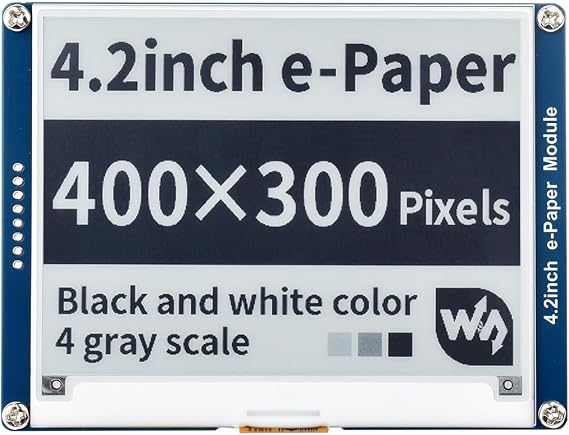


商品#:
30768720
Waveshare 4.2 Inch E-Paper Display Module Kit 400 x 300 Resolution 3.3 V/5 V E-Ink Electronic Screen with Embedded Controller SPI Interface for
回答者の87%がこの商品を友人に勧めたいと回答
商品#:
30768720
JPY 7972
価格の詳細
配送料と関税を除く ( 配送料と関税は購入手続き時に計算されます )
*すべての商品はアメリカから輸入されます
0 ratings
レビューを書く
在庫あり
 USA ストアからの輸入品
今すぐ注文すると 頃に届きます 木曜日, 9月 10
安全な取引
Ubuyはお客様のセキュリティとプライバシーの保護に努めています。当社の高度な決済セキュリティシステムは、AES(高度暗号化標準)およびSSL(セキュアソケットレイヤー)プロトコルを使用して送信中の情報を暗号化することで機密性を確保しています。お客様の決済情報は第三者の販売者と共有されることはなく、100%安全に保護されています。
最高の物流パートナー


An ideal choice for applications such as shelf label, industrial instruments and more. No backlight required, clear display, and ultra-low power consumption. Compatible with Raspberry Pi/Arduino/Nucleo and more.

Fast
Shipping

Free
Return*

安全な梱包

100%正規品

PCI DSS 準拠

ISO 27001認証取得





この商品の利点
High Resolution
The 400x300 resolution provides sharp, clear visuals, ideal for displaying text and graphics, enhancing user experience for projects using Raspberry Pi and other compatible devices.
E-Ink Technology
E-Ink minimizes power consumption by maintaining images without constant refresh, making it perfect for battery-powered applications and outdoor visibility with excellent readability under sunlight.
Versatile Interface
The SPI interface ensures easy integration with Raspberry Pi and similar platforms, allowing developers to quickly implement this display module in a wide range of DIY and commercial applications.
製品詳細
- E-Ink display module, 4.2inch, 400x300 resolution
- Ultra low power consumption, ideal for shelf labels and industrial instruments
- No backlight, retains last content even when powered off
- SPI interface for easy connection with controller boards
- Onboard voltage translator, compatible with 3.3V/5V MCUs
- Online user manual available for Raspberry Pi, Jetson Nano, Arduino, STM32
どんな人にお勧めですか?

-
Prototype Developers
Ideal for developers creating low-power prototypes requiring clear, static visuals with minimal refresh needs.
-
E-Book Enthusiasts
Great for hobbyists wishing to customize e-book readers or other textual displays with an e-ink solution.
-
Energy-Conscious Users
Perfect for applications where battery life is critical, minimizing power consumption while displaying information.

-
Video Applications
Not suitable for users needing high-refresh rates or video playback due to slow refresh capabilities.
製品説明書
Waveshare 4.2 Inch E-Paper Display Module Kit 400 x 300 Resolution 3.3 V/5 V E-Ink Electronic Screen with Embedded Controller SPI Interface for Raspberry Pi/Jetson Nano/Arduino, Support Full Refresh
何か質問はありますか? チャットでお問い合わせください
お客様の質問と回答
-
質問:
What is the resolution of the Waveshare 4.2inch E-Ink Display Module?
回答: The Waveshare 4.2inch E-Ink Display Module has a resolution of 400x300 pixels. This high resolution allows for sharp and clear text and images, making it an ideal choice for projects requiring legibility in various lighting conditions. The e-ink technology provides excellent contrast and visibility, especially in bright sunlight, which is perfect for outdoor applications or displays that need to be visible from a distance. -
質問:
Is the Waveshare E-Ink Display Module compatible with all Raspberry Pi models?
回答: The Waveshare 4.2inch E-Ink Display Module is specifically compatible with several Raspberry Pi models, including the Raspberry Pi 4, 3B+, Zero, and Pico. It connects through the SPI interface, allowing you to easily integrate the display with your Raspberry Pi projects. This compatibility makes it a versatile choice for developers looking to create unique applications, such as e-readers, information panels, or smart mirrors. -
質問:
What projects can I create using the Waveshare 4.2inch E-Ink Display?
回答: You can create a variety of projects using the Waveshare 4.2inch E-Ink Display, such as electronic signage, e-readers, and IoT devices. The low power consumption of e-ink technology makes it suitable for battery-operated devices where energy efficiency is crucial. Developers often use it in home automation systems, weather display stations, and even digital photo frames to create stunning visuals without draining power. -
質問:
How does the SPI interface work with this E-Ink Display?
回答: The SPI (Serial Peripheral Interface) allows for fast communication between the Waveshare E-Ink Display and your Raspberry Pi. This interface enables quick data transfer, making the display responsive to updates. By connecting the display using SPI, you can control it with minimal code, which simplifies the development process for users new to programming. This ease of setup makes it an attractive option for both novice and seasoned developers. -
質問:
What is the benefit of using an E-Ink display compared to traditional LCDs?
回答: E-Ink displays, like the Waveshare 4.2inch, are beneficial due to their low power consumption and readability in direct sunlight. Unlike traditional LCDs, E-Ink technology mimics the appearance of ink on paper, providing a glare-free viewing experience. This makes them ideal for applications where prolonged viewing is needed without the eye strain caused by backlit screens. Users often prefer E-Ink displays for digital books or outdoor information boards. -
質問:
Can the Waveshare E-Ink Display be used for outdoor applications?
回答: Yes, the Waveshare 4.2inch E-Ink Display is well-suited for outdoor applications due to its excellent sunlight readability and low power requirements. Its robust design allows for use in various environmental conditions, making it a preferred choice for displays that require visibility outdoors, such as electronic billboards or weather stations. Users appreciate the longevity and durability E-Ink displays offer in such scenarios. -
質問:
How do I connect the Waveshare E-Ink Display to a Raspberry Pi?
回答: To connect the Waveshare 4.2inch E-Ink Display to a Raspberry Pi, begin by connecting the SPI pins from the display to the corresponding GPIO pins on the Raspberry Pi. Power the display through the appropriate Voltage pin to ensure optimal performance. Following the hardware setup, you can use provided libraries or examples to begin programming your display. This straightforward setup allows for rapid prototyping and experimentation in your Raspberry Pi projects. -
質問:
What kind of software or libraries do I need to use with this display?
回答: To effectively use the Waveshare 4.2inch E-Ink Display, you need to utilize libraries compatible with Raspberry Pi, such as the Python E-Ink library provided by Waveshare. This library simplifies controlling the display by allowing you to easily draw text and images programmatically. Many developers explore community forums and resources to share their experiences and codes, making it easier to learn and implement exciting features in their projects. -
質問:
What are the advantages of the size of the Waveshare E-Ink Display?
回答: The 4.2-inch size of the Waveshare E-Ink Display strikes a balance between portability and visibility. This size is compact enough for handheld projects, while still offering adequate space for displaying detailed information. Ideal uses include personal devices like e-readers and portable weather stations. The size also makes it easy to integrate into various enclosures, enhancing the aesthetic and functional appeal of custom projects. -
質問:
Where can I buy the Waveshare 4.2inch E-Ink Display Module?
回答: You can purchase the Waveshare 4.2inch E-Ink Display Module from Ubuy in Japan. Ubuy offers a wide range of electronic components, ensuring you find the necessary tools for your Raspberry Pi projects. With a user-friendly interface, Ubuy facilitates a convenient shopping experience while ensuring you get genuine quality products that meet your project requirements.
waveshare Single Board Computers Editorial Review
The Waveshare E-Paper display is a great option for a variety of projects. With its large display size, it is perfect for displaying detailed information. The display has a resolution of 400x300 pixels, displaying text and images with great clarity. It runs off very low power, with updates taking only 4 seconds, making it perfect for power-sensitive projects. While there are no MicroPython libraries included with the display, there are demos available for Python C and Arduino that can be referred to via Waveshare's Wiki page, which may be more useful for some users. It is also easy to connect to projects and can be powered off while keeping the display on. However, it is important to connect the GPIO pins with the correct pinouts, as the instructions provided by Waveshare can be incorrect. Although the screw holes allow for easy mounting, the screw holes do not align with a Raspberry Pi B. Overall, this display is great for projects that require clear text and image display at a low power consumption.
お客様のレビュー&評価
1 カスタマー評価
-
5 星
100%
-
4 星
0%
-
3 星
0%
-
2 星
0%
-
1 星
0%
この商品のレビュー
お考えをお聞かせください
長所
- Large display size
- Low power consumption
- Easy to connect to projects
- Display can be powered off while keeping display on
短所
- No MicroPython libraries included
プラットフォームの信頼性とお客様の安心

MA
Mohammad
Verified buyer
“Excellent quality and original too,when ubuy send original things I will appreciate that ,I very satisfied thank you”
23 July 2026 · via Trustpilot
CK
Chitra
Verified buyer
“The order and delivery progress was communicated very well. Package arrived within the estimated time. Products arrived as expected in good condition.”
22-Jul-26 · via Trustpilot
K
kund
Verified buyer
“Good supply of products. Safe payment methods, and shipment worldwide! Genuine products.”
23-Jul-26 · via Trustpilot
OO
Onesi
Verified buyer
“Was my first time buying a product from Ubuy, but I found it so helpful. This is reliable. Gonna place a new order!”
22 July 2026 · via Trustpilot
SJ
SAO JOHN
Verified buyer
“Ubuy is a great online platform to buy stuff. Reliable, fast delivery time and great value for money. I've been using Ubuy online shopping platform for three years now and will continue to do so.”
23 July 2026 · via Trustpilot
安全な決済
国際配送
簡単返品
正規品保証
価格推移
重要な情報
- 注意:国際運送の商品に関して、製造会社保障は無効になる可能性、アフターサービスは受けれない可能性、取説や安全情報は発送先の言語になっていない可能性ある。商品とその付属品は配送先の国の規格、仕様、ラベル表示法などに適応していない可能性があります。また、配送先の国の電力企画に適応しいない(アダプタや変換器を必要とする)可能性があります。ご注文の商品は配送先の国に輸入することは合法なのかを確認するのは購入者の責任になります。Ubuyからご購入の際、受け取り者は正式な輸入者となり、配送先の全ての法律やルールに遵守する必要があります。
- Ubuyはグローバル検索エンジンのためリストにある全ての商品が購入できないことがあります。商品は輸出規制、貿易規制があります。
JPY 7972
今すぐ注文すると 頃に届きます 木曜日, 9月 10
This item is not restrict in my country.(Please click on above link if this item is not restrict in your country, So our team will review and allow.)
数量:
安全な取引
PCI DSS準拠・ISO 27001:2022認証取得。すべてのご注文に暗号化決済と充実したバイヤープロテクションが適用されます。
最高の物流パートナー
最速の国際配送
特徴と利点
- Ideal display for shelf label and industrial instruments
- Clear display without the requirement of electricity
- No backlight required for display
- Ultra-low power consumption
- Compatibility with Raspberry Pi/ Arduino/Nucleo
- SPI interface for connecting with controller boards
Ubuyの安心保証
100%正規品、PCI DSS準拠の決済セキュリティ、ISO 27001認証のデータ保護、最速の国際配送、無料返品※、安全な梱包をすべてのご注文でお届けします。