- ホームページ /
- 家電・カメラ /
- パソコンアクセサリー /
- Networking Products /
- Print Servers /
- Dual-Mode USB Print Server for Sharing USB Pr...
0 ratings





商品#:
30908820
Dual-Mode USB Print Server for Sharing USB Printer Through LAN Local Network
回答者の60%がこの商品を友人に勧めたいと回答
商品#:
30908820
JPY 11514
価格の詳細
配送料と関税を除く ( 配送料と関税は購入手続き時に計算されます )
*すべての商品はアメリカから輸入されます
0 ratings
レビューを書く
在庫あり
 USA ストアからの輸入品
今すぐ注文すると 頃に届きます 木曜日, 10月 08
安全な取引
Ubuyはお客様のセキュリティとプライバシーの保護に努めています。当社の高度な決済セキュリティシステムは、AES(高度暗号化標準)およびSSL(セキュアソケットレイヤー)プロトコルを使用して送信中の情報を暗号化することで機密性を確保しています。お客様の決済情報は第三者の販売者と共有されることはなく、100%安全に保護されています。
最高の物流パートナー


Premium printer to network adapter for all USB printer use. Any computer on the network can access and control the networked USB printer directly.

Fast
Shipping

Free
Return*

安全な梱包

100%正規品

PCI DSS 準拠

ISO 27001認証取得





この商品の利点
Dual-Mode Functionality
Seamlessly switch between USB direct connection and LAN sharing, ensuring flexibility in how you connect your printer across various devices and networks.
Easy Setup
User-friendly installation with minimal configuration required, allowing you to quickly integrate the print server into your existing network without technical hassle.
Cross-Platform Compatibility
Supports multiple operating systems to ensure reliable printing from PCs, laptops, and mobile devices, making it ideal for diverse office or home environments.
製品詳細
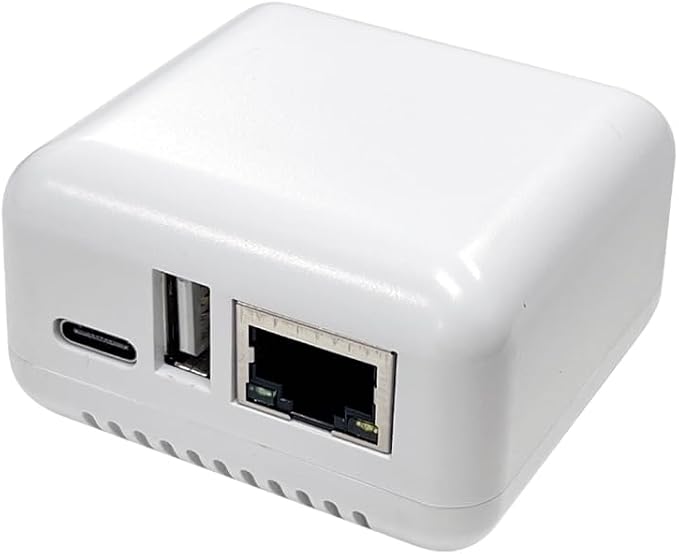
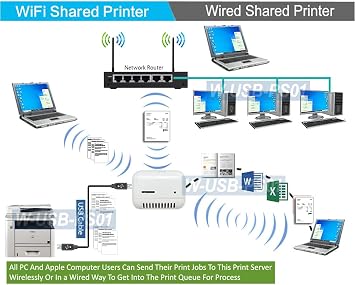
- Transform any USB printer into a wireless printer over the local network or Wi-Fi
- Share one printer over the network, saving money, space, and reducing cable clutter
- Simple setup requires installing the printer driver on each networked computer
- Allows placing the printer anywhere within the Wi-Fi range
- Easily change the IP address of the print server using a smartphone, tablet, or computer
- Compatible with Windows OS (Win10, Win8.1/8, Win7, XP) and Mac OS, and all types of printers
| Printer Type | Laser, Thermal |
| Other Special Features of the Product | Network-Ready |
| Printer Output Type | Monochrome |
| Item Weight | 4 ounces (113.4 grams) |
| Print media | Labels |
| Compatible Devices | PC, Smartphones, Tablets |
| Additional Printer Functions | Print Only |
| Control Method | Remote |
| Maximum Media Size | A3 |
| Maximum Print Resolution Black and White | 600 dpi |
| Duplex | simplex |
| Brand | AllAboutAdapters |
| Model Name | W-USB-PS12 |
| Model Number | W-USB-PS12 |
| Built-In Media | Ethernet Cable |
| Model Series | USB Print Server |
| Specific Uses For Product | Gaming |
| Unit Count | 1 Count |
| Manufacturer | AllAboutAdapters |
| Printer Connectivity Type | USB, Wi-Fi |
| Hardware Interface | USB |
| Total Usb Ports | 1 |
| Connectivity Technology | USB, Wi-Fi |
| Printing Technology | Laser, Thermal |
| Special Feature | Network-Ready |
| Printer Output | Monochrome |
| Included Components | Ethernet Cable |
内容物
Ethernet Cable
どんな人にお勧めですか?

-
Home Office Users
Ideal for remote workers needing to share a single printer across multiple devices on a home network.
-
Small Businesses
Useful for small teams requiring multiple devices to access a single printer without constant physical connections.
-
Tech Enthusiasts
Great for users who enjoy experimenting with network devices and streamlining their home or office network setup.

-
Large Corporations
Not suitable for large businesses requiring extensive and reliable printing infrastructure; scalability may be limited.
製品説明書
About This Item
Introducing the Dual Wired and Wireless USB Print Server: Your Solution for Easy Printer Sharing Are you tired of having multiple printers for each computer in your home or office? Say goodbye to the hassle and expense with our premium Dual Wired and Wireless USB Print Server. This innovative device allows you to transform any USB printer into a wireless printer, making it accessible for all users through a wired or Wi-Fi network. Save Money and Simplify Your Setup With this USB print server, you can save money and eliminate the need for multiple printers. By connecting your USB printer to this device, all computers on your local network or Wi-Fi network can access and print to it.
This means less cable mess and more space in your workspace. Place Your Printer Anywhere Thanks to the Wi-Fi functionality of this print server, you can place your printer anywhere within the range of your Wi-Fi network. No more worries about the proximity of your printer to each computer. Whether you want to keep it in a central location or tuck it away in a separate room, the choice is yours. Easy Setup and Configuration Setting up this print server is a breeze.
Simply connect the USB server box to your wired or wireless router and provide power. Then, follow the easy steps to add a network printer on each computer. By installing the printer driver on each networked computer, you can gain access to the printer connected via the print server. Compatibility with All Printers and Operating Systems Our USB print server is fully compatible with all printers, including laser printers, thermal label printers, barcode printers, and more.
It also supports all Windows operating systems, including Windows 10, 8.1/8, 7, XP, and Mac OS. No matter what printer you have or what computer you use, our print server has got you covered. Don't Wait, Upgrade Your Printing Experience Today Experience the convenience and cost savings of our Dual Wired and Wireless USB Print Server. Say goodbye to the hassle of multiple printers and hello to seamless printer sharing.
Upgrade your printing experience now and enjoy the freedom of easy and accessible printing for all.
何か質問はありますか? チャットでお問い合わせください
お客様の質問と回答
-
質問:
What is a Dual-Mode USB Print Server?
回答: A Dual-Mode USB Print Server is a device that allows multiple users on a Local Area Network (LAN) to share a single USB printer efficiently. This device connects to the USB port of the printer and provides network connectivity either through Ethernet or Wi-Fi, enabling seamless printing from multiple computers and devices. For environments such as offices or homes with various users wanting to print from their respective devices, this server eliminates the need for direct USB connections and enhances productivity. -
質問:
How does a Dual-Mode USB Print Server work?
回答: The Dual-Mode USB Print Server works by connecting to a USB printer and then allowing that printer to be accessible over a network. Users can send print jobs to the printer via the network, whether connected through Ethernet or Wi-Fi, without needing to be physically near the printer. This functionality is beneficial in both small and large setups, ensuring that any device on the network can access the printer for convenience and efficiency. -
質問:
What are the benefits of using a USB Print Server?
回答: Using a USB Print Server offers several advantages, such as increased accessibility to a shared printer, reduced clutter by eliminating multiple direct connections, and enhanced flexibility with wireless printing options. Particularly in an office environment, it allows multiple users to access the printing device simultaneously, streamlining workflow and saving users' time as they no longer need to transfer files to a single computer connected to the printer. -
質問:
Can I use a Dual-Mode USB Print Server with any printer?
回答: Most USB printers are compatible with Dual-Mode USB Print Servers, but it's essential to check for specific compatibility with your printer's make and model. Always refer to the print server's documentation for a list of supported devices, as some specialized printers may have limitations. For households or offices that have a variety of printers, ensuring compatibility can help maintain a smooth printing process across all devices. -
質問:
What is the difference between wired and wireless print servers?
回答: Wired print servers connect directly to a printer via Ethernet, providing a stable connection ideal for environments with heavy printing needs. Wireless print servers, on the other hand, connect through Wi-Fi, allowing more flexibility in printer placement within an office or home. Users can choose based on their network setup and preferences—wired servers generally offer faster and more reliable connections, while wireless servers facilitate easier access for a wide array of devices without being tethered to a single point. -
質問:
Do I need to install drivers for a Dual-Mode USB Print Server?
回答: Typically, a Dual-Mode USB Print Server may require driver installation depending on the operating systems used by computers connected to the network. Most modern print servers are designed to support plug-and-play setups with common operating systems, which simplifies the process. If your system does not automatically recognize the print server, check the manufacturer’s website for the latest drivers or documentation to ensure proper installation and connectivity. -
質問:
Is my network secure when using a Dual-Mode USB Print Server?
回答: Most Dual-Mode USB Print Servers come with security features to ensure that your network remains secure. Utilizing WPA2 encryption for wireless connections and offering IP filtering are common ways these devices help protect your data. It's advised to configure your network settings properly to maintain high security levels, especially when handling sensitive documents. Users in business environments should also consider regular updates to firmware for enhanced security. -
質問:
How do I set up a Dual-Mode USB Print Server?
回答: Setting up a Dual-Mode USB Print Server generally involves connecting it to your printer via USB, connecting it to your router or network, and then configuring it through a computer interface or app. Most devices have a user-friendly guide that assists in establishing the connection through either Ethernet or Wi-Fi. Once set up, any device on the same network can send print jobs wirelessly, enhancing convenience and accessibility for all users. -
質問:
What types of users benefit from using a Dual-Mode USB Print Server?
回答: Various users can benefit from a Dual-Mode USB Print Server, especially those in office settings, small businesses, or even families with multiple devices. For example, in an office where multiple employees require access to a common printer, the print server allows them to print from their workstations without needing to be directly connected. Similarly, in a household, family members can print from laptops, tablets, or smartphones without interrupting each other’s activities. -
質問:
Where can I buy a Dual-Mode USB Print Server for Sharing USB Printer Through LAN Local Network?
回答: You can purchase a Dual-Mode USB Print Server for Sharing USB Printer Through LAN Local Network at Ubuy. Ubuy offers a wide range of options with quick access to product details and specifications, allowing you to choose the right server that fits your needs efficiently. Their platform is designed to make online shopping easy, ensuring you can find what you need to enhance your printing capabilities without hassle.
AllAboutAdapters Print Servers W-USB-PS12 Editorial Review
Dual-Mode USB Print Server for Sharing USB Printer Through LAN Local Network is designed to enhance your printing capabilities by connecting with various devices such as PCs, smartphones, and tablets. While it boasts features like being network-ready and supporting both USB and Wi-Fi connectivity, users have expressed frustration regarding setup difficulties. Many encountered challenges with incomplete instructions and a lack of guidance on connecting to Wi-Fi. Despite these hurdles, some found initial functionality promising, highlighting the unit's potential in a gaming environment or other networked applications. Overall, it seems that while the product holds good specifications, users may need additional support for smoother installation.
お客様のレビュー&評価
7 カスタマー評価
-
5 星
35%
-
4 星
0%
-
3 星
0%
-
2 星
14%
-
1 星
51%
この商品のレビュー
お考えをお聞かせください
長所
- Network-ready functionality for versatile use
- Compatible with multiple devices
- Monochrome output suitable for clear prints
- Supports both USB and Wi-Fi connections
- Lightweight design for easy placement
短所
- Setup instructions may be unclear for some users
プラットフォームの信頼性とお客様の安心

JK
Jasmin
Verified buyer
“Great products and very good service: very easy and very fast international delivery.”
9 September 2026 · via Trustpilot
AG
Anke
Verified buyer
“Wonderful online shopping experience, smooth transaction from the start. Payment method works conveniently and delivery is unexpectedly fast and reliable. You go the extra mile for service. What makes this even more amazing, you deliver to Namibia. I will remain a happy Ubuy customer and will increase my purchases for sure! Thank you!”
10 September 2026 · via Trustpilot
H
Hazel
Verified buyer
“Very easy to find the products what you need, and so fast delivery, that’s why I highly recommended to others costumers to used ubuy.”
10 September 2026 · via Trustpilot
O
Opaleye
Verified buyer
“I received exactly what I ordered I was skeptical about your site because that was my first time to order. But the order came timely and neatly packaged. I was not disappointed. Thank you.”
11 September 2026 · via Trustpilot
AC
Adele
Verified buyer
“Easy to find and order what you want on the website. Delivery is quick to the UK”
8 September 2026 · via Trustpilot
安全な決済
国際配送
簡単返品
正規品保証
価格推移
重要な情報
- 注意:国際運送の商品に関して、製造会社保障は無効になる可能性、アフターサービスは受けれない可能性、取説や安全情報は発送先の言語になっていない可能性ある。商品とその付属品は配送先の国の規格、仕様、ラベル表示法などに適応していない可能性があります。また、配送先の国の電力企画に適応しいない(アダプタや変換器を必要とする)可能性があります。ご注文の商品は配送先の国に輸入することは合法なのかを確認するのは購入者の責任になります。Ubuyからご購入の際、受け取り者は正式な輸入者となり、配送先の全ての法律やルールに遵守する必要があります。
- Ubuyはグローバル検索エンジンのためリストにある全ての商品が購入できないことがあります。商品は輸出規制、貿易規制があります。
JPY 11514
今すぐ注文すると 頃に届きます 木曜日, 10月 08
This item is not restrict in my country.(Please click on above link if this item is not restrict in your country, So our team will review and allow.)
数量:
安全な取引
PCI DSS準拠・ISO 27001:2022認証取得。すべてのご注文に暗号化決済と充実したバイヤープロテクションが適用されます。
最高の物流パートナー
最速の国際配送
特徴と利点
- Easily connect your USB printer to a network and print from any computer on your network.
- No additional printers needed and save money and no need to place the printer right next to the computer.
- LED indication for power, connectivity and USB connection.
- Compatible with the latest Windows OS versions including Win10, Win8.1/8, Wini7, Vista and XP and also Mac OS X.
- Easy Wi-Fi configuration. Users can configure the IP address of this device manually through the Wi-Fi link with a smart phone.
Ubuyの安心保証
100%正規品、PCI DSS準拠の決済セキュリティ、ISO 27001認証のデータ保護、最速の国際配送、無料返品※、安全な梱包をすべてのご注文でお届けします。