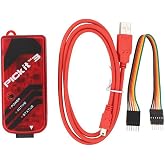
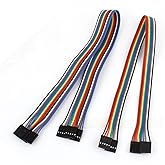
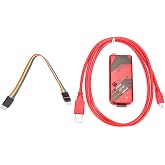
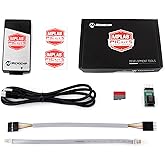
Original PICkit4 by Microchip MPLAB PICkit 4 3 PIC In-Circuit Debugger Programmer @XYGStudy
The MPLAB PICkit 4 In-Circuit Debugger/Programmer allows fast and easy debugging and programming of PIC and dsPIC flash microcontrollers, with a wider target voltage and more advanced interfaces.
Original PICkit4 by Microchip MPLAB PICkit 4 3 PIC In-Circuit Debugger Programmer @XYGStudy
商品#: 8446234

Original PICkit4 by Microchip MPLAB PICkit 4 3 PIC In-Circuit Debugger Programmer @XYGStudy

商品#: 8446234

JPY 77274

Price Details

Excluding Shipping & Custom charges ( Shipping and custom charges will be calculated on checkout )

*All items will import from アメリカ

在庫あり
アメリカ USA ストアからの輸入品

QTY:

今すぐ注文すると 頃に届きます Sunday, 7月 26
最高の物流パートナー
  • fedex
  • dhl
The MPLAB PICkit 4 In-Circuit Debugger/Programmer allows fast and easy debugging and programming of PIC and dsPIC flash microcontrollers, with a wider target voltage and more advanced interfaces.
U-Care保証:
なし
プランを選択してください
fast shipping

Fast
Shipping

free return

Free
Return*

安全な梱包

安全な梱包

100%本物

100%本物

pci-dss

PCI DSS 準拠

iso certified

ISO 27001 保証


paypal payment
visa payment
mastercard payment
american express payment
jcb payment

この商品の利点

Enhanced Debugging
The MPLAB PICkit 4 offers advanced debugging capabilities, enabling users to efficiently troubleshoot and refine their embedded designs, thus reducing development time and enhancing product quality.
Wide Compatibility
Compatible with a broad range of Microchip microcontrollers, the PICkit 4 simplifies the integration process for engineers, ensuring versatility across various projects and reducing the need for multiple tools.
User-Friendly Interface
Designed with an intuitive user interface, the MPLAB PICkit 4 allows users of all skill levels to easily program and debug their projects, fostering a smoother learning curve and enhancing productivity.

製品詳細

Fast and Easy Debugging & Programming of PIC and dsPIC Microcontrollers. Get the Latest MPLAB X IDE 4.15. Supports Advanced Interfaces. Self-Powered and Portable. Buy Now! Shop at Ubuy 日本
Package Weight1.27 Pound

どんな人にお勧めですか?

Suitable For
  • Embedded Developers

    Ideal for developers working on PIC microcontrollers needing versatile debugging and programming functionalities.

  • Students and Educators

    Great for students learning embedded systems, offering hands-on experiences with in-circuit debugging tools.

  • Hobbyists

    Perfect for electronics enthusiasts experimenting with PIC microcontrollers and requiring simple, effective debugging methods.

Not Suitable For
  • Advanced Engineers

    May lack advanced features required by experienced engineers working on complex projects requiring sophisticated debugging tools.

  • Non-PIC Users

    Not suitable for users working with microcontrollers other than PIC, limiting versatility with different brands.

  • Casual Users

    May be overkill for casual users seeking a basic programming device without extensive debugging functionalities.

製品説明書

Original PICkit4 by Microchip MPLAB PICkit 4 3 PIC In-Circuit Debugger Programmer @XYGStudy

何か質問はありますか? おしゃべりしましょう

顧客の質問と回答

  • 質問: What is the MPLAB PICkit 4 and what does it do?

    答え: The MPLAB PICkit 4 is a versatile in-circuit debugger and programmer specifically designed for Microchip's PIC microcontrollers. It enables developers to program and debug their applications directly in the target circuit. This tool is essential for evaluating designs, making it easier to troubleshoot and fine-tune programming, ensuring that projects run smoothly during development.
  • 質問: What types of microcontrollers are compatible with the PICkit 4?

    答え: The PICkit 4 supports a wide variety of Microchip's PIC microcontrollers, including the PIC16, PIC18, and PIC32 families. This compatibility allows developers to work across various projects without needing to switch tools. Its flexible nature makes it a preferred choice for hobbyists and professionals alike when working with different PIC architectures.
  • 質問: How can I install and set up the MPLAB PICkit 4?

    答え: Installing the MPLAB PICkit 4 is straightforward. Begin by downloading the MPLAB X IDE software from the Microchip website. After installation, connect the PICkit 4 to your PC via USB, and follow the on-screen prompts to set it up. This initialization process includes driver installation, allowing for seamless communication between your computer and the debugger, vital for creating and testing your projects.
  • 質問: Can I use the PICkit 4 for projects involving both debug and programming?

    答え: Yes, the PICkit 4 is designed for both debugging and programming functions. It offers features like real-time debugging, allowing developers to monitor microcontroller performance while running their code. This dual functionality is vital for anyone developing embedded systems, as it helps identify issues quickly and ensures optimized software performance.
  • 質問: What software do I need to use with the PICkit 4?

    答え: To use the PICkit 4, you will need the MPLAB X IDE software, which includes the integrated environment for coding and debugging. Additionally, the MPLAB IPE (Integrated Programming Environment) can be used for simpler programming tasks. This software suite is designed to enhance user experience, making it more efficient to manage your microcontroller development lifecycle from coding to debugging.
  • 質問: Does the PICkit 4 support wireless communication?

    答え: The PICkit 4 itself does not have built-in wireless capabilities; however, you can use it in conjunction with compatible Microchip devices that support wireless communication protocols. This allows developers to prototype and test wireless applications, making it suitable for IoT projects where wireless data transmission is essential.
  • 質問: How does the PICkit 4 enhance the debugging process?

    答え: The PICkit 4 enhances the debugging process through features like breakpoints, watch variables, and real-time performance tracking. These capabilities enable developers to pause program execution, inspect variable states, and understand how the program interacts with the microcontroller. This deeper insight is critical for resolving issues and optimizing code efficiently.
  • 質問: What is the maximum programming speed of the PICkit 4?

    答え: The PICkit 4 offers a programming speed of up to 1.0 Mbps, which is significantly faster than its predecessors. This increased speed reduces the time spent programming devices during development, allowing for quicker iterations and faster project completion. Faster programming times also enhance productivity, crucial for developers working on tight timelines.
  • 質問: What kind of projects can I develop using the PICkit 4?

    答え: With the PICkit 4, you can develop a wide range of projects, from simple embedded systems to complex electronics designs. It is ideal for hobby projects, educational applications, and professional prototypes across various industries such as automotive, consumer electronics, and industrial automation. Its versatility empowers developers to experiment and innovate without limitations.
  • 質問: Where can I buy Original PICkit4 by Microchip in Japan?

    答え: You can purchase the Original PICkit4 by Microchip from Ubuy. This platform provides a convenient shopping experience, ensuring that you can easily find and obtain this essential tool for your development projects. Ubuy often features various shipping options and user-friendly interfaces, making it an excellent choice for procuring your electronics needs.

XYG-PIC Programmable Logic Circuits Editorial Review

編集レビューが見つかりませんでした

お客様のレビュー&評価

5.0
1 カスタマー評価
  • 5 星
    100%
  • 4 星
    0%
  • 3 星
    0%
  • 2 星
    0%
  • 1 星
    0%

この商品のレビュー

お考えをお聞かせください

Product Price History

重要な情報

  • 注意:国際運送の商品に関して、製造会社保障は無効になる可能性、アフターサービスは受けれない可能性、取説や安全情報は発送先の言語になっていない可能性ある。商品とその付属品は配送先の国の規格、仕様、ラベル表示法などに適応していない可能性があります。また、配送先の国の電力企画に適応しいない(アダプタや変換器を必要とする)可能性があります。ご注文の商品は配送先の国に輸入することは合法なのかを確認するのは購入者の責任になります。Ubuyからご購入の際、受け取り者は正式な輸入者となり、配送先の全ての法律やルールに遵守する必要があります。
  • Ubuyはグローバル検索エンジンのためリストにある全ての商品が購入できないことがあります。商品は輸出規制、貿易規制があります。